5. Buildroot Application
5.1 Serial Terminal
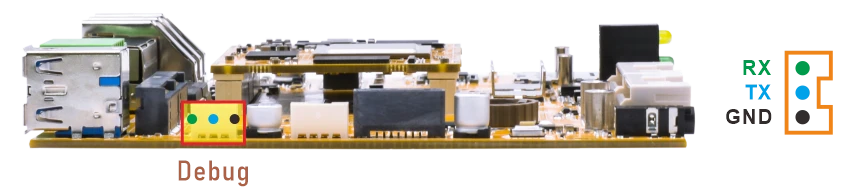
Connect the board and PC with USB Serial cable, then power on, the terminal will output boot information. The default baudrate is 1500000.
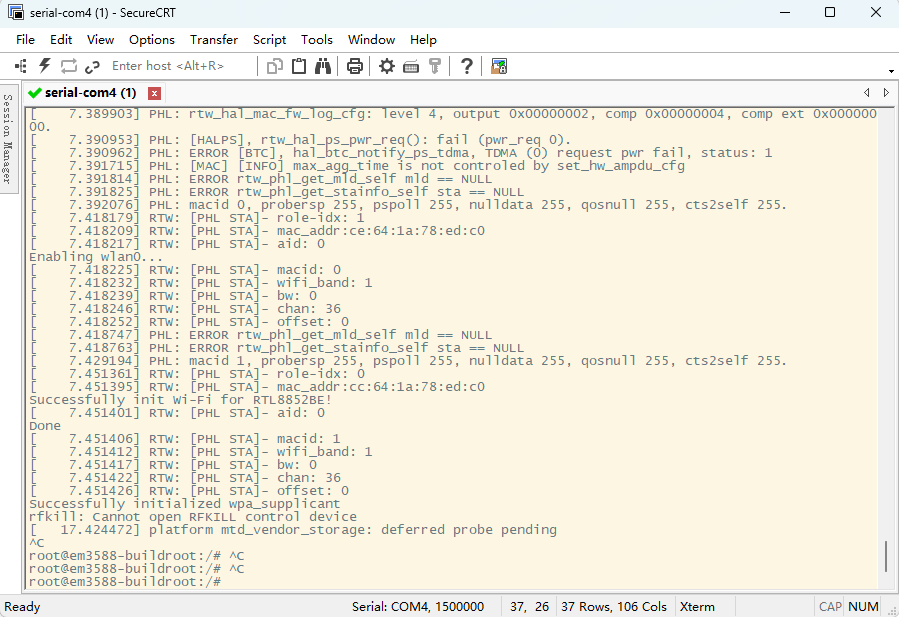
Serial Terminal
5.2 Display
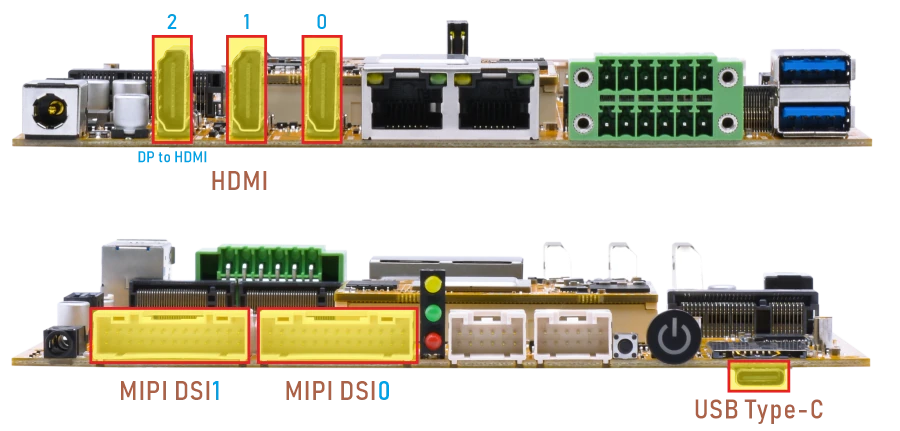
Under Linux, the EM3588 supports simultaneous output to up to four displays. With six physical display interfaces available, users can flexibly configure the output mapping as needed.
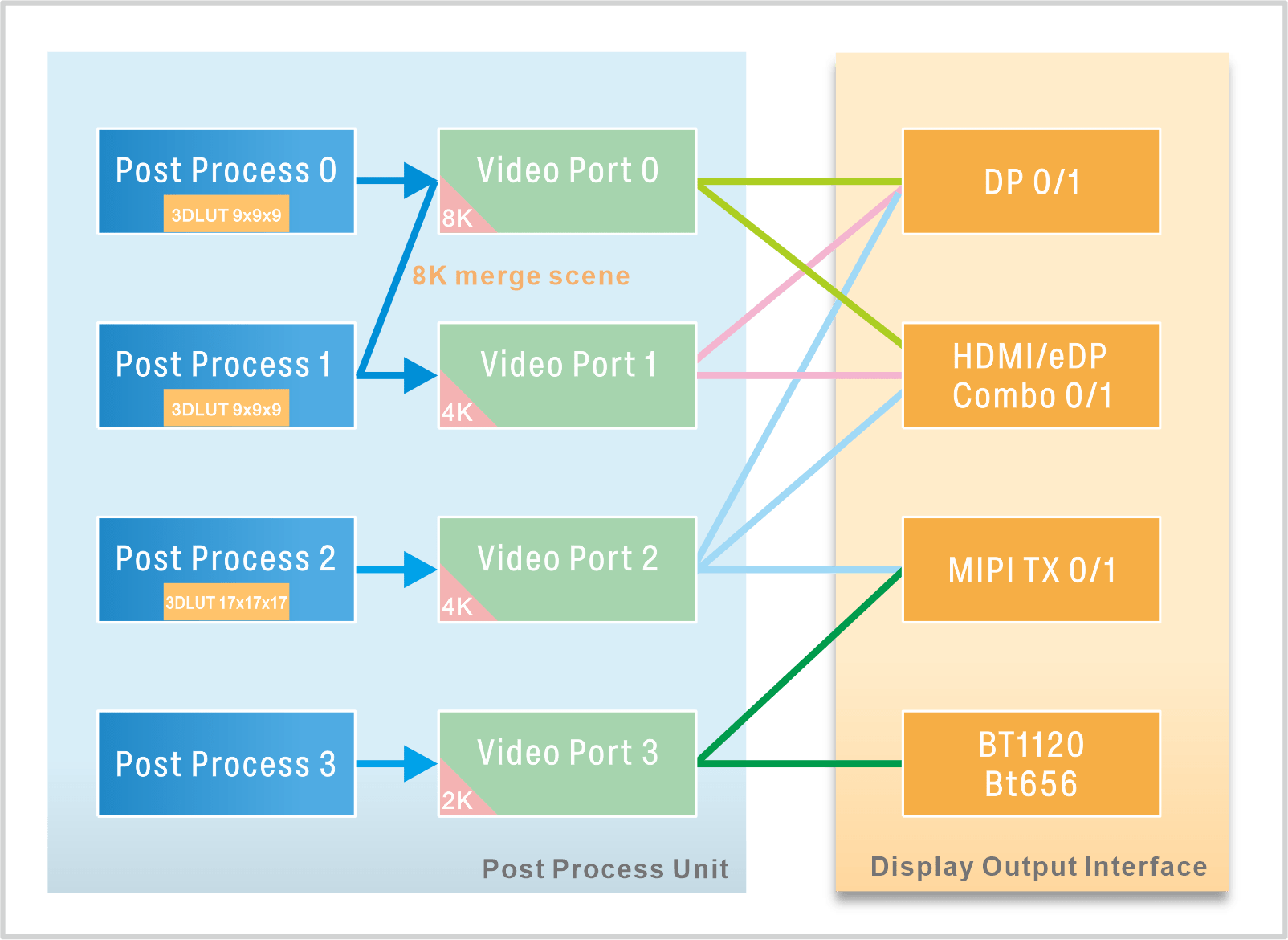
RK3588 Display Output Mapping
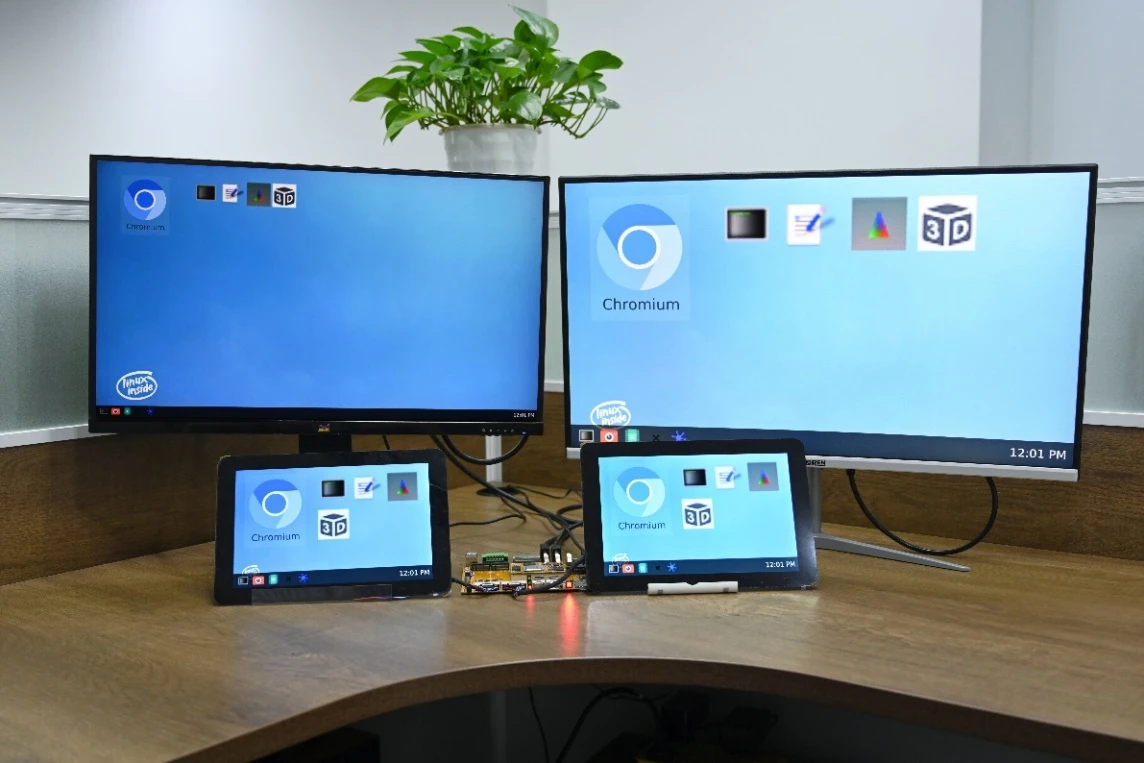
Display synchronization
5.3 USB Type-C
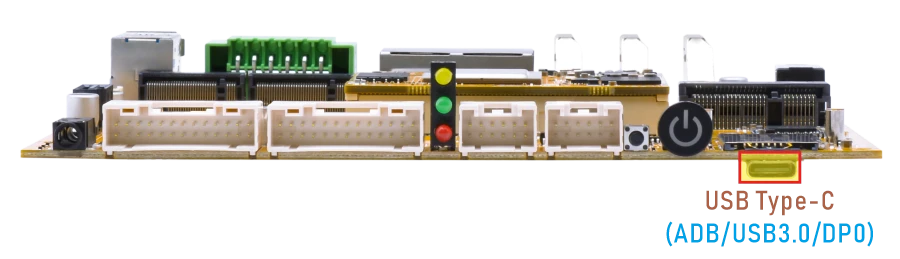
Features supported by the USB-C interface:
Reversible Design: Allows insertion in either orientation for user convenience.
Data Transmission Roles: Supports flexible designation of host and device roles.
Multiple Protocol Support: Compatible with USB 3.0 and DisplayPort, enabling high-speed data transmission.
5.3.1 ADB
❶ Connect the board and PC host with USB-C cable.
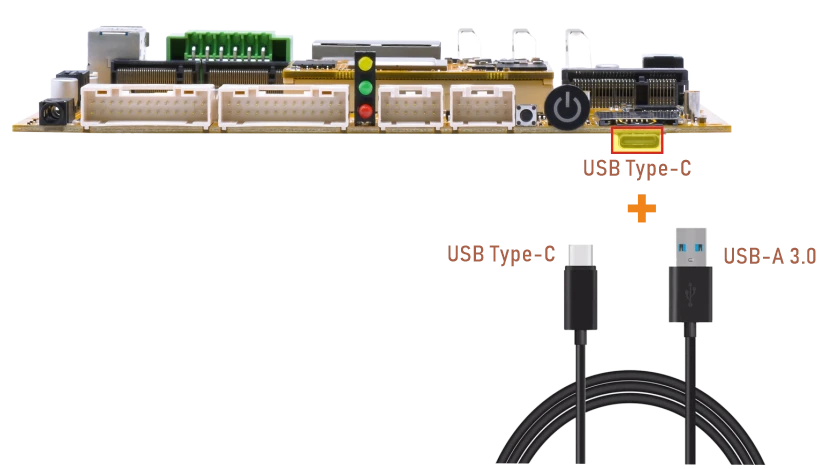
❷ Install ADB driver on Windows system.
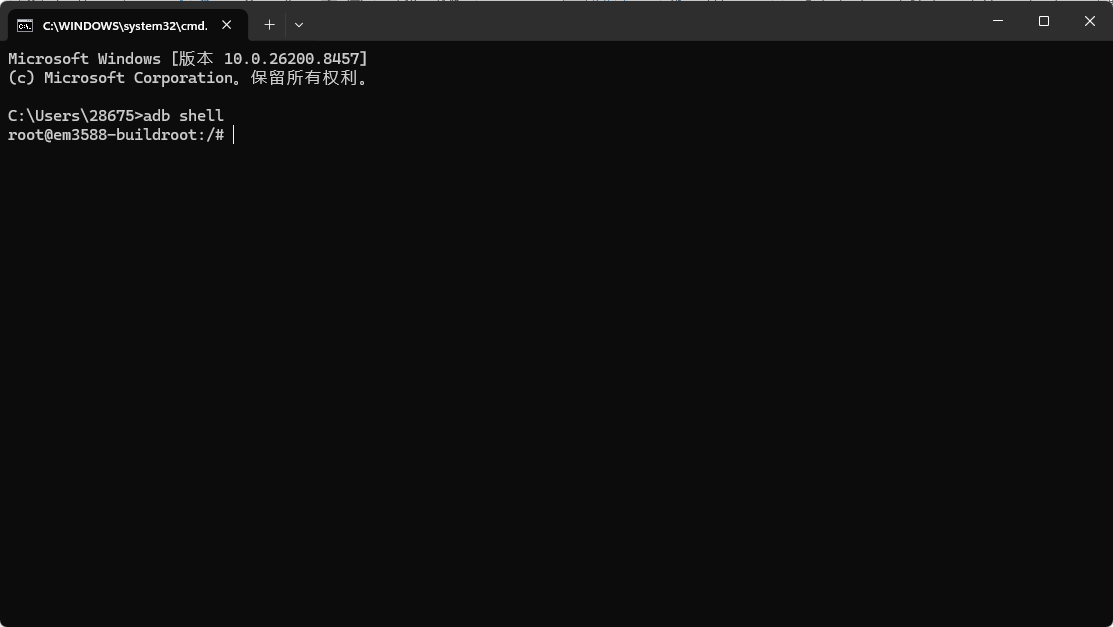
❸ Press Windows + R to open the Run program. Type cmd and press Enter
❹ Execute the follow commands to enable ADB.
1adb shell
5.3.2 USB Host
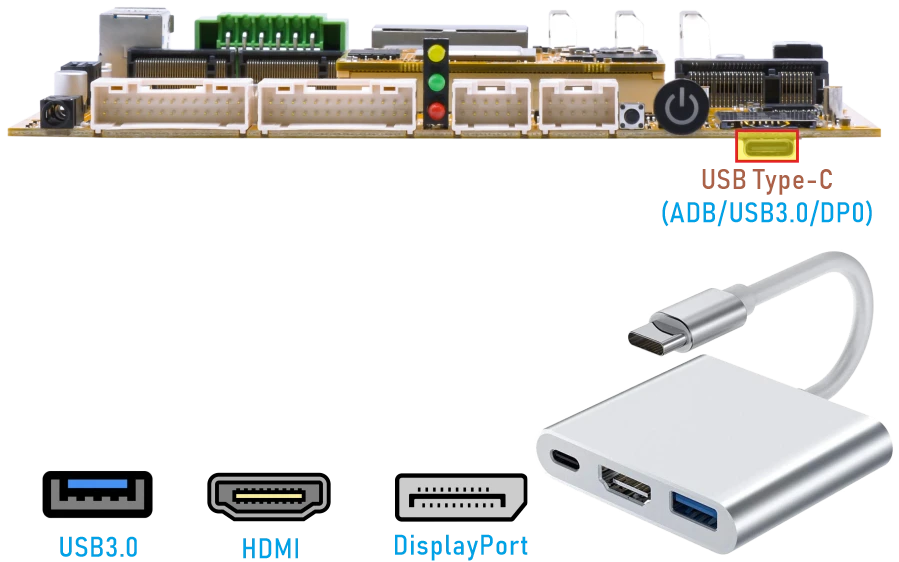
The EM3588’s USB Type-C port can operate in USB 3.0 host mode with a USB-C to USB-A adapter. When a USB flash drive is connected, the system automatically mounts it.
Check information about mounted device:
1df -h
root@em3588-buildroot:/# df -h
Filesystem      Size  Used Avail Use% Mounted on
/dev/root        14G  701M   13G   6% /
devtmpfs        3.9G  8.0K  3.9G   1% /dev
tmpfs           3.9G  140K  3.9G   1% /tmp
tmpfs           3.9G  612K  3.9G   1% /run
tmpfs           3.9G  232K  3.9G   1% /var/log
tmpfs           3.9G     0  3.9G   0% /dev/shm
/dev/mmcblk0p8   15G  332K   15G   1% /userdata
/dev/mmcblk0p7  123M   12M  110M  10% /oem
/dev/sda1       120G  1.6M  120G   1% /mnt/storage
/dev/mmcblk1p1  120G   70M  120G   1% /mnt/sdcard
/dev/sdb1        58G   33G   26G  56% /mnt/udisk
5.3.3 DP Alt Mode
DisplayPort Alternate Mode (DP Alt Mode) is a technology that facilitates the transmission of DisplayPort video signals through a USB Type-C interface. It enables devices to output video and audio via a USB-C connection without requiring a dedicated DisplayPort connector. This allows users to connect a display using a single USB-C port while transmitting video, audio, and additional data.
Boardcon has conducted the testing at USB-C to HDMI/DP (3840 x 2160 @ 60fps).
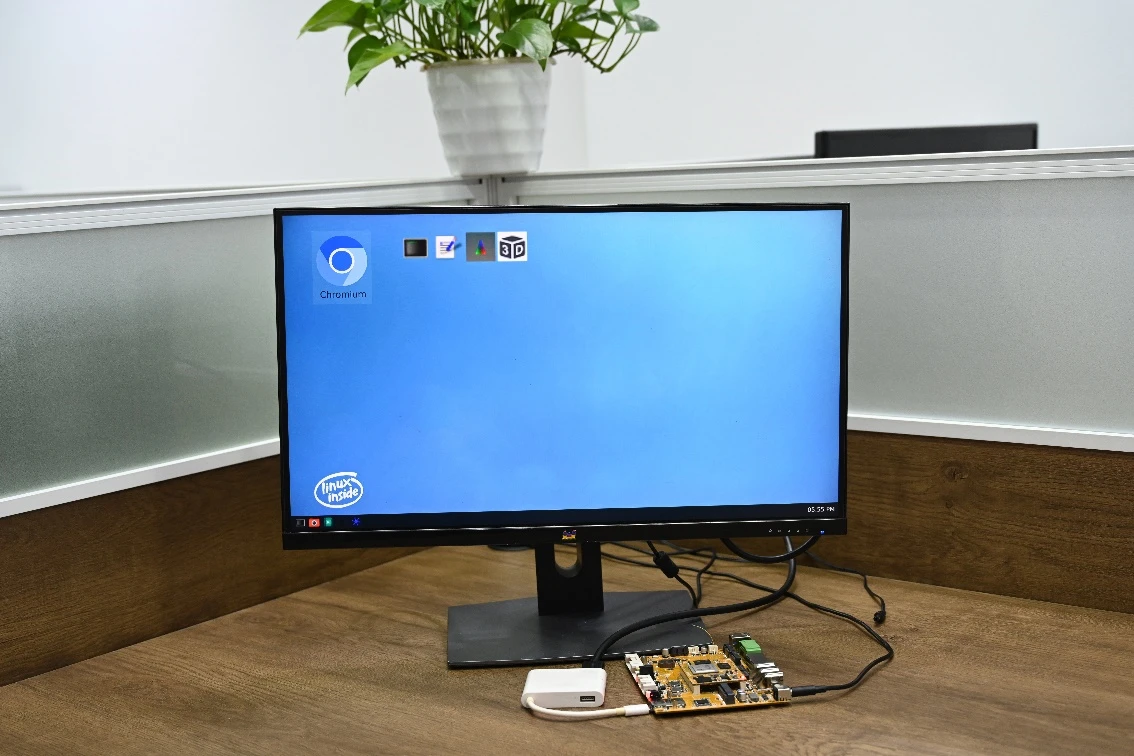
USB-C to HDMI
5.4 USB-A (USB3.0 Host)
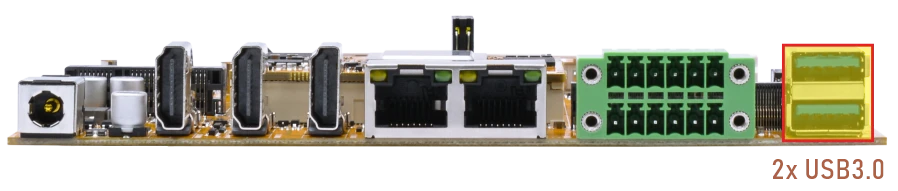
When a USB flash drive is connected, the system automatically mounts it.
Check information about mounted device:
1df -h
root@em3588-buildroot:/# df -h
Filesystem      Size  Used Avail Use% Mounted on
/dev/root        14G  701M   13G   6% /
devtmpfs        3.9G  8.0K  3.9G   1% /dev
tmpfs           3.9G  140K  3.9G   1% /tmp
tmpfs           3.9G  568K  3.9G   1% /run
tmpfs           3.9G  252K  3.9G   1% /var/log
tmpfs           3.9G     0  3.9G   0% /dev/shm
/dev/mmcblk0p8   15G  332K   15G   1% /userdata
/dev/mmcblk0p7  123M   12M  110M  10% /oem
/dev/sda1       120G  1.6M  120G   1% /mnt/storage
/dev/mmcblk1p1  120G   70M  120G   1% /mnt/sdcard
/dev/sdb1        31G   24G  6.6G  79% /mnt/udisk
/dev/sdc1        58G   33G   26G  56% /media/udisk1
5.5 Ethernet
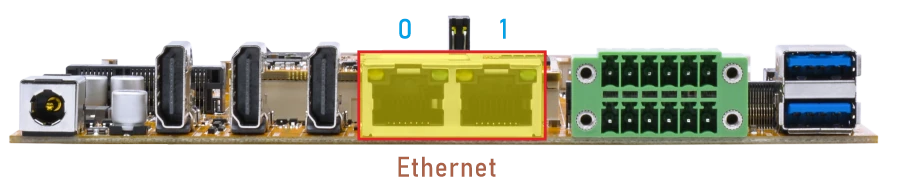
❶ Connect both Ethernet ports on the development board to the router using Ethernet cables.
The log shows that the Gigabit Ethernet link has been successfully established.
root@em3588-buildroot:/# [  933.895721] rk_gmac-dwmac fe1b0000.ethernet eth1: Link is Up - 1Gbps/Full - flow control rx/tx
[  933.895903] IPv6: ADDRCONF(NETDEV_CHANGE): eth1: link becomes ready
root@em3588-buildroot:/# [  946.055718] rk_gmac-dwmac fe1c0000.ethernet eth0: Link is Up - 1Gbps/Full - flow control rx/tx
[  946.056250] IPv6: ADDRCONF(NETDEV_CHANGE): eth0: link becomes ready
❷ View the status of the Network interface.
1ifconfig
root@em3588-buildroot:/# ifconfig
eth0      Link encap:Ethernet  HWaddr 5A:0D:96:F9:98:96
          inet addr:192.168.0.190  Bcast:192.168.0.255  Mask:255.255.255.0
          inet6 addr: fe80::e702:e500:4496:e6c9/64 Scope:Link
          UP BROADCAST RUNNING MULTICAST  MTU:1500  Metric:1
          RX packets:71 errors:0 dropped:13 overruns:0 frame:0
          TX packets:11 errors:0 dropped:0 overruns:0 carrier:0
          collisions:0 txqueuelen:1000
          RX bytes:6954 (6.7 KiB)  TX bytes:1410 (1.3 KiB)
          Interrupt:73

eth1      Link encap:Ethernet  HWaddr 56:0D:96:F9:98:96
          inet addr:192.168.0.215  Bcast:192.168.0.255  Mask:255.255.255.0
          inet6 addr: fe80::5367:a846:5ed5:b1bc/64 Scope:Link
          UP BROADCAST RUNNING MULTICAST  MTU:1500  Metric:1
          RX packets:112 errors:0 dropped:22 overruns:0 frame:0
          TX packets:11 errors:0 dropped:0 overruns:0 carrier:0
          collisions:0 txqueuelen:1000
          RX bytes:11440 (11.1 KiB)  TX bytes:1410 (1.3 KiB)
          Interrupt:75
❸ Test network connectivity.
1ping -I eth0 www.armdesigner.com
2ping -I eth1 www.armdesigner.com
root@em3588-buildroot:/# ping -I eth0 www.armdesigner.com
PING www.armdesigner.com (67.222.54.196) from 192.168.0.190 eth0: 56(84) bytes of data.
64 bytes from 67-222-54-196.unifiedlayer.com (67.222.54.196): icmp_seq=1 ttl=50 time=183 ms
64 bytes from 67-222-54-196.unifiedlayer.com (67.222.54.196): icmp_seq=2 ttl=50 time=183 ms
64 bytes from 67-222-54-196.unifiedlayer.com (67.222.54.196): icmp_seq=3 ttl=50 time=183 ms
64 bytes from 67-222-54-196.unifiedlayer.com (67.222.54.196): icmp_seq=4 ttl=50 time=183 ms
64 bytes from 67-222-54-196.unifiedlayer.com (67.222.54.196): icmp_seq=5 ttl=50 time=183 ms
64 bytes from 67-222-54-196.unifiedlayer.com (67.222.54.196): icmp_seq=6 ttl=50 time=183 ms
^C
--- www.armdesigner.com ping statistics ---
6 packets transmitted, 6 received, 0% packet loss, time 5007ms
rtt min/avg/max/mdev = 182.578/182.987/183.289/0.230 ms
root@em3588-buildroot:/# ping -I eth1 www.armdesigner.com
PING www.armdesigner.com (67.222.54.196) from 192.168.0.215 eth1: 56(84) bytes of data.
64 bytes from 67-222-54-196.unifiedlayer.com (67.222.54.196): icmp_seq=1 ttl=50 time=186 ms
64 bytes from 67-222-54-196.unifiedlayer.com (67.222.54.196): icmp_seq=2 ttl=50 time=183 ms
64 bytes from 67-222-54-196.unifiedlayer.com (67.222.54.196): icmp_seq=3 ttl=50 time=183 ms
64 bytes from 67-222-54-196.unifiedlayer.com (67.222.54.196): icmp_seq=4 ttl=50 time=184 ms
64 bytes from 67-222-54-196.unifiedlayer.com (67.222.54.196): icmp_seq=5 ttl=50 time=183 ms
64 bytes from 67-222-54-196.unifiedlayer.com (67.222.54.196): icmp_seq=6 ttl=50 time=184 ms
64 bytes from 67-222-54-196.unifiedlayer.com (67.222.54.196): icmp_seq=7 ttl=50 time=183 ms
^C
--- www.armdesigner.com ping statistics ---
7 packets transmitted, 7 received, 0% packet loss, time 6007ms
rtt min/avg/max/mdev = 182.695/183.642/186.285/1.125 ms
5.6 SD Card
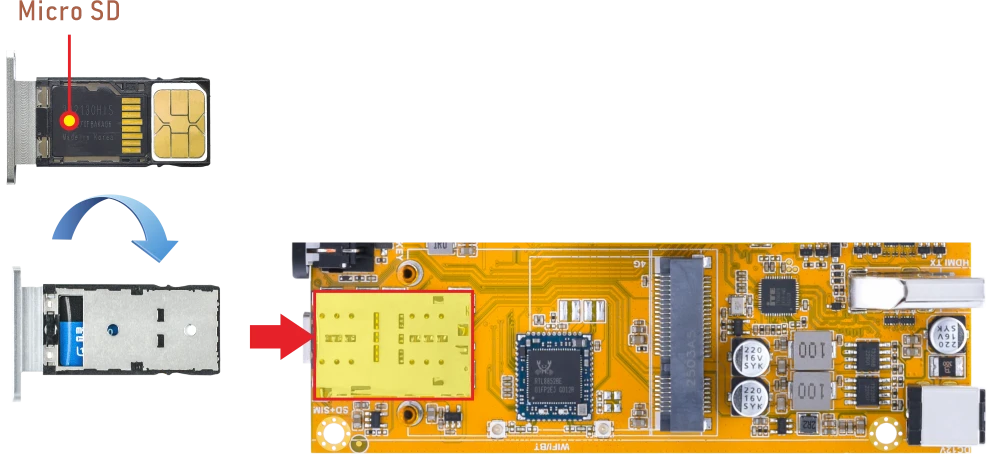
After a microSD card is inserted, the system will automatically mount it.
1df -h
root@em3588-buildroot:/# df -h
Filesystem      Size  Used Avail Use% Mounted on
/dev/root        14G  774M   13G   6% /
devtmpfs        3.9G  8.0K  3.9G   1% /dev
tmpfs           3.9G  528K  3.9G   1% /run
tmpfs           3.9G  272K  3.9G   1% /var/log
tmpfs           3.9G     0  3.9G   0% /dev/shm
tmpfs           3.9G  140K  3.9G   1% /tmp
/dev/mmcblk0p7  124M  5.3M  118M   5% /oem
/dev/mmcblk0p8   15G  320K   15G   1% /userdata
/dev/mmcblk1p1   60G   33G   27G  56% /mnt/sdcard
5.7 SATA
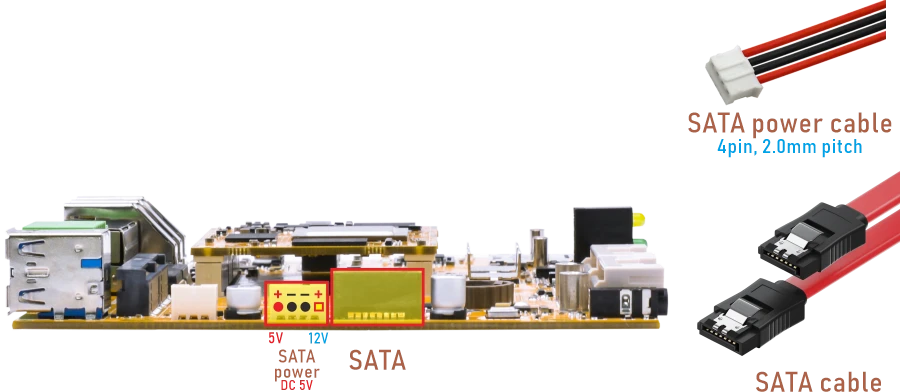
❶ Connect SATA and SATA power(5V).
❷ Power on.
❸ Format SATA to ext4. If the device is in ext4 format, skip this step.
1mke2fs -t ext4 /dev/sda
Warning
This operation will permanently erase all existing data on the selected partition. Before running the command below, double‑check that the device path is correct.
❹ The system will automatically mount the device. Check information about mounted device:
1df -h
root@em3588-buildroot:/# df -h
Filesystem      Size  Used Avail Use% Mounted on
/dev/root        14G  774M   13G   6% /
devtmpfs        3.9G  8.0K  3.9G   1% /dev
tmpfs           3.9G  528K  3.9G   1% /run
tmpfs           3.9G  268K  3.9G   1% /var/log
tmpfs           3.9G     0  3.9G   0% /dev/shm
tmpfs           3.9G  140K  3.9G   1% /tmp
/dev/mmcblk0p7  124M  5.3M  115M   5% /oem
/dev/mmcblk0p8   15G  328K   15G   1% /userdata
/dev/sda1       112G   90G   23G  80% /mnt/storage
5.8 M.2 SSD
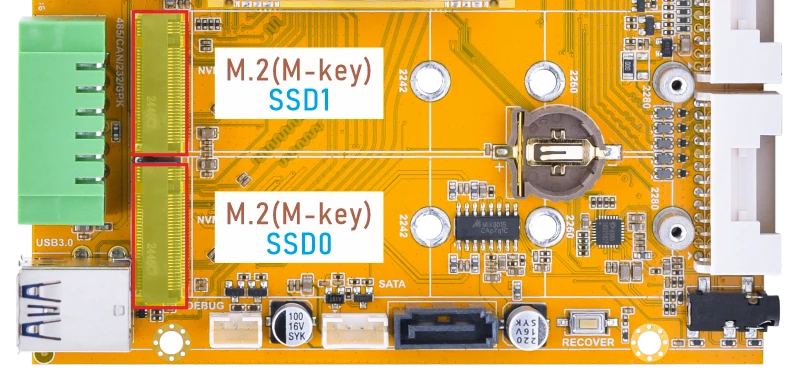
EM3588 only supports SSD in ext4 format.
❶ Insert the SSD into the M.2 slot.
❷ Power on.
❸ Format SSD to ext4. If the device is in ext4 format, skip this step.
1mke2fs -t ext4 /dev/nvme0n1p1
/dev/nvme0n1p1 for SSD0
/dev/nvme1n1p1 for SSD1
❹ The system will automatically mount the device. Check information about mounted device:
1df -h
root@em3588-buildroot:/# df -h
Filesystem      Size  Used Avail Use% Mounted on
/dev/root        14G  774M   13G   6% /
devtmpfs        3.9G  8.0K  3.9G   1% /dev
tmpfs           3.9G  552K  3.9G   1% /run
tmpfs           3.9G  280K  3.9G   1% /var/log
tmpfs           3.9G     0  3.9G   0% /dev/shm
tmpfs           3.9G  140K  3.9G   1% /tmp
/dev/mmcblk0p8   15G  312K   15G   1% /userdata
/dev/mmcblk0p7  124M  5.3M  118M   5% /oem
/dev/nvme0n1p1  233G   15M  233G   1% /mnt/storage
/dev/nvme1n1p1  477G  1.3M  477G   1% /media/storage1
/dev/mmcblk1p1  120G   85M  119G   1% /mnt/sdcard
5.9 WiFi & Bluetooth
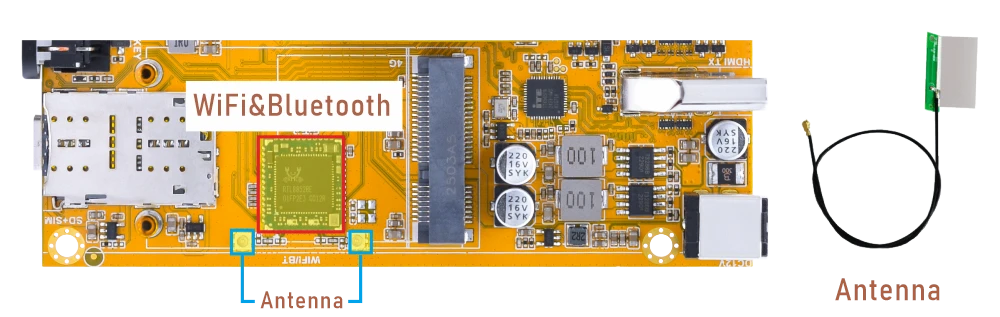
5.9.1 WiFi
❶ Connect the WiFi antenna.
❷ View the device information.
1ifconfig wlan0
root@em3588-buildroot:/# ifconfig wlan0
wlan0     Link encap:Ethernet  HWaddr CC:64:1A:78:ED:C0
          UP BROADCAST MULTICAST  MTU:1500  Metric:1
          RX packets:0 errors:0 dropped:0 overruns:0 frame:0
          TX packets:0 errors:0 dropped:0 overruns:0 carrier:0
          collisions:0 txqueuelen:1000
          RX bytes:0 (0.0 B)  TX bytes:0 (0.0 B)
          Interrupt:196
❸ Scan for available WiFi hotspots.
1iwlist wlan0 scan
root@em3588-buildroot:/# iwlist wlan0 scan
wlP4p65s0  Scan completed :
          Cell 01 - Address: B2:22:7A:5A:B6:4A
                    ESSID:"DIRECT-4A-HP Laser 136w"
                    Protocol:IEEE 802.11gn
                    Mode:Master
                    Frequency:2.412 GHz (Channel 1)
                    Encryption key:on
                    Bit Rates:72 Mb/s
                    Extra:rsn_ie=30140100000fac040100000fac040100000fac020c00
                    IE: IEEE 802.11i/WPA2 Version 1
                        Group Cipher : CCMP
                        Pairwise Ciphers (1) : CCMP
                        Authentication Suites (1) : PSK
                    Quality=56/100  Signal level=56/100
                    Extra:fm=0003
          Cell 02 - Address: B4:F1:8C:6D:D1:29
                    ESSID:""
                    Protocol:IEEE 802.11bgn
                    Mode:Master
                    Frequency:2.412 GHz (Channel 1)
                    Encryption key:on
                    Bit Rates:780 Mb/s
                    Extra:rsn_ie=30140100000fac040100000fac040100000fac020c00
                    IE: IEEE 802.11i/WPA2 Version 1
                        Group Cipher : CCMP
                        Pairwise Ciphers (1) : CCMP
                        Authentication Suites (1) : PSK
                    IE: Unknown: DD230050F204104A0001101044000102100800020780103C0001011049000600372A000120
                    Quality=74/100  Signal level=74/100
                    Extra:fm=0002
          Cell 03 - Address: B4:F1:8C:6D:D1:24
                    ESSID:"Boardcon"
                    Protocol:IEEE 802.11bgn
                    Mode:Master
                    Frequency:2.412 GHz (Channel 1)
                    Encryption key:on
                    Bit Rates:780 Mb/s                    Extra:fm=0003
❹ Connect to the hotspot.
1wifi-connect.sh SSID PSK //input your SSID and password
❺ Once the device is connected to Wi-Fi, users can verify network connectivity by running test commands.
1ifconfig wlan0
2ping -I wlan0 www.armdesigner.com
root@em3588-buildroot:/# ifconfig wlan0
wlan0     Link encap:Ethernet  HWaddr CC:64:1A:78:ED:C0
          inet addr:192.168.0.234  Bcast:192.168.0.255  Mask:255.255.255.0
          inet6 addr: fe80::7e11:81b3:2dd1:aa67/64 Scope:Link
          UP BROADCAST RUNNING MULTICAST  MTU:1500  Metric:1
          RX packets:236 errors:0 dropped:39 overruns:0 frame:0
          TX packets:20 errors:0 dropped:0 overruns:0 carrier:0
          collisions:0 txqueuelen:1000
          RX bytes:31492 (30.7 KiB)  TX bytes:2492 (2.4 KiB)
          Interrupt:196
root@em3588-buildroot:/# ping -I wlan0 www.armdesigner.com
PING d3dsoj86mhwkk6.cloudfront.net (108.138.246.8) from 192.168.0.234 wlan0: 56(84) bytes of data.
64 bytes from www.armdesigner.com (108.138.246.8): icmp_seq=1 ttl=246 time=212 ms
64 bytes from www.armdesigner.com (108.138.246.8): icmp_seq=2 ttl=246 time=176 ms
64 bytes from www.armdesigner.com (108.138.246.8): icmp_seq=3 ttl=246 time=152 ms
64 bytes from www.armdesigner.com (108.138.246.8): icmp_seq=4 ttl=246 time=180 ms
64 bytes from www.armdesigner.com (108.138.246.8): icmp_seq=5 ttl=246 time=199 ms
64 bytes from www.armdesigner.com (108.138.246.8): icmp_seq=6 ttl=246 time=163 ms
^C
--- d3dsoj86mhwkk6.cloudfront.net ping statistics ---
6 packets transmitted, 6 received, 0% packet loss, time 5007ms
rtt min/avg/max/mdev = 152.040/180.307/211.977/20.297 ms
5.9.2 Bluetooth
By default, the device is configured to operate as a Bluetooth speaker. The following steps describe how to pair with and connect to a device:
❶ Start the Bluetooth control tool.
1bluetoothctl
root@em3588-buildroot:/# bluetoothctl
hci0 new_settings: powered bondable ssp br/edr le secure-conn cis-central cis-peripheral
Agent registered
[CHG] Controller CC:64:1A:78:B3:E7 Pairable: yes
[bluetooth]#
❷ Scan for nearby Bluetooth devices. Turn scanning on, then turn it off once the devices are discovered (otherwise, the scan will keep running and the list will keep refreshing).
1scan on
2scan off
[bluetooth]# scan on
SetDiscoveryFilter success
[bluetooth]# [  238.841649] rtk_btcoex: hci (periodic)inq start
hci0 type 7 discovering on
Discovery started
[CHG] Controller CC:64:1A:78:B3:E7 Discovering: yes
[NEW] Device 62:C4:BC:DB:F6:CC 62-C4-BC-DB-F6-CC
[NEW] Device A8:35:12:9A:EB:4D liuy
[NEW] Device 62:B8:78:F2:78:08 62-B8-78-F2-78-08
[NEW] Device 75:F4:53:77:15:99 75-F4-53-77-15-99
[NEW] Device C1:14:88:1E:63:B5 C1-14-88-1E-63-B5
[NEW] Device 79:63:4C:2A:04:50 NZbI73aRlO1JD/BBPtMyHLHK0
[CHG] Device A8:35:12:9A:EB:4D RSSI: 0xffffffb8 (-72)
[NEW] Device 7F:6C:64:88:4D:DF 7F-6C-64-88-4D-DF
[NEW] Device 08:1A:91:55:4D:22 08-1A-91-55-4D-22
[NEW] Device 44:5E:76:2E:8A:56 44-5E-76-2E-8A-56
[NEW] Device 75:12:98:ED:80:B6 75-12-98-ED-80-B6
[NEW] Device D4:6C:27:DF:40:46 D4-6C-27-DF-40-46
[CHG] Device 62:B8:78:F2:78:08 RSSI: 0xffffff96 (-106)
[NEW] Device 4D:82:D9:E0:69:FA 4D-82-D9-E0-69-FA
[CHG] Device 79:63:4C:2A:04:50 RSSI: 0xffffffa4 (-92)
[CHG] Device 75:F4:53:77:15:99 RSSI: 0xffffffa2 (-94)
[CHG] Device D4:6C:27:DF:40:46 RSSI: 0xffffff98 (-104)
[NEW] Device 66:51:05:89:D4:18 66-51-05-89-D4-18
[NEW] Device 5A:F1:9B:78:0D:AC 5A-F1-9B-78-0D-AC
[CHG] Device C1:14:88:1E:63:B5 RSSI: 0xffffffaa (-86)
[CHG] Device 5A:F1:9B:78:0D:AC RSSI: 0xffffffa2 (-94)
[CHG] Device D4:6C:27:DF:40:46 RSSI: 0xffffffa0 (-96)
[CHG] Device 79:63:4C:2A:04:50 RSSI: 0xffffff94 (-108)
[bluetooth]# scan off
[bluetooth]# [  244.787547] rtk_btcoex: hci (periodic)inq cancel/exit
hci0 type 7 discovering off
Discovery stopped
[CHG] Device 5A:F1:9B:78:0D:AC TxPower is nil
[CHG] Device 5A:F1:9B:78:0D:AC RSSI is nil
[CHG] Device 66:51:05:89:D4:18 TxPower is nil
[CHG] Device 66:51:05:89:D4:18 RSSI is nil
[CHG] Device 4D:82:D9:E0:69:FA TxPower is nil
[CHG] Device 4D:82:D9:E0:69:FA RSSI is nil
[CHG] Device D4:6C:27:DF:40:46 RSSI is nil
[CHG] Device 75:12:98:ED:80:B6 TxPower is nil
[CHG] Device 75:12:98:ED:80:B6 RSSI is nil
[CHG] Device 44:5E:76:2E:8A:56 TxPower is nil
[CHG] Device 44:5E:76:2E:8A:56 RSSI is nil
[CHG] Device 08:1A:91:55:4D:22 RSSI is nil
[CHG] Device 7F:6C:64:88:4D:DF TxPower is nil
[CHG] Device 7F:6C:64:88:4D:DF RSSI is nil
[CHG] Device 79:63:4C:2A:04:50 TxPower is nil
[CHG] Device 79:63:4C:2A:04:50 RSSI is nil
[CHG] Device C1:14:88:1E:63:B5 RSSI is nil
[CHG] Device 75:F4:53:77:15:99 TxPower is nil
[CHG] Device 75:F4:53:77:15:99 RSSI is nil
[CHG] Device 62:B8:78:F2:78:08 TxPower is nil
[CHG] Device 62:B8:78:F2:78:08 RSSI is nil
[CHG] Device A8:35:12:9A:EB:4D RSSI is nil
[CHG] Device 62:C4:BC:DB:F6:CC RSSI is nil
[CHG] Controller CC:64:1A:78:B3:E7 Discovering: no
❸ List available devices.
1devices
Run scan on to start searching for devices.
After scanning, run scan off to stop the search and prevent continuous refreshing.
Run devices to view the list of detected devices.
[bluetooth]# scan on
SetDiscoveryFilter success
hci0 type 7 discovering on
Discovery started
[CHG] Controller 38:7A:CC:2A:11:88 Discovering: yes
[NEW] Device 88:68:4B:74:39:44 OPPO K10 5G
[NEW] Device 4B:73:65:34:5F:5D 4B-73-65-34-5F-5D
[NEW] Device D4:6C:27:DF:40:46 D4-6C-27-DF-40-46
[NEW] Device 10:0E:A1:1C:13:A8 10-0E-A1-1C-13-A8
[CHG] Device A8:35:12:9A:EB:4D RSSI: 0xffffffe1 (-31)
[NEW] Device 7D:B8:B6:62:89:47 7D-B8-B6-62-89-47
[NEW] Device 2C:A0:42:D1:14:D5 Kang
[NEW] Device 5D:9A:E9:D5:D8:9B 5D-9A-E9-D5-D8-9B
[NEW] Device 14:DE:39:72:B3:C3 Mate 40 Pro
[NEW] Device 43:C7:3D:C0:16:E4 43-C7-3D-C0-16-E4
[CHG] Device 14:DE:39:72:B3:C3 RSSI: 0xffffffb3 (-77)
[NEW] Device 7B:7E:22:4C:1B:08 7B-7E-22-4C-1B-08
[bluetooth]# scan off
hci0 type 7 discovering off
Discovery stopped
[CHG] Device 7B:7E:22:4C:1B:08 TxPower is nil
[CHG] Device 7B:7E:22:4C:1B:08 RSSI is nil
[CHG] Device 43:C7:3D:C0:16:E4 RSSI is nil
[CHG] Device 14:DE:39:72:B3:C3 RSSI is nil
[CHG] Device 5D:9A:E9:D5:D8:9B TxPower is nil
[CHG] Device 5D:9A:E9:D5:D8:9B RSSI is nil
[CHG] Device 2C:A0:42:D1:14:D5 RSSI is nil
[CHG] Device 7D:B8:B6:62:89:47 TxPower is nil
[CHG] Device 7D:B8:B6:62:89:47 RSSI is nil
[CHG] Device A8:35:12:9A:EB:4D RSSI is nil
[CHG] Device 10:0E:A1:1C:13:A8 RSSI is nil
[CHG] Device D4:6C:27:DF:40:46 RSSI is nil
[CHG] Device 4B:73:65:34:5F:5D TxPower is nil
[CHG] Device 4B:73:65:34:5F:5D RSSI is nil
[CHG] Device 88:68:4B:74:39:44 RSSI is nil
[CHG] Controller 38:7A:CC:2A:11:88 Discovering: no
[bluetooth]# devices
Device A8:35:12:9A:EB:4D liuy
Device 88:68:4B:74:39:44 OPPO K10 5G
Device 4B:73:65:34:5F:5D 4B-73-65-34-5F-5D
Device D4:6C:27:DF:40:46 D4-6C-27-DF-40-46
Device 10:0E:A1:1C:13:A8 10-0E-A1-1C-13-A8
Device 7D:B8:B6:62:89:47 7D-B8-B6-62-89-47
Device 2C:A0:42:D1:14:D5 Kang
Device 5D:9A:E9:D5:D8:9B 5D-9A-E9-D5-D8-9B
Device 14:DE:39:72:B3:C3 Mate 40 Pro
Device 43:C7:3D:C0:16:E4 43-C7-3D-C0-16-E4
Device 7B:7E:22:4C:1B:08 7B-7E-22-4C-1B-08
[bluetooth]#
❹ Pair the device A8:35:12:9A:EB:4D for example.
1pair A8:35:12:9A:EB:4D
[bluetooth]# pair A8:35:12:9A:EB:4D
Attempting to pair with A8:35:12:9A:EB:4D
hci0 device_flags_changed: A8:35:12:9A:EB:4D (BR/EDR)
     supp: 0x00000000  curr: 0x00000000
[bluetooth]# [  338.394633] rtk_btcoex: hci create connection, start paging
[  339.157433] rtk_btcoex: connected, handle 0001, status 0x00
[  339.157521] rtk_btcoex: Page success
[CHG] Device A8:35:12:9A:EB:4D Connected: yes
[liuy]# [  339.194604] rtk_btcoex: io capability request
hci0 A8:35:12:9A:EB:4D type BR/EDR connected eir_len 5
Request confirmation
[agent] Confirm passkey 085701 (yes/no): yes
[liuy]# [  345.695474] rtk_btcoex: link key notify
[CHG] Device A8:35:12:9A:EB:4D Bonded: yes
[liuy]# [  345.859749] rtk_btcoex: l2cap op 2, len 16, out 0
[  345.859904] rtk_btcoex: RX l2cap conn req, hndl 0x0001, PSM 0x0001, scid 0x0045
hci0 A8:35:12:9A:EB:4D type BR/EDR connected eir_len 5
[  345.859942] rtk_btcoex: PSM(0x0001) do not need parse
[liuy]# [  345.860210] rtk_btcoex: l2cap op 3, len 20, out 1
[  345.860297] rtk_btcoex: TX l2cap conn rsp, hndl 0x0001, dcid 0x0041, scid 0x0045, result 0x0001
hci0 A8:35:12:9A:EB:4D type BR/EDR connected eir_len 5
[  346.158682] rtk_btcoex: l2cap op 3, len 20, out 1
[liuy]# [  346.158771] rtk_btcoex: TX l2cap conn rsp, hndl 0x0001, dcid 0x0042, scid 0x005e, result 0x0000
hci0 A8:35:12:9A:EB:4D type BR/EDR connected eir_len 5
[CHG] Device A8:35:12:9A:EB:4D Modalias: bluetooth:v010Fp107Ed1436
[CHG] Device A8:35:12:9A:EB:4D UUIDs: 0000046a-0000-1000-8000-00805f9b34fb
[CHG] Device A8:35:12:9A:EB:4D UUIDs: 00001105-0000-1000-8000-00805f9b34fb
[CHG] Device A8:35:12:9A:EB:4D UUIDs: 0000110a-0000-1000-8000-00805f9b34fb
[CHG] Device A8:35:12:9A:EB:4D UUIDs: 0000110c-0000-1000-8000-00805f9b34fb
[CHG] Device A8:35:12:9A:EB:4D UUIDs: 00001112-0000-1000-8000-00805f9b34fb
[CHG] Device A8:35:12:9A:EB:4D UUIDs: 00001115-0000-1000-8000-00805f9b34fb
[CHG] Device A8:35:12:9A:EB:4D UUIDs: 00001116-0000-1000-8000-00805f9b34fb
[CHG] Device A8:35:12:9A:EB:4D UUIDs: 0000111f-0000-1000-8000-00805f9b34fb
[CHG] Device A8:35:12:9A:EB:4D UUIDs: 0000112f-0000-1000-8000-00805f9b34fb
[CHG] Device A8:35:12:9A:EB:4D UUIDs: 00001132-0000-1000-8000-00805f9b34fb
[CHG] Device A8:35:12:9A:EB:4D UUIDs: 00001200-0000-1000-8000-00805f9b34fb
[CHG] Device A8:35:12:9A:EB:4D UUIDs: 00001800-0000-1000-8000-00805f9b34fb
[CHG] Device A8:35:12:9A:EB:4D UUIDs: 00001801-0000-1000-8000-00805f9b34fb
[CHG] Device A8:35:12:9A:EB:4D UUIDs: 0000fe35-0000-1000-8000-00805f9b34fb
[CHG] Device A8:35:12:9A:EB:4D UUIDs: 11c8b310-80e4-4276-afc0-f81590b2177f
[CHG] Device A8:35:12:9A:EB:4D UUIDs: 8ce255c0-200a-11e0-ac64-0800200c9a66
[CHG] Device A8:35:12:9A:EB:4D UUIDs: 9664aa26-d76c-43ad-9775-d310f253a408
[CHG] Device A8:35:12:9A:EB:4D ServicesResolved: yes
[CHG] Device A8:35:12:9A:EB:4D Paired: yes
Pairing successful
❺ Mark the device as trusted to avoid having to pair it again each time.
1trust A8:35:12:9A:EB:4D
[bluetooth]# trust A8:35:12:9A:EB:4D
[CHG] Device A8:35:12:9A:EB:4D Trusted: yes
Changing A8:35:12:9A:EB:4D trust succeeded
❻ Connect to the paired device。
1connect A8:35:12:9A:EB:4D
[bluetooth]# connect A8:35:12:9A:EB:4D
Attempting to connect to A8:35:12:9A:EB:4D
[bluetooth]# [  365.704531] rtk_btcoex: hci create connection, start paging
[  367.301010] rtk_btcoex: connected, handle 0002, status 0x00
[  367.301105] rtk_btcoex: Page success
[CHG] Device A8:35:12:9A:EB:4D Connected: yes
[liuy]# [  367.638107] rtk_btcoex: l2cap op 2, len 16, out 1
hci0 A8:35:12:9A:EB:4D type BR/EDR connected eir_len 5
[  367.638226] rtk_btcoex: TX l2cap conn req, hndl 0x0002, PSM 0x0019, scid 0x0040
[liuy]# [  367.638265] rtk_btcoex: list_allocate_add: Add a2dp signal channel
[  367.756506] rtk_btcoex: l2cap op 3, len 20, out 0
[  367.756655] rtk_btcoex: RX l2cap conn rsp, hndl 0x0002, dcid 0x005a, scid 0x0040, result 0x0000
hci0 A8:35:12:9A:EB:4D type BR/EDR connected eir_len 5
[  367.756697] rtk_btcoex: l2cap connection success, update connection
[liuy]# [  367.756721] rtk_btcoex: update_profile_connection: is_add 1, profile_index 2
[  367.756756] rtk_btcoex: update_profile_connection: phci_conn->profile_bitmap 0x04
[  367.756784] rtk_btcoex: rtk_notify_profileinfo_to_fw: BufferSize 7
[  367.756807] rtk_btcoex: rtk_notify_profileinfo_to_fw: NumberOfHandles 1
[  367.756831] rtk_btcoex: rtk_notify_profileinfo_to_fw: profile_status 0xfd8c
[  367.756856] rtk_btcoex: rtk_notify_profileinfo_to_fw: profile_bitmap 0x04
[  367.756883] rtk_btcoex: rtk_vendor_cmd_to_fw: opcode 0xfc1b
[NEW] Endpoint /org/bluez/hci0/dev_A8_35_12_9A_EB_4D/sep1
[NEW] Endpoint /org/bluez/hci0/dev_A8_35_12_9A_EB_4D/sep2
[NEW] Endpoint /org/bluez/hci0/dev_A8_35_12_9A_EB_4D/sep3
[NEW] Endpoint /org/bluez/hci0/dev_A8_35_12_9A_EB_4D/sep4
hci0 A8:35:12:9A:EB:4D type BR/EDR connected eir_len 5
[NEW] Transport /org/bluez/hci0/dev_A8_35_12_9A_EB_4D/sep1/fd0
hci0 A8:35:12:9A:EB:4D type BR/EDR connected eir_len 5
hci0 A8:35:12:9A:EB:4D type BR/EDR connected eir_len 5
[liuy]# [  367.972586] rtk_btcoex: l2cap op 2, len 16, out 1
[  367.972714] rtk_btcoex: TX l2cap conn req, hndl 0x0002, PSM 0x0019, scid 0x0041
[  367.972756] rtk_btcoex: list_allocate_add: Add a2dp media channel
[  367.992965] rtk_btcoex: l2cap op 3, len 20, out 0
[  367.993091] rtk_btcoex: RX l2cap conn rsp, hndl 0x0002, dcid 0x0049, scid 0x0041, result 0x0000
hci0 A8:35:12:9A:EB:4D type BR/EDR connected eir_len 5
[  367.993133] rtk_btcoex: l2cap connection success, update connection
[liuy]# [  367.993157] rtk_btcoex: update_profile_connection: is_add 1, profile_index 2
[  367.993186] rtk_btcoex: update_profile_connection: phci_conn->profile_bitmap 0x04
[liuy]# [  368.015640] rtk_btcoex: l2cap op 2, len 16, out 1
[  368.015683] rtk_btcoex: TX l2cap conn req, hndl 0x0002, PSM 0x0001, scid 0x0042
Connection successful
[  368.015695] rtk_btcoex: PSM(0x0001) do not need parse
[liuy]#
❼ Remove a paired device (unpair).
1remove A8:35:12:9A:EB:4D
[liuy]# remove A8:35:12:9A:EB:4D
[liuy]# [  776.858051] rtk_btcoex: l2cap op 6, len 16, out 1
[  776.858178] rtk_btcoex: l2cap op 6, len 16, out 1
[  776.858233] rtk_btcoex: TX l2cap disconn req, hndl 0x0002, dcid 0x0052, scid 0x0044
[  776.858269] rtk_btcoex: handle_l2cap_discon_req: handle 0x0002, dcid 0x0052, scid 0x0044, dir 1
[DEL] Player /org/bluez/hci0/dev_A8_35_12_9A_EB_4D/player0 [default]
[  776.858304] rtk_btcoex: update_profile_connection: is_add 0, profile_index 3
[liuy]# [01:46:50.107] event10 - liuy (AVRCP): device removed
[  776.858331] rtk_btcoex: update_profile_connection: phci_conn->profile_bitmap 0x0c
[  776.858356] rtk_btcoex: Delete profile: hndl 0x0002, psm 0x001b, dcid 0x0052, scid 0x0044
[  776.858396] rtk_btcoex: TX l2cap disconn req, hndl 0x0002, dcid 0x005d, scid 0x0043
[  776.858424] rtk_btcoex: handle_l2cap_discon_req: handle 0x0002, dcid 0x005d, scid 0x0043, dir 1
[  777.083512] rtk_btcoex: update_hid_active_state: handle 0x0002, interval 0
[  777.083598] rtk_btcoex: HID not connected, nothing to be down
hci0 A8:35:12:9A:EB:4D type BR/EDR connected eir_len 5
[liuy]# [  777.135979] rtk_btcoex: l2cap op 6, len 16, out 1
[  777.136067] rtk_btcoex: TX l2cap disconn req, hndl 0x0002, dcid 0x0049, scid 0x0041
[  777.136104] rtk_btcoex: handle_l2cap_discon_req: handle 0x0002, dcid 0x0049, scid 0x0041, dir 1
[  777.136138] rtk_btcoex: update_profile_connection: is_add 0, profile_index 2
[  777.136167] rtk_btcoex: update_profile_connection: phci_conn->profile_bitmap 0x0c
[  777.136194] rtk_btcoex: Delete profile: hndl 0x0002, psm 0x0019, dcid 0x0049, scid 0x0041
[  777.139428] rtk_btcoex: l2cap op 6, len 16, out 1
[DEL] Transport /org/bluez/hci0/dev_A8_35_12_9A_EB_4D/sep1/fd0
[  777.139516] rtk_btcoex: TX l2cap disconn req, hndl 0x0002, dcid 0x005a, scid 0x0040
[liuy]# [  777.139552] rtk_btcoex: handle_l2cap_discon_req: handle 0x0002, dcid 0x005a, scid 0x0040, dir 1
[  777.139585] rtk_btcoex: update_profile_connection: is_add 0, profile_index 2
[DEL] Endpoint /org/bluez/hci0/dev_A8_35_12_9A_EB_4D/sep1
[  777.139612] rtk_btcoex: rtk_check_del_timer: handle 0x   2
[liuy]# [  777.139641] rtk_btcoex: update_profile_connection: phci_conn->profile_bitmap 0x08
[DEL] Endpoint /org/bluez/hci0/dev_A8_35_12_9A_EB_4D/sep2
[  777.139668] rtk_btcoex: rtk_notify_profileinfo_to_fw: BufferSize 7
[DEL] Endpoint /org/bluez/hci0/dev_A8_35_12_9A_EB_4D/sep3
[  777.139692] rtk_btcoex: rtk_notify_profileinfo_to_fw: NumberOfHandles 1
[DEL] Endpoint /org/bluez/hci0/dev_A8_35_12_9A_EB_4D/sep4
[  777.139716] rtk_btcoex: rtk_notify_profileinfo_to_fw: profile_status 0xfd80
[liuy]# [  777.139741] rtk_btcoex: rtk_notify_profileinfo_to_fw: profile_bitmap 0x08
[  777.139767] rtk_btcoex: rtk_vendor_cmd_to_fw: opcode 0xfc1b
[  777.139830] rtk_btcoex: Delete profile: hndl 0x0002, psm 0x0019, dcid 0x005a, scid 0x0040
hci0 A8:35:12:9A:EB:4D type BR/EDR connected eir_len 5
hci0 A8:35:12:9A:EB:4D type BR/EDR connected eir_len 5
hci0 A8:35:12:9A:EB:4D type BR/EDR connected eir_len 5
hci0 A8:35:12:9A:EB:4D type BR/EDR connected eir_len 5
[liuy]# [  778.982920] rtk_btcoex: HCI Disconnect, handle 0002, reason 0x13
[  779.119198] rtk_btcoex: disconn cmpl evt: status 0x00, handle 0002, reason 0x16
[  779.119273] rtk_btcoex: process disconn complete event.
hci0 A8:35:12:9A:EB:4D type BR/EDR disconnected with reason 2
[  779.119298] rtk_btcoex: hci disconn, hndl 2, psm 3, dcid 44, scid 42, profile 3
[CHG] Device A8:35:12:9A:EB:4D ServicesResolved: no
[  779.119328] rtk_btcoex: disconn_profile: profile_ref[3] 1
Device has been removed
[  779.119356] rtk_btcoex: rtk_check_del_timer: handle 0x   2
[liuy]# [  779.119388] rtk_btcoex: Delete profile: hndl 0x0002, psm 0x0003, dcid 0x0044, scid 0x0042
[  779.119421] rtk_btcoex: rtk_notify_profileinfo_to_fw: BufferSize 1
[  779.119445] rtk_btcoex: rtk_notify_profileinfo_to_fw: NumberOfHandles 0
[  779.119473] rtk_btcoex: rtk_vendor_cmd_to_fw: opcode 0xfc1b
[CHG] Device A8:35:12:9A:EB:4D Connected: no
[DEL] Device A8:35:12:9A:EB:4D liuy
[bluetooth]#
# bluetoothctl                               /* Start bluetoothctl interactive tool */
[bluetooth]# scan on                         /* Enable scanning for nearby devices */
[bluetooth]# scan off                /* Disable scanning, stop refreshing */
[bluetooth]# devices                         /* Show discovered devices with MAC addresses */
[bluetooth]# pair XX:XX:XX:XX:XX:XX                  /* Pair with specified device */
[bluetooth]# trust XX:XX:XX:XX:XX:XX                         /* Trust device for auto-connect */
[bluetooth]# connect XX:XX:XX:XX:XX:XX               /* Connect to paired device */
[bluetooth]# disconnect XX:XX:XX:XX:XX:XX            /* Disconnect from device */
[bluetooth]# remove XX:XX:XX:XX:XX:XX                        /* Remove (unpair) device */
[bluetooth]# paired-devices          /* List previously paired devices */
[bluetooth]# list                            /* Show local Bluetooth adapters */
[bluetooth]# discoverable on                 /* Make device discoverable */
[bluetooth]# discoverable off        /* Make device non-discoverable */
[bluetooth]# exit                            /* Exit bluetoothctl */
5.10 4G & GPS
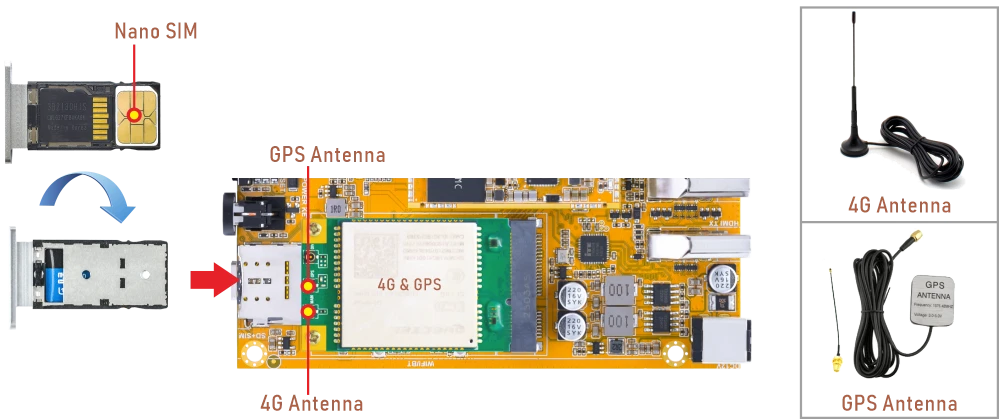
5.10.1 4G
❶ Insert the 4G module into the mPCIe slot(4G model: EC20).
❷ Connect antenna and insert SIM card.
❸ Power on.
❹ Initiate the PPP connection.
1mkdir -p var/run/pppd/lock
2pppd call quectel-ppp &
❺ Test network connectivity.
1ifconfig ppp0
2ping -I ppp0 www.armdesigner.com
5.10.2 GPS
❶ Insert the 4G module into the mPCIe slot.
❷ Connect a GPS antenna.
❸ Power on.
❹ Enable the GPS function.
1echo -e "AT+QGPS=1\r\n" > /dev/ttyUSB2
❺ Read the GPS data.
1cat /dev/ttyUSB1
root@em3588-buildroot:/# echo -e "AT+QGPS=1\r\n" > /dev/ttyUSB2
root@em3588-buildroot:/# cat /dev/ttyUSB1
$GPVTG,,T,,M,,N,,K,N*2C

$GPGSA,A,1,,,,,,,,,,,,,,,,*32

$GPGGA,,,,,,0,,,,,,,,*66

$GPRMC,,V,,,,,,,,,,N,V*29

$GPVTG,,T,,M,,N,,K,N*2C

$GPGSA,A,1,,,,,,,,,,,,,,,,*32

$GPGGA,,,,,,0,,,,,,,,*66

$GPRMC,,V,,,,,,,,,,N,V*29

$GPVTG,,T,,M,,N,,K,N*2C

$GPGSA,A,1,,,,,,,,,,,,,,,,*32

$GPGGA,,,,,,0,,,,,,,,*66
5.11 Audio
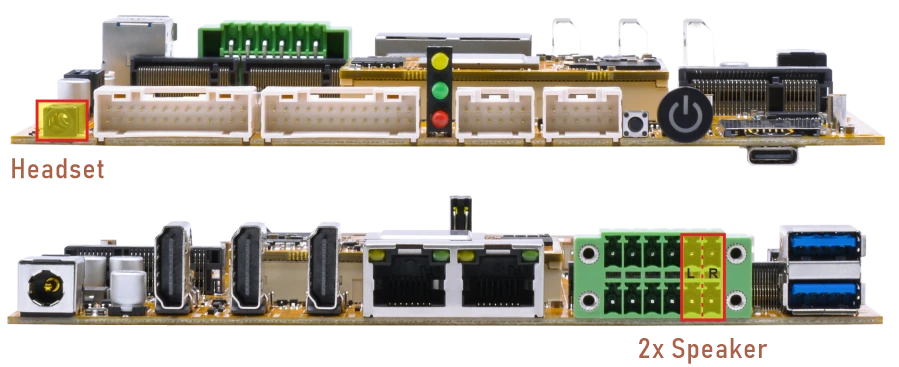
View sound card.
1cat /proc/asound/cards
root@em3588-buildroot:/# cat /proc/asound/cards
 0 [rockchipes8388 ]: rockchip-es8388 - rockchip-es8388
                      rockchip-es8388
 1 [rockchiphdmi0  ]: rockchip-hdmi0 - rockchip-hdmi0
                      rockchip-hdmi0
 2 [rockchiphdmi1  ]: rockchip-hdmi1 - rockchip-hdmi1
                      rockchip-hdmi1
 3 [rockchipdp0    ]: rockchip-dp0 - rockchip-dp0
                      rockchip-dp0
 4 [rockchipdp1    ]: rockchip-dp1 - rockchip-dp1
                      rockchip-dp1
0- Headset or speaker1- HDMI0 TX(HDMI0)2- HDMI1 TX(HDMI1)3- DP AIT mode(USB-C)4- DP to HDMI(HDMI2)
The headset jack supports both audio output and microphone input. For audio output, the headphone output has priority over the speaker output. When headphones are connected, the speaker output is disabled.
4.11.1 Audio in
❶ Plug the Headset into the 3.5mm Audio jack.
❷ Start recording.
1arecord -Dhw:0,0 -f cd record.wav
Press Ctrl + C to exit recording.
4.11.2 Audio out
Select Audio output device to play record.wav
1aplay -Dhw:0,0 record.wav
1aplay -Dhw:1,0 record.wav
1aplay -Dhw:2,0 record.wav
1aplay -Dhw:3,0 record.wav
1aplay -Dhw:4,0 record.wav
5.12 RTC
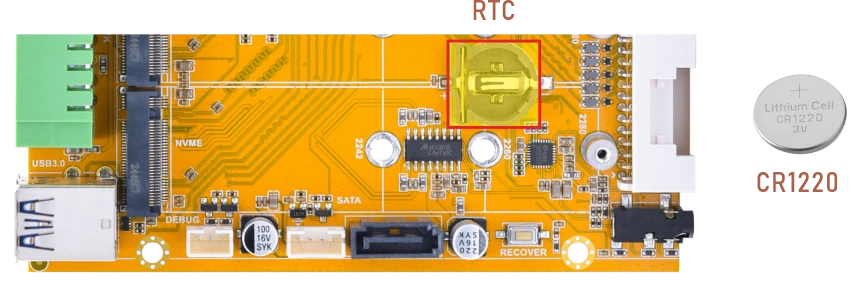
❶ Insert a CR1220 battery before test. It keeps the time running when the main power is off.
❷ Set date and time manually.
1date -s "2026-06-19 15:00:00"     //set system date
2hwclock -w                        //set the hardware clock to current system time
3hwclock                           //display date and time
root@em3588-buildroot:/# date -s "2026-06-19 15:00:00"
Fri Jun 19 15:00:00 UTC 2026
root@em3588-buildroot:/# hwclock -w
root@em3588-buildroot:/# hwclock
Fri Jun 19 15:00:02 2026  0.000000 seconds
root@em3588-buildroot:/# hwclock
Fri Jun 19 15:00:06 2026  0.000000 seconds
❸ Power off. Wait a while, then reapply power. If the RTC is functioning correctly, the clock should maintain its time and keep running while the board is powered off.
1hwclock
root@em3588-buildroot:/# hwclock
Fri Jun 19 15:01:46 2026  0.000000 seconds
root@em3588-buildroot:/# hwclock
Fri Jun 19 15:01:49 2026  0.000000 seconds
root@em3588-buildroot:/# hwclock
Fri Jun 19 15:02:02 2026  0.000000 seconds
5.13 RS485
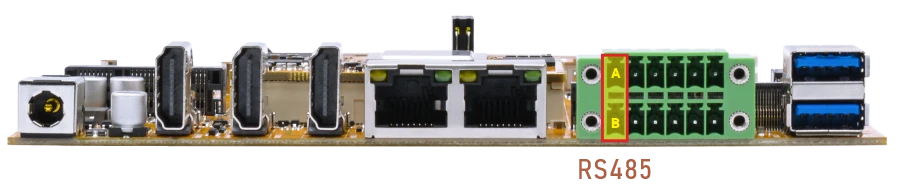
❶ Connect PC and board with USB-to-RS485 adapter.
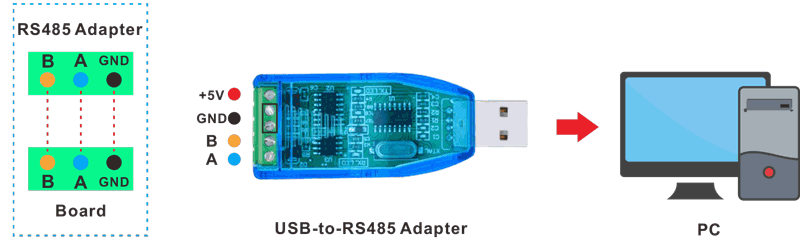
RS485 connection
❷ Open the Serial Terminal and set baud rate for RS485 adapter and development board respectively.
Baud rate: development board - 1500000; RS485 adapter - 115200
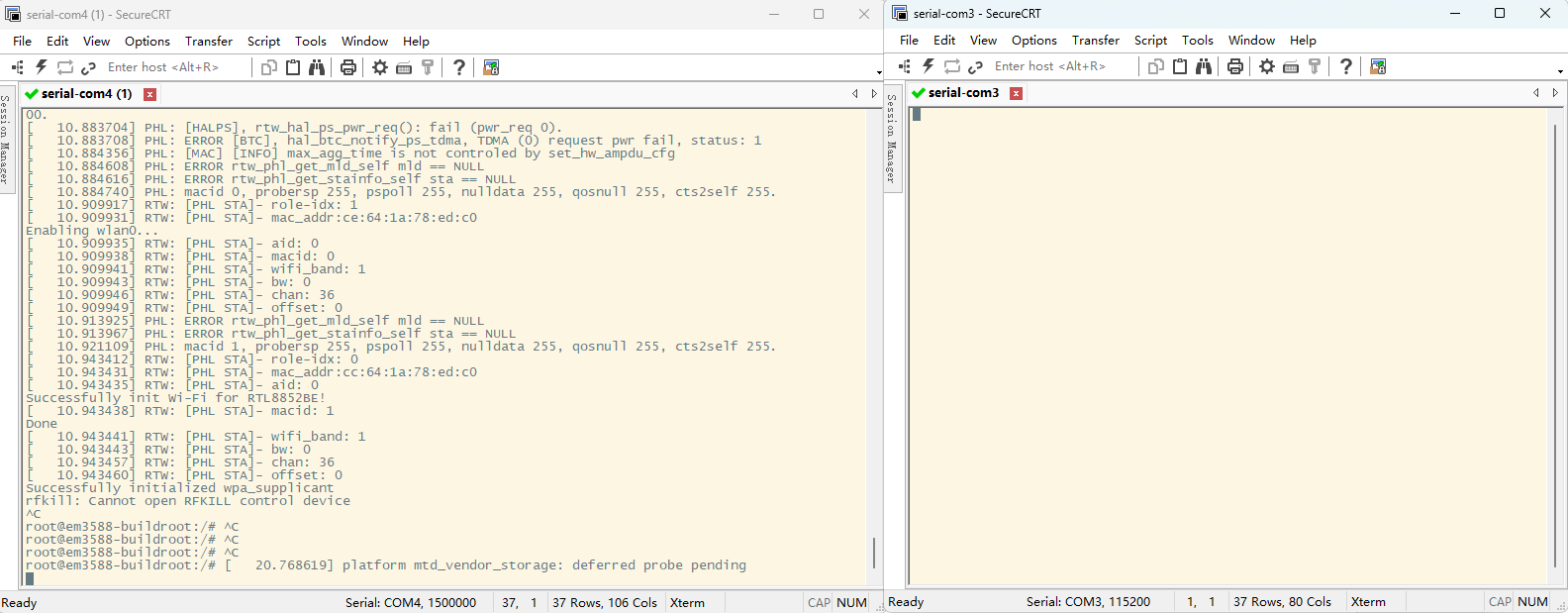
❸ Execute command in the terminal of the board.
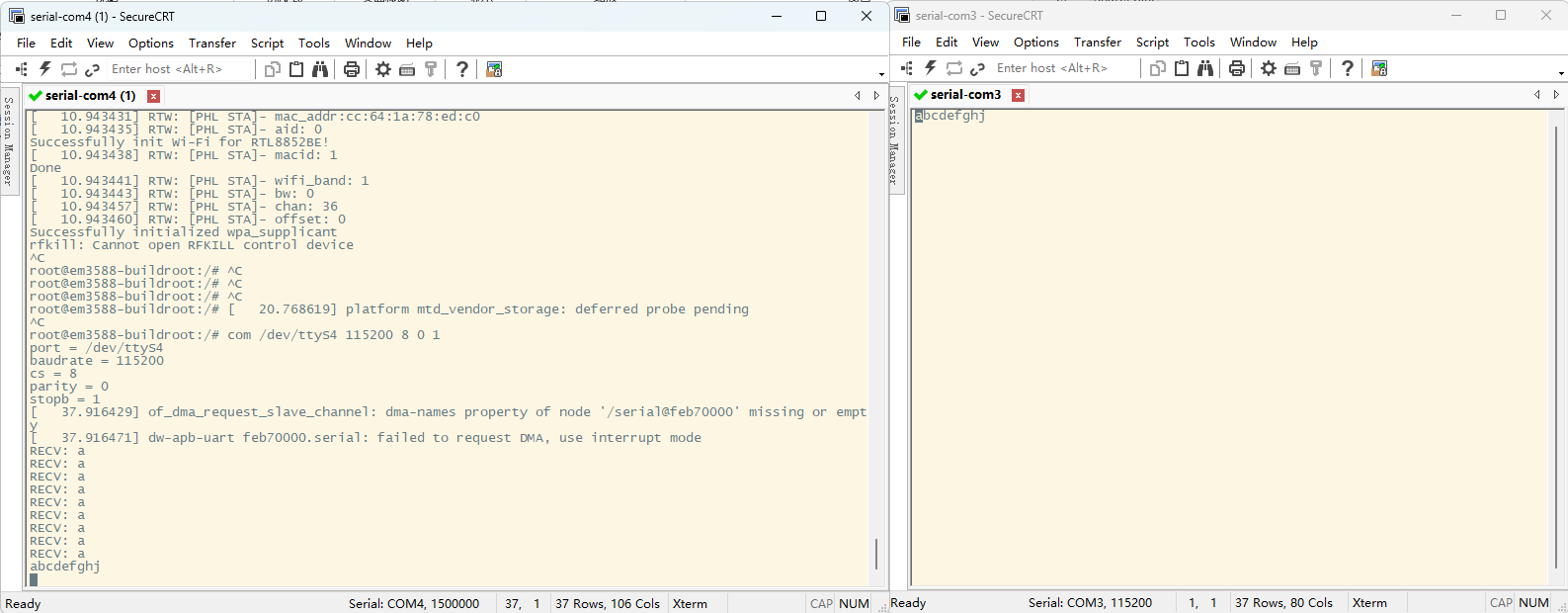
1com /dev/ttyS4 115200 8 0 1
❹ Input character to test RS485 communication.
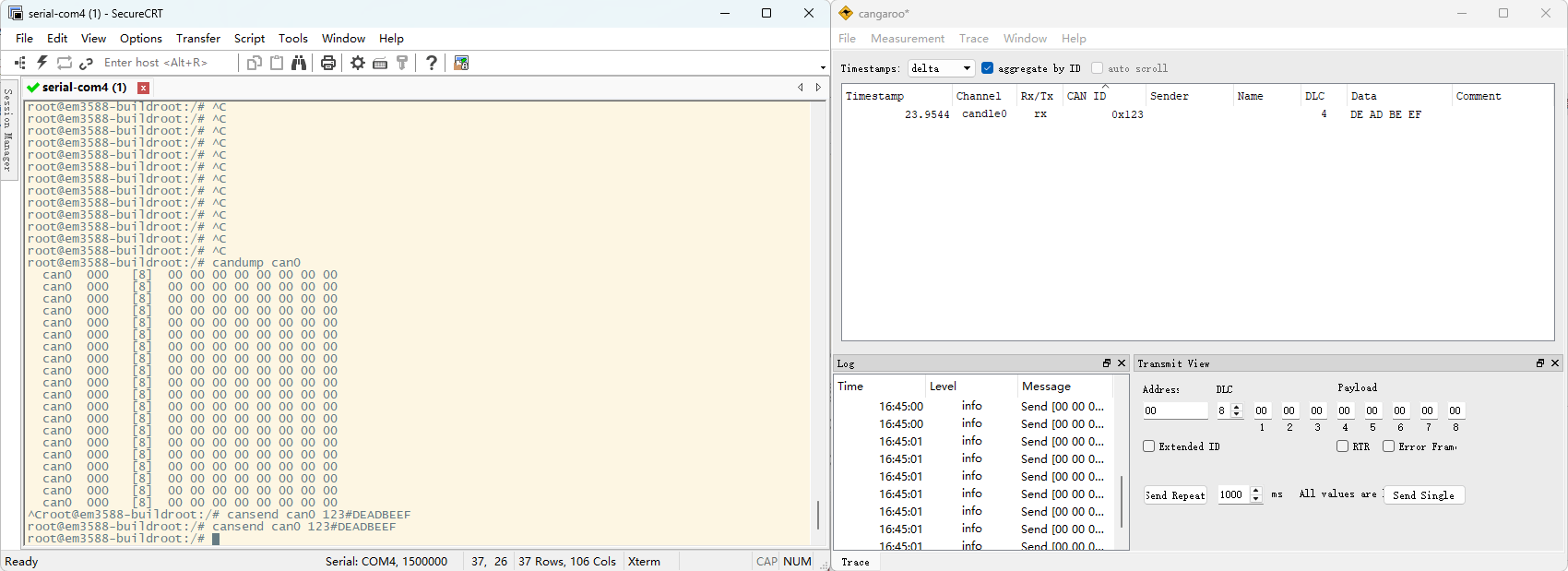
5.14 CAN
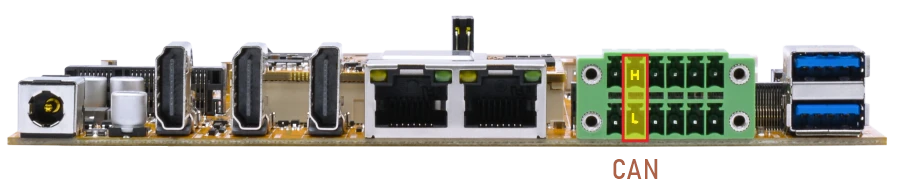
❶ Connect PC and board with USB-to-CAN adapter.
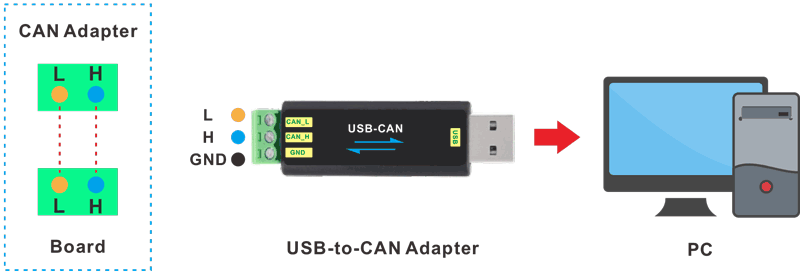
CAN connection
❷ Open the CAN application and set the baudrate to 500000 on PC.
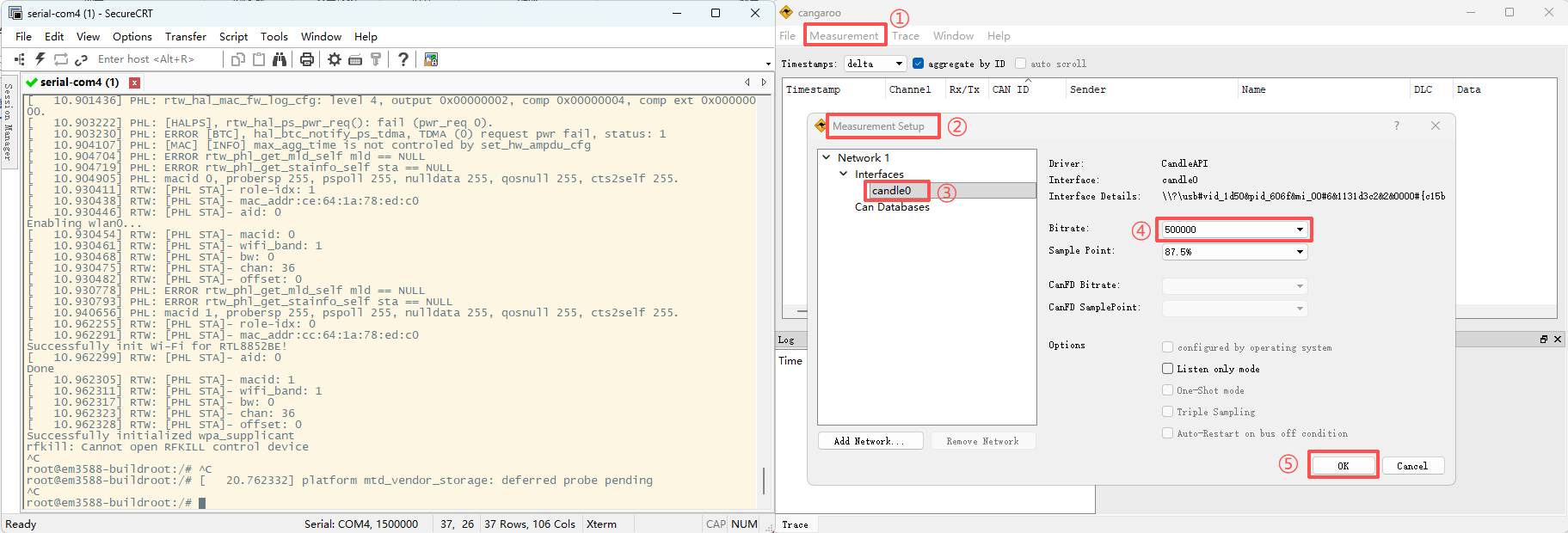
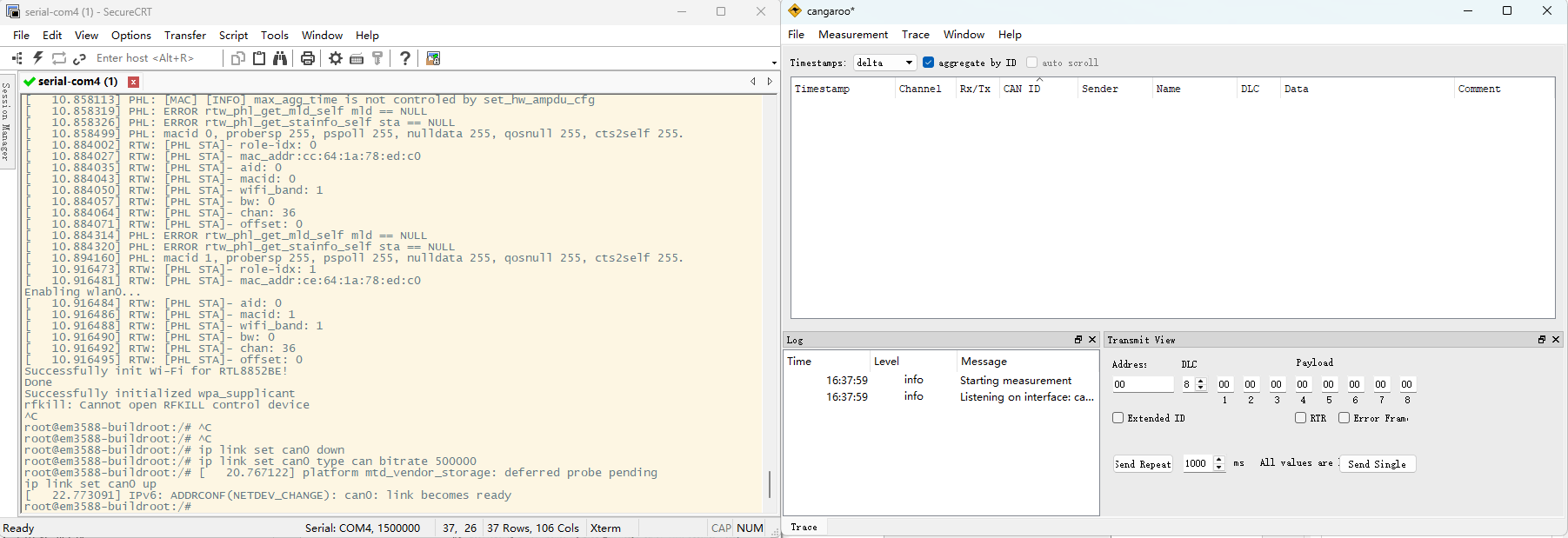
❸ Execute commands on Serial Terminal to configure CAN.
1ip link set can0 down
2ip link set can0 type can bitrate 500000
3ip link set can0 up
❹ Configure CAN as receiver.
1candump can0
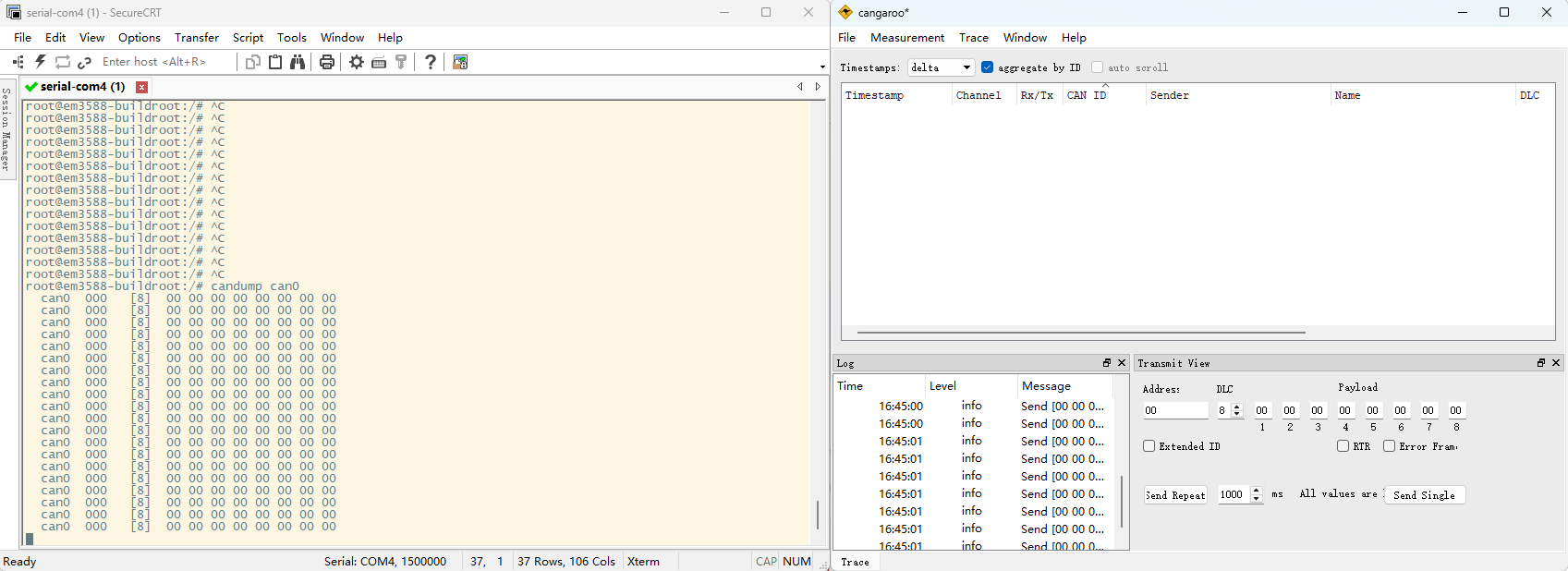
❺ Configure CAN as Transmitter.
1cansend can0 123#DEADBEEFDEADBEEF
5.15 UART(RS232)
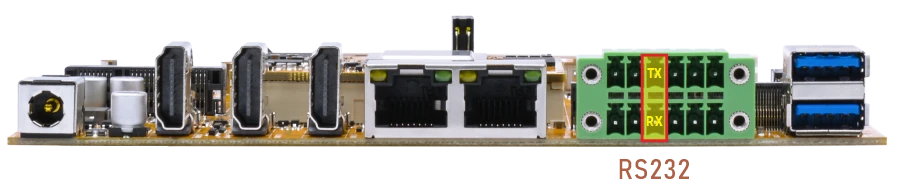
The UART loopback test is for reference only.
❶ Connect RX and TX of UART(RS232).
❷ Execute command and input character to test.
1com /dev/ttyS7 115200 8 0 1
root@em3588-buildroot:/# com /dev/ttyS7 115200 8 0 1
port = /dev/ttyS7
baudrate = 115200
cs = 8
parity = 0
stopb = 1
jjjjjjj
RECV: jjjjjjj
yuyuyuuy
RECV: yuyuyuuy
888888888
RECV: 888888888
777
5.16 Camera
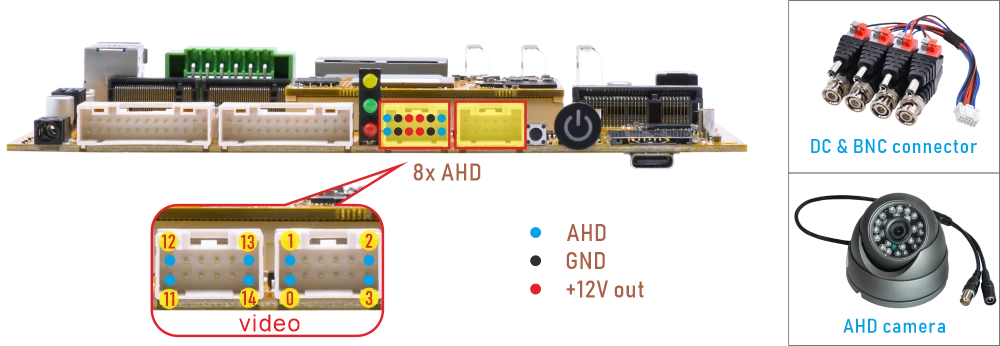
❶ Connect AHD camera to the development board.
❷ Preview.
1/rockchip-test/camera/camera-ahd_1280x800.sh //MIPI display output
1/rockchip-test/camera/camera-ahd_3640x2160.sh //HDMI display output
To preview any specific camera, just modify the device ID. Take video0 as an example:
1gst-launch-1.0 v4l2src device=/dev/video0 ! video/x-raw, format=NV12, width=1920, height=1080, framerate=25/1 ! waylandsink
4.17 Video Playback
4.17.1 Built-in Playback
The script instruction directory is in /rockchip-test/video/, just run it.
root@em3588-buildroot:/# ls /rockchip-test/video/
test_gst_multivideo.sh  test_gst_video_fps.sh     video_stresstest.sh
test_gst_video.sh       test_gst_video_maxfps.sh  video_test.sh

root@em3588-buildroot:/# /rockchip-test/video/test_gst_video.sh
Setting pipeline to PAUSED ...
Pipeline is PREROLLING ...
Redistribute latency...
mpp[1834]: mpp_info: mpp version: ab796560 author: Herman Chen   2024-12-30 docs: Update 1.0.8 CHANGELOG.md
mpp[1834]: mpp_info: mpp version: ab796560 author: Herman Chen   2024-12-30 docs: Update 1.0.8 CHANGELOG.md
mpp[1834]: mpp_info: mpp version: ab796560 author: Herman Chen   2024-12-30 docs: Update 1.0.8 CHANGELOG.md
mpp[1834]: mpp_info: mpp version: ab796560 author: Herman Chen   2024-12-30 docs: Update 1.0.8 CHANGELOG.md
mpp[1834]: mpp_info: mpp version: ab796560 author: Herman Chen   2024-12-30 docs: Update 1.0.8 CHANGELOG.md
Redistribute latency...
mpp[1834]: h264d_api: is_avcC=1
Pipeline is PREROLLED ...
Prerolled, waiting for async message to finish...
Setting pipeline to PLAYING ...
Redistribute latency...
New clock: GstSystemClock
0:00:02.6 / 0:00:29.5 (9.0 %)
4.17.2 Browser Playback
1chromium /media/udisk1/video/4KP60/4KP60-exist.mp4
Command explanation:
chromiuLaunches the Chromium browser./media/udisk1/video/4KP60/4KP60-exist.mp4The media file path to be played.
Note
Google Chrome supports up to 4K@60Hz playback for VP8, H.264, H.265, VP9, and AV1; however, for H.265, only certain files can be played.
4.17.3 Command Line
1gst-play-1.0 --videosink="waylandsink fullscreen=true" /media/udisk1/video/8KP30/8KP30-2.mp4 --audiosink="alsasink device=hw:0,0"
Command explanation:
/media/udisk1/video/8KP30/8KP30-2.mp4The media file path to be played.--audiosink="alsasink device=hw:0,0"Specifies the Audio output device.