2. Compile Source
2.1 Android 14
❶ Extract Source Code
1tar xvf Rockchip_Android14.0_SDK_RELEASE_20260115.tar.bz2
2cd Rockchip_Android14.0_SDK_RELEASE_20260115
❷ Configuration
1source build/envsetup.sh
2lunch em3588_u-userdebug
❸ One key compiling
1./build.sh -AUCKu
./build.sh -UKAup
( WHERE: -U = build uboot
-C = build kernel with Clang
-K = build kernel
-A = build android
-p = will build packaging in IMAGE
-o = build OTA package
-u = build update.img
-v = build android with 'user' or 'userdebug'
-d = huild kernel dts name
-V = build version
-J = build jobs
------------you can use according to the requirement, no need to record
uboot/kernel compiling commands------------------
)
============================================================
Please remember to set the environment variable before using the one key
compiling command, and select the platform to be compiled, for example:
source build/envsetup.sh
lunch rk3588_t-userdebug
============================================================
After the command is completed, the image files will be generated in the rockdev/ Image-em3588_u directory.
Note
The kernel compiled here is only for generating the resource.img. The kernel source code will be compiled into KO files and packaged into vendor_boot.img. The kernel part uses the boot.img released by Google, and the specific path is in mkcombinedroot/prebuilts/boot-6.1.img
Compiling vendor_boot.img solely is also supported during debugging.
Execute the following command:
1make installclean;make vendorbootimage -j12
Flash directly after compiling out/target/product/em3588_u/vendor_boot.img
2.2 Android 16
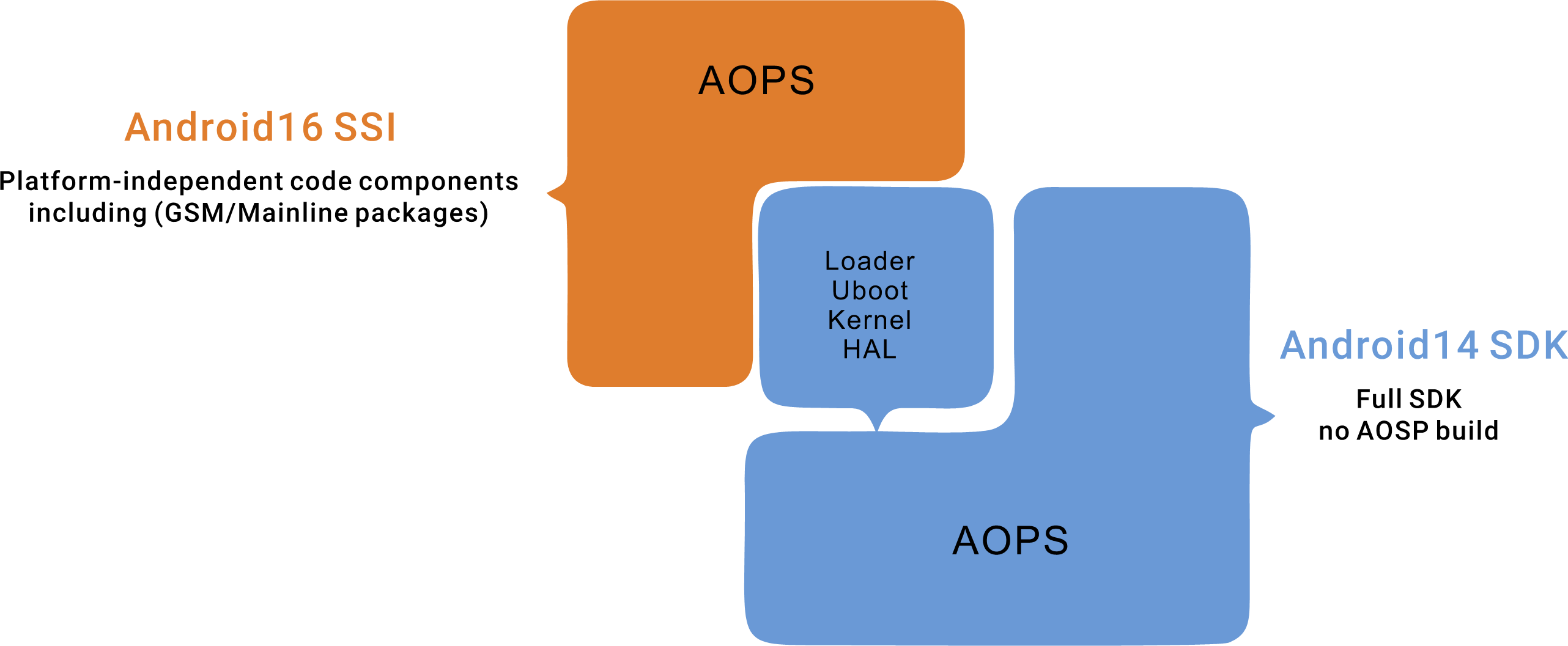
The Rockchip Android 16.0 SSI SDK provides only the AOSP codebase. After compilation, it generates only system-related images (system.img, system_ext.img, product.img), which are identical to Google’s GSI images. Other code modules must be compiled using the Android 14 SDK. Therefore, the Rockchip Android 16.0 SSI SDK must be used in conjunction with the Android 14 SDK. The architecture diagram of the complete SDK (comprising both the Rockchip Android 16 SSI SDK and the Android 14 SDK) is shown below:
❶ Extract Source Code
1tar xvf Rockchip_Android16.0_SDK_RELEASE_20260114.tar.bz2
2tar xvf Rockchip_Android14.0_SDK_RELEASE_20260115.tar.bz2
3cd Rockchip_Android16.0_SDK_RELEASE_20260114
❷ Configuration
1source build/envsetup.sh
2lunch ssi_16_arm64-bp2a-userdebug
xuejunchao@boardcon:~/Rockchip_Android16.0_SDK_RELEASE_20260114$ source build/envsetup.sh
including device/rockchip/rockchip_generic/vendorsetup.sh
xuejunchao@boardcon:~/Rockchip_Android16.0_SDK_RELEASE_20260114$ lunch ssi_16_arm64-bp2a-userdebug
build/make/core/product_config.mk:489: warning: PRODUCT_INSTALL_DEBUG_POLICY_TO_SYSTEM_EXT is set but PRODUCT_NAME (ssi_16_arm64) doesn't look like a GSI for compliance testing. This is a special configuration for compliance GSI, so do make sure you understand the security implications before setting this option. If you don't know what this option does, then you probably shouldn't set this.
build/make/core/product_config.mk:489: warning: PRODUCT_INSTALL_DEBUG_POLICY_TO_SYSTEM_EXT is set but PRODUCT_NAME (ssi_16_arm64) doesn't look like a GSI for compliance testing. This is a special configuration for compliance GSI, so do make sure you understand the security implications before setting this option. If you don't know what this option does, then you probably shouldn't set this.

============================================
PLATFORM_VERSION_CODENAME=REL
PLATFORM_VERSION=16
TARGET_PRODUCT=ssi_16_arm64
TARGET_BUILD_VARIANT=userdebug
TARGET_ARCH=arm64
TARGET_ARCH_VARIANT=armv8-a
TARGET_CPU_VARIANT=generic
HOST_OS=linux
HOST_OS_EXTRA=Linux-6.8.0-101-generic-x86_64-Ubuntu-22.04.5-LTS
HOST_CROSS_OS=windows
BUILD_ID=BP2A.250605.031.A3
OUT_DIR=out
SOONG_ONLY=false
============================================
❸ Link Android 14 SDK and configure compilation parameters
1rkbuild_setup
xuejunchao@boardcon:~/Rockchip_Android16.0_SDK_RELEASE_20260114$ rkbuild_setup
[WARN] rkbuild_setup -d <kernel_dts> -l <vendor_lunch> -f <build_number> -p <vendor_sdk_path> -j <build_thread>
Enter parameters in the specified format or press Enter to input as prompted:

/Rockchip_Android14.0_SDK_RELEASE_20260115

[WARN] The optional lunch projects for Android_VENDOR_SDK are as follows:

You're building on Linux

Lunch menu .. Here are the common combinations:
     1. PX30_u-user
     2. PX30_u-userdebug
     3. aosp_arm-eng
     4. aosp_arm64-eng
     5. aosp_x86-eng
     6. aosp_x86_64-eng
     7. em3588_u-user
     8. em3588_u-userdebug
     9. idea3588_u-user
     10. idea3588_u-userdebug
      ……
     45. sbc3588_u-user
     46. sbc3588_u-userdebug

Please enter the lunch option for Android_VENDOR_SDK (for example: rk3588_u-user):em3588_u-userdebug

Do you need to specify the build number? (Press Enter to automatically generate, or directly enter the required build number):8

Current PRODUCT_KERNEL_DTS=em3588-u, If you need to modify the DTS, please enter. Press Enter to use the default value:
Enter parameters in format or press Enter to input interactively: Press Enter, then input the path of the Android 14 SDK.
Please enter the lunch option for Android_VENDOR_SDK (for example: rk3588_u-user): Select
em3588_u-userdebugDo you need to specify the build number?: Input the build number here, such as
8.Current PRODUCT_KERNEL_DTS=em3588-u, If you need to modify the DTS, please enter. Press Enter to use the default value: Press Enter
❹ Compile
1rkbuild_build all
rkbuild_build { uboot | kernel | ssi | vendor | all }
- uboot: Build the uboot in Android_VENDOR_SDK
- kernel: Build the kernel modules in Android_VENDOR_SDK
- ssi: Build the system SDK
- vendor: Build the GRF SDK
- all: Build the uboot & kernel & ssi & vendor, then pack the images to update.img
For partial compilation, need to perform merge operation after compilation:
1rkbuild_merge
2rkbuild_mkupdate
The path of the compiled firmware is /Rockchip_Android16.0_SDK_RELEASE_20260114/rockdev/Image-em3588_u/