4. Debian Application
4.1 Serial Terminal
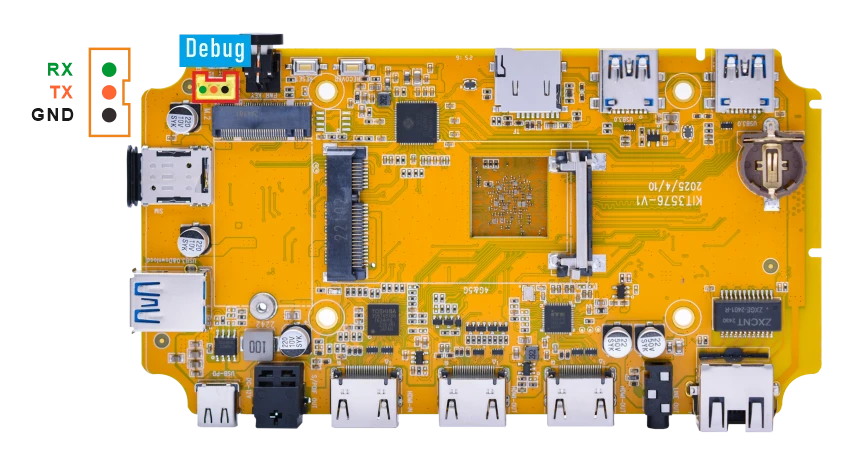
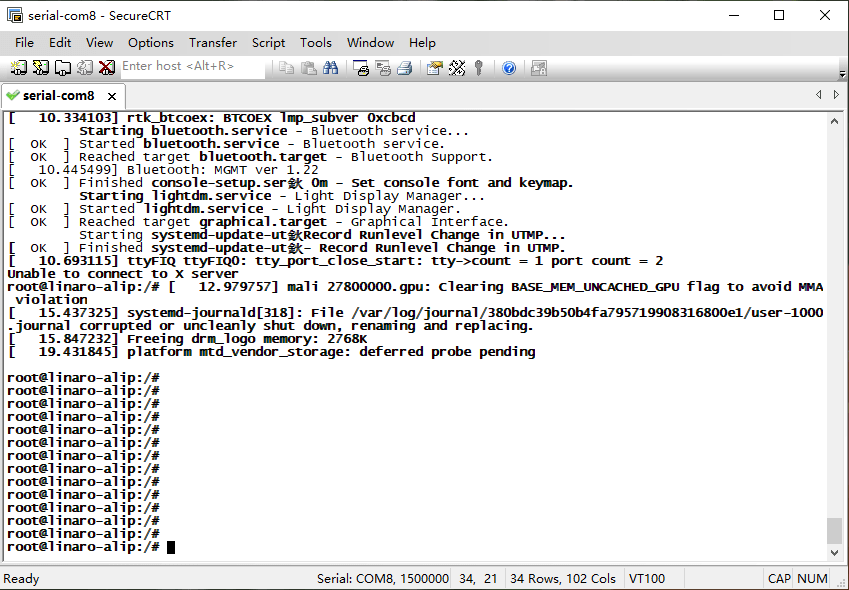
Connect the board and PC with USB Serial cable, then power on, the terminal will output boot information. The default baudrate is 1500000.
4.2 Display

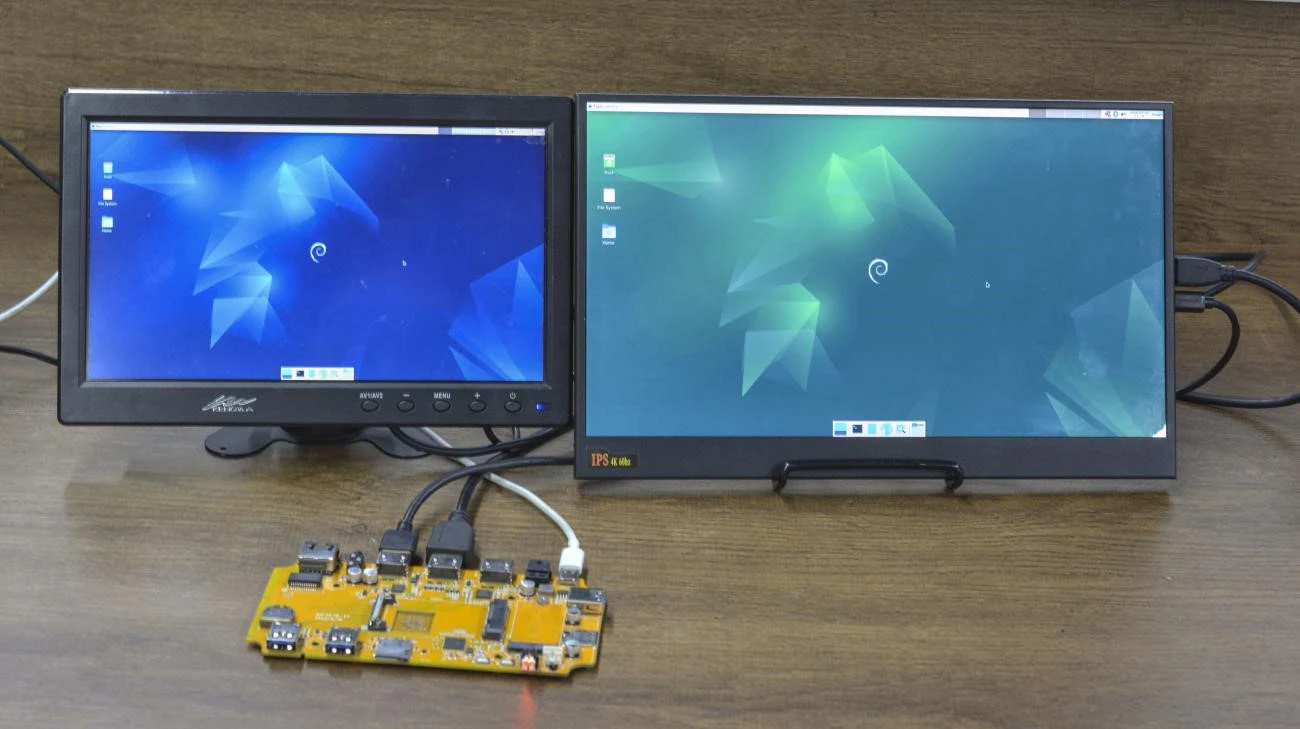
Compact3576 supports dual HDMI display synchronization.
4.3 USB
4.3.1 USB3.0 DRD
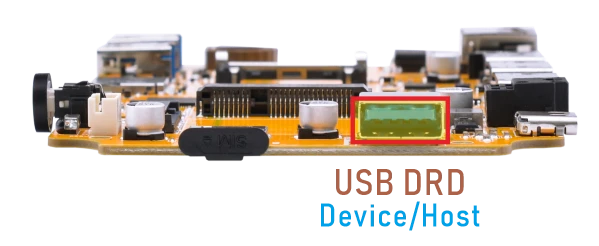
The Compact3576 USB3.0 DRD supports both Host and Device roles, with Device as the default configuration. ADB requires the USB3.0 port to be in Device mode.
ADB
❶ Connect the board and PC host with USB-A cable.
❷ Install ADB driver on Windows system.
❸ Press Windows + R to open the Run program. Type cmd and press Enter
❹ Execute the follow commands to enable ADB.
1adb root
2adb remount
3adb shell
USB3.0 Host
❶ Switch USB DRD to Host mode.
1echo host > /sys/kernel/debug/usb/23000000.usb/mode
❷ After inserting the USB flash drive, it will be automatically mounted.
USB3.0 Superspeed detectedroot@linaro-alip:/# [ 389.429177] usb 4-1: new SuperSpeed USB device number 2 using xhci-hcd [ 389.459908] usb 4-1: New USB device found, idVendor=0dd8, idProduct=3b00, bcdDevice= 0.02 [ 389.459969] usb 4-1: New USB device strings: Mfr=1, Product=2, SerialNumber=3 [ 389.459998] usb 4-1: Product: OnlyDisk [ 389.460021] usb 4-1: Manufacturer: Netac [ 389.460044] usb 4-1: SerialNumber: C0E8BFA3EC38F796 [ 389.462272] usb-storage 4-1:1.0: USB Mass Storage device detected [ 389.463559] scsi host0: usb-storage 4-1:1.0 [ 391.053776] scsi 0:0:0:0: Direct-Access Netac OnlyDisk 8.01 PQ: 0 ANSI: 6 [ 391.058363] sd 0:0:0:0: [sda] 121610240 512-byte logical blocks: (62.3 GB/58.0 GiB) [ 391.058773] sd 0:0:0:0: [sda] Write Protect is off [ 391.058976] sd 0:0:0:0: [sda] Write cache: disabled, read cache: enabled, doesn't support DPO or FUA [ 391.063834] sda: sda1 [ 391.064693] sd 0:0:0:0: [sda] Attached SCSI removable disk
Switch USB3.0 DRD to USB device mode.
1echo device> /sys/kernel/debug/usb/23000000.usb/mode
4.3.2 USB3.0 Host
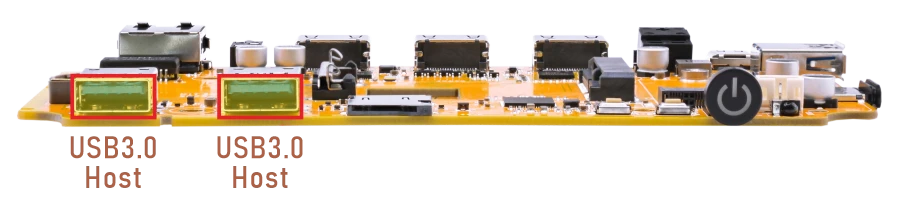
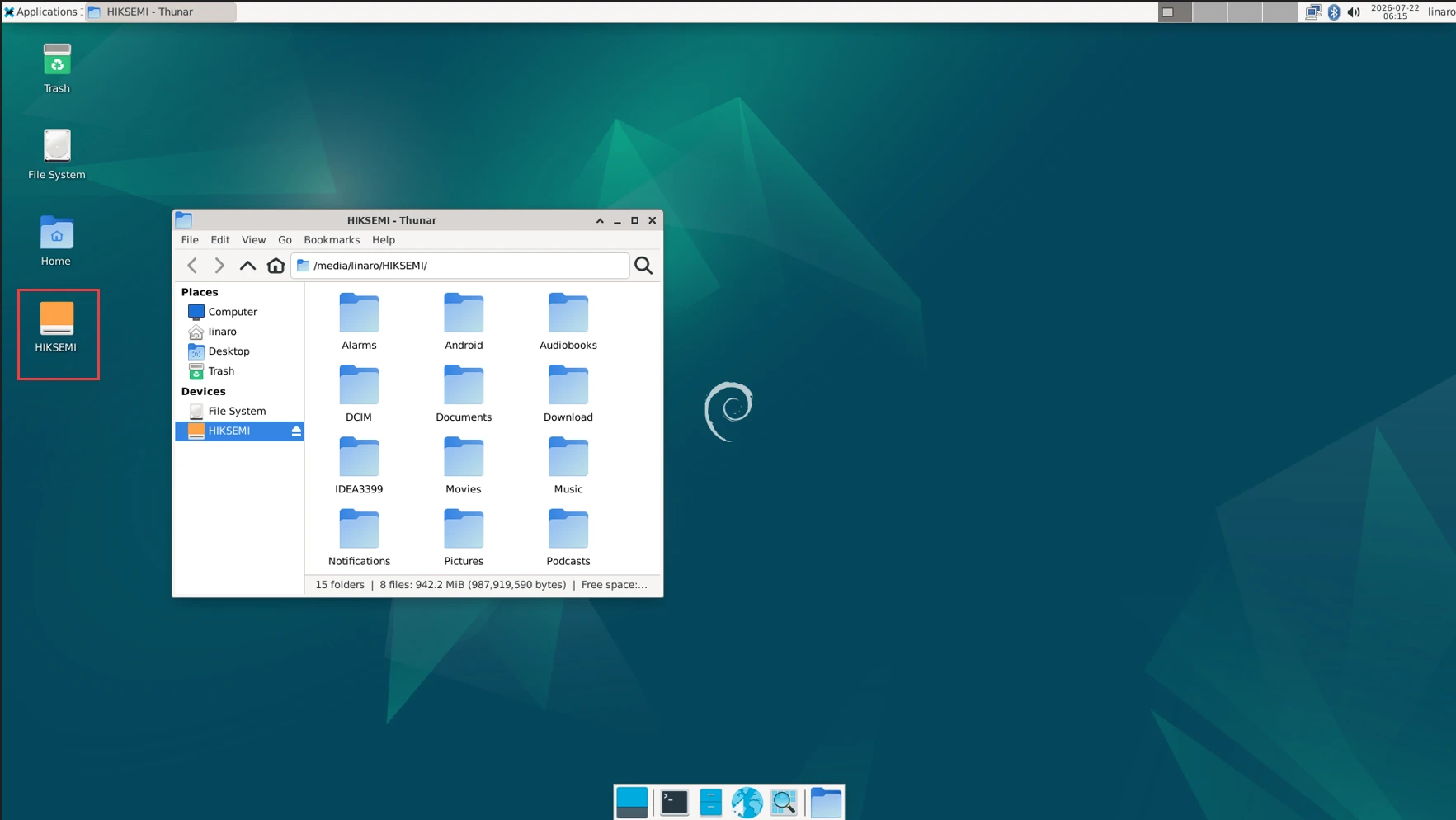
The USB3.0 Host can connect peripherals such as mouse, keyboards, and flash drives. After connecting the USB flash drive, if the device is successfully recognized, an icon will appear on the desktop. Users need to click the icon in order to access the files on the device.
The current USB connection speed can be checked from the kernel log. When the device operates in USB2.0 mode, the log usually shows high-speed. When the device operates in USB3.0 mode, the log usually shows SuperSpeed.
root@linaro-alip:/# [  180.206884] usb 1-1.4: new high-speed USB device number 4 using xhci-hcd
[  180.309438] usb 1-1.4: New USB device found, idVendor=346d, idProduct=5678, bcdDevice= 2.00
[  180.309503] usb 1-1.4: New USB device strings: Mfr=1, Product=2, SerialNumber=3
[  180.309532] usb 1-1.4: Product: Disk 2.0
[  180.309556] usb 1-1.4: Manufacturer: HIKSEMI
[  180.309579] usb 1-1.4: SerialNumber: 7896431044660721636
[  180.311335] usb-storage 1-1.4:1.0: USB Mass Storage device detected
[  180.312240] usb-storage 1-1.4:1.0: Quirks match for vid 346d pid 5678: 520
[  180.312602] scsi host0: usb-storage 1-1.4:1.0
[  181.329015] scsi 0:0:0:0: Direct-Access     HIKSEMI  ProductCode      2.00 PQ: 0 ANSI: 4
[  181.336040] sd 0:0:0:0: [sda] 122880000 512-byte logical blocks: (62.9 GB/58.6 GiB)
[  181.336539] sd 0:0:0:0: [sda] Write Protect is off
[  181.337009] sd 0:0:0:0: [sda] No Caching mode page found
[  181.337048] sd 0:0:0:0: [sda] Assuming drive cache: write through
[  181.342369]  sda: sda1
[  181.343416] sd 0:0:0:0: [sda] Attached SCSI removable disk
root@linaro-alip:/# [   42.383393] usb 2-1.4: new SuperSpeed USB device number 3 using xhci-hcd
[   42.413116] usb 2-1.4: New USB device found, idVendor=0dd8, idProduct=3b00, bcdDevice= 0.02
[   42.413143] usb 2-1.4: New USB device strings: Mfr=1, Product=2, SerialNumber=3
[   42.413155] usb 2-1.4: Product: OnlyDisk
[   42.413165] usb 2-1.4: Manufacturer: Netac
[   42.413174] usb 2-1.4: SerialNumber: C0E8BFA3EC38F796
[   42.415034] usb-storage 2-1.4:1.0: USB Mass Storage device detected
[   42.416622] scsi host0: usb-storage 2-1.4:1.0
[   43.444907] scsi 0:0:0:0: Direct-Access     Netac    OnlyDisk         8.01 PQ: 0 ANSI: 6
[   43.451077] sd 0:0:0:0: [sda] 121610240 512-byte logical blocks: (62.3 GB/58.0 GiB)
[   43.451478] sd 0:0:0:0: [sda] Write Protect is off
[   43.451683] sd 0:0:0:0: [sda] Write cache: disabled, read cache: enabled, doesn't support DPO or FUA
[   43.456109]  sda: sda1
[   43.456653] sd 0:0:0:0: [sda] Attached SCSI removable disk
View the USB flash disk node.
1df -h
root@linaro-alip:/# df -h
Filesystem      Size  Used Avail Use% Mounted on
/dev/root        14G  3.8G  9.4G  29% /
devtmpfs        1.9G  8.0K  1.9G   1% /dev
tmpfs           2.0G     0  2.0G   0% /dev/shm
tmpfs           780M  1.9M  778M   1% /run
tmpfs           5.0M   20K  5.0M   1% /run/lock
/dev/mmcblk0p7  123M   12M  108M  10% /oem
/dev/mmcblk0p8   15G  288K   15G   1% /userdata
tmpfs           390M   36K  390M   1% /run/user/1000
/dev/mmcblk1p1   59G   54G  4.3G  93% /media/linaro/6AEA-5795
/dev/sda1        59G   36G   24G  61% /media/linaro/HIKSEMI
4.4 Ethernet

❶ Connect the Board and router with an Ethernet cable.
❷ View the status of the network interfaces.
1ifconfig
root@linaro-alip:/# ifconfig
end1: flags=4163<UP,BROADCAST,RUNNING,MULTICAST>  mtu 1500
        inet 192.168.0.216  netmask 255.255.255.0  broadcast 192.168.0.255
        inet6 fe80::d9ee:fef5:287e:a836  prefixlen 64  scopeid 0x20<link>
        ether b2:ef:e7:4f:bf:85  txqueuelen 1000  (Ethernet)
        RX packets 370  bytes 41403 (40.4 KiB)
        RX errors 0  dropped 8  overruns 0  frame 0
        TX packets 153  bytes 13818 (13.4 KiB)
        TX errors 0  dropped 0 overruns 0  carrier 0  collisions 0
        device interrupt 64
❸ Ping URL to test Network.
1ping -I end1 www.armdesigner.com
root@linaro-alip:/# ping -I end1 www.armdesigner.com
PING www.armdesigner.com (67.222.54.196) from 192.168.0.216 end1: 56(84) bytes of data.
64 bytes from 67-222-54-196.unifiedlayer.com (67.222.54.196): icmp_seq=1 ttl=48 time=194 ms
64 bytes from 67-222-54-196.unifiedlayer.com (67.222.54.196): icmp_seq=2 ttl=48 time=192 ms
64 bytes from 67-222-54-196.unifiedlayer.com (67.222.54.196): icmp_seq=3 ttl=48 time=193 ms
64 bytes from 67-222-54-196.unifiedlayer.com (67.222.54.196): icmp_seq=4 ttl=48 time=193 ms
64 bytes from 67-222-54-196.unifiedlayer.com (67.222.54.196): icmp_seq=5 ttl=48 time=192 ms
64 bytes from 67-222-54-196.unifiedlayer.com (67.222.54.196): icmp_seq=6 ttl=48 time=193 ms
64 bytes from 67-222-54-196.unifiedlayer.com (67.222.54.196): icmp_seq=7 ttl=48 time=196 ms
64 bytes from 67-222-54-196.unifiedlayer.com (67.222.54.196): icmp_seq=8 ttl=48 time=193 ms
64 bytes from 67-222-54-196.unifiedlayer.com (67.222.54.196): icmp_seq=9 ttl=48 time=193 ms
64 bytes from 67-222-54-196.unifiedlayer.com (67.222.54.196): icmp_seq=10 ttl=48 time=192 ms
64 bytes from 67-222-54-196.unifiedlayer.com (67.222.54.196): icmp_seq=11 ttl=48 time=193 ms
^C
--- www.armdesigner.com ping statistics ---
11 packets transmitted, 11 received, 0% packet loss, time 10015ms
rtt min/avg/max/mdev = 192.094/192.977/195.780/0.990 ms
4.5 SD Card
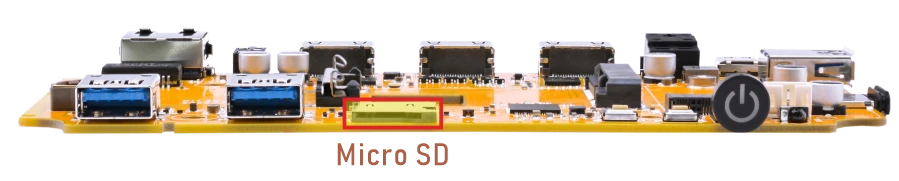
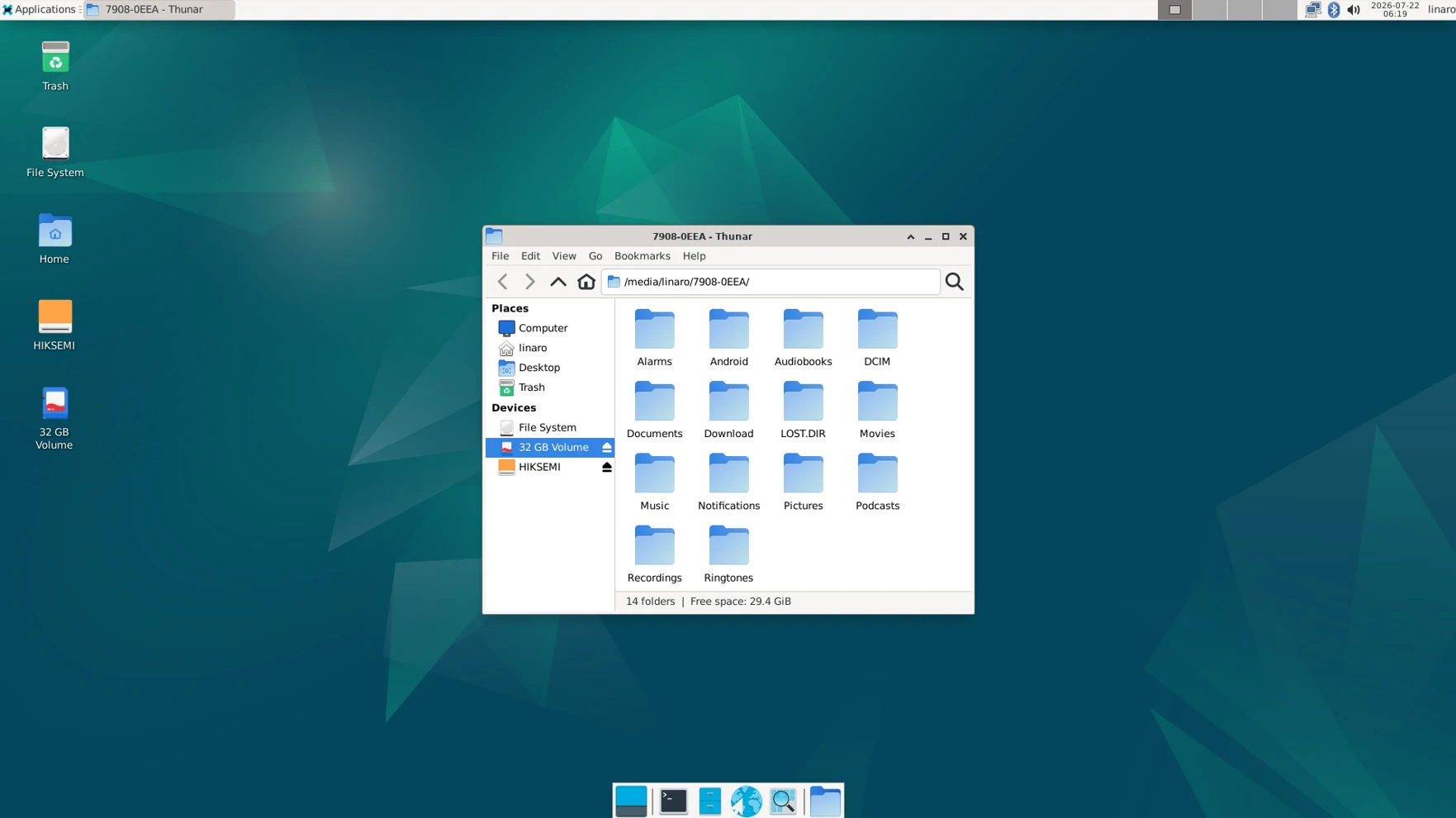
After inserting the MicroSD Card, an icon will appear on the desktop. Click the icon to automatically mount the device.
4.6 M.2(M-Key)
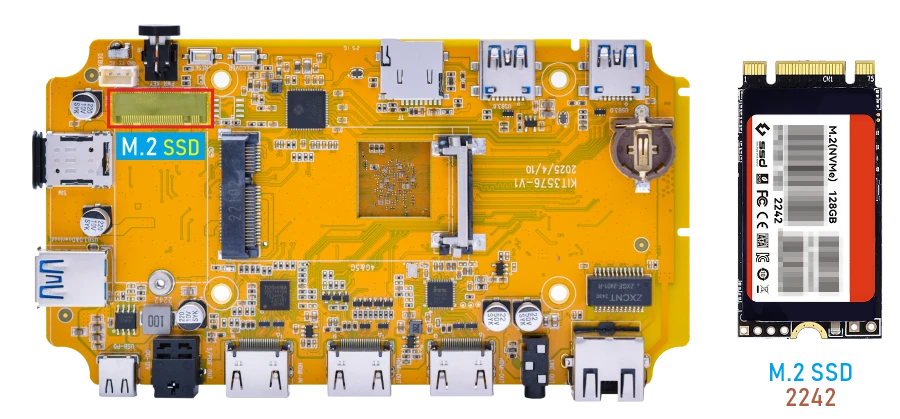
❶ Connect SSD to the development board before power on.
❷ Check the SSD device node.
After the SSD is recognized, the corresponding NVMe device node will be generated.
1ls /dev/nvme0*
❸ Check the SSD mount path.
After the SSD is recognized, it will be mounted automatically.
1df -h
root@linaro-alip:/# df -h
Filesystem      Size  Used Avail Use% Mounted on
/dev/root        14G  3.7G  9.5G  28% /
devtmpfs        1.9G   12K  1.9G   1% /dev
tmpfs           2.0G     0  2.0G   0% /dev/shm
tmpfs           781M  1.7M  779M   1% /run
tmpfs           5.0M   24K  5.0M   1% /run/lock
/dev/mmcblk0p7  124M  5.3M  115M   5% /oem
tmpfs           2.0G  408K  2.0G   1% /tmp
/dev/mmcblk0p8   15G  288K   15G   1% /userdata
tmpfs           391M   36K  391M   1% /run/user/1000
/dev/nvme0n1p1  120G  864K  120G   1% /mnt/storage
Attention
If the target device is not formatted with the ext4 file system, you must format it as ext4 before proceeding. This operation will permanently erase all existing data on the selected partition. Before running the command below, double‑check that the device path is correct.
1mke2fs -t ext4 /dev/block/nvme0n1p1
(Replace /dev/block/nvme0n1p1 with the actual partition on your device.)
4.7 WiFi & Bluetooth
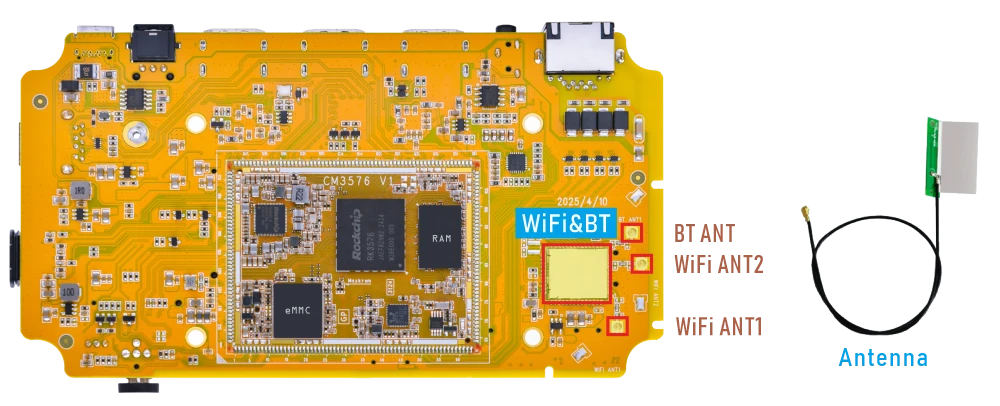
4.7.1 WiFi
❶ Connect the antennas.
❷ Click the network icon in the upper-right corner of the UI interface.
❸ Select the SSID from the list of available networks and enter the password.
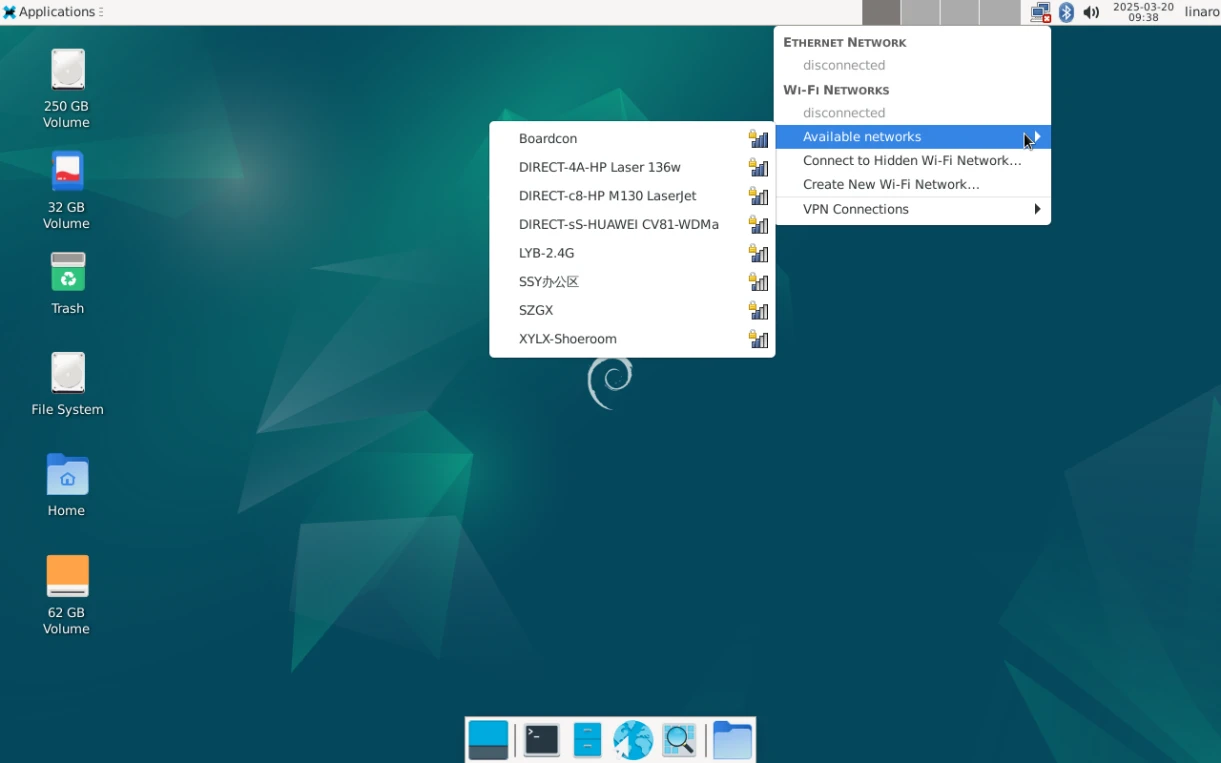
After connected, user can open Browser or ping URL/IP at terminal to test network.
1ifconfig wlan0
2ping -I wlan0 www.armdesigner.com
root@linaro-alip:/# ifconfig wlan0
wlan0: flags=4163<UP,BROADCAST,RUNNING,MULTICAST>  mtu 1500
        inet 192.168.0.169  netmask 255.255.255.0  broadcast 192.168.0.255
        inet6 fe80::9ba2:8ab4:a077:beca  prefixlen 64  scopeid 0x20<link>
        ether 84:fc:14:f9:69:1c  txqueuelen 1000  (Ethernet)
        RX packets 77  bytes 10717 (10.4 KiB)
        RX errors 0  dropped 12  overruns 0  frame 0
        TX packets 62  bytes 7282 (7.1 KiB)
        TX errors 0  dropped 0 overruns 0  carrier 0  collisions 0
root@linaro-alip:/# ping -I wlan0 www.armdesigner.com
PING d3dsoj86mhwkk6.cloudfront.net (3.174.46.103) from 192.168.0.169 wlan0: 56(84) bytes of data.
64 bytes from server-3-174-46-103.fra60.r.cloudfront.net (3.174.46.103): icmp_seq=1 ttl=246 time=294 ms
64 bytes from server-3-174-46-103.fra60.r.cloudfront.net (3.174.46.103): icmp_seq=2 ttl=246 time=215 ms
64 bytes from server-3-174-46-103.fra60.r.cloudfront.net (3.174.46.103): icmp_seq=3 ttl=246 time=229 ms
64 bytes from server-3-174-46-103.fra60.r.cloudfront.net (3.174.46.103): icmp_seq=4 ttl=246 time=206 ms
64 bytes from server-3-174-46-103.fra60.r.cloudfront.net (3.174.46.103): icmp_seq=5 ttl=246 time=286 ms
64 bytes from server-3-174-46-103.fra60.r.cloudfront.net (3.174.46.103): icmp_seq=6 ttl=246 time=313 ms
^C64 bytes from 3.174.46.103: icmp_seq=7 ttl=246 time=210 ms
--- d3dsoj86mhwkk6.cloudfront.net ping statistics ---
7 packets transmitted, 7 received, 0% packet loss, time 10526ms
rtt min/avg/max/mdev = 206.057/250.541/313.323/42.013 ms
4.7.2 Bluetooth
❶ Click the Bluetooth icon in the upper-right corner of the UI interface.
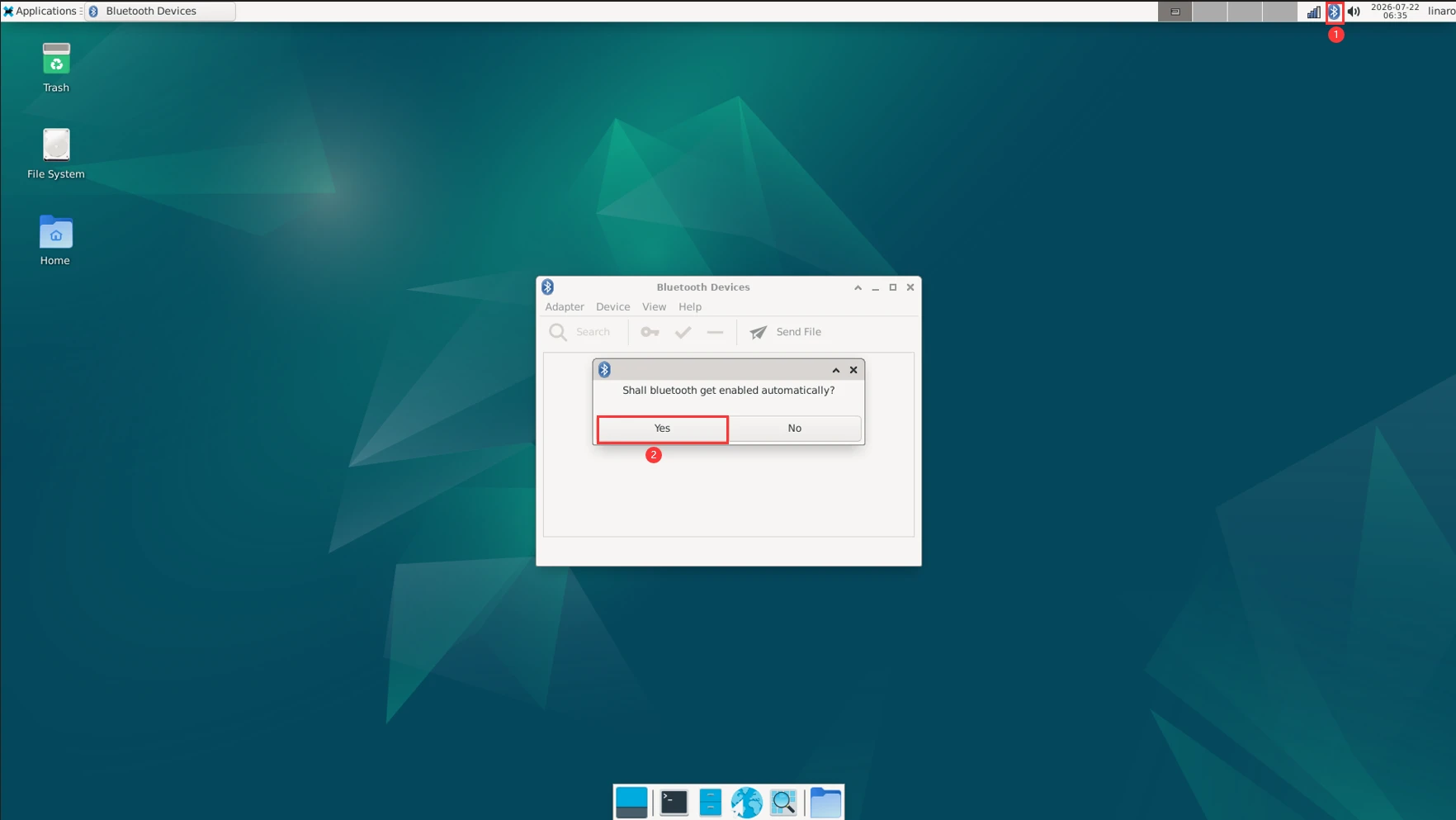
❷ The Bluetooth device name is hidden by default. Set the Bluetooth device name to be visible.
Click Adapter -> Preferences -> Always visible
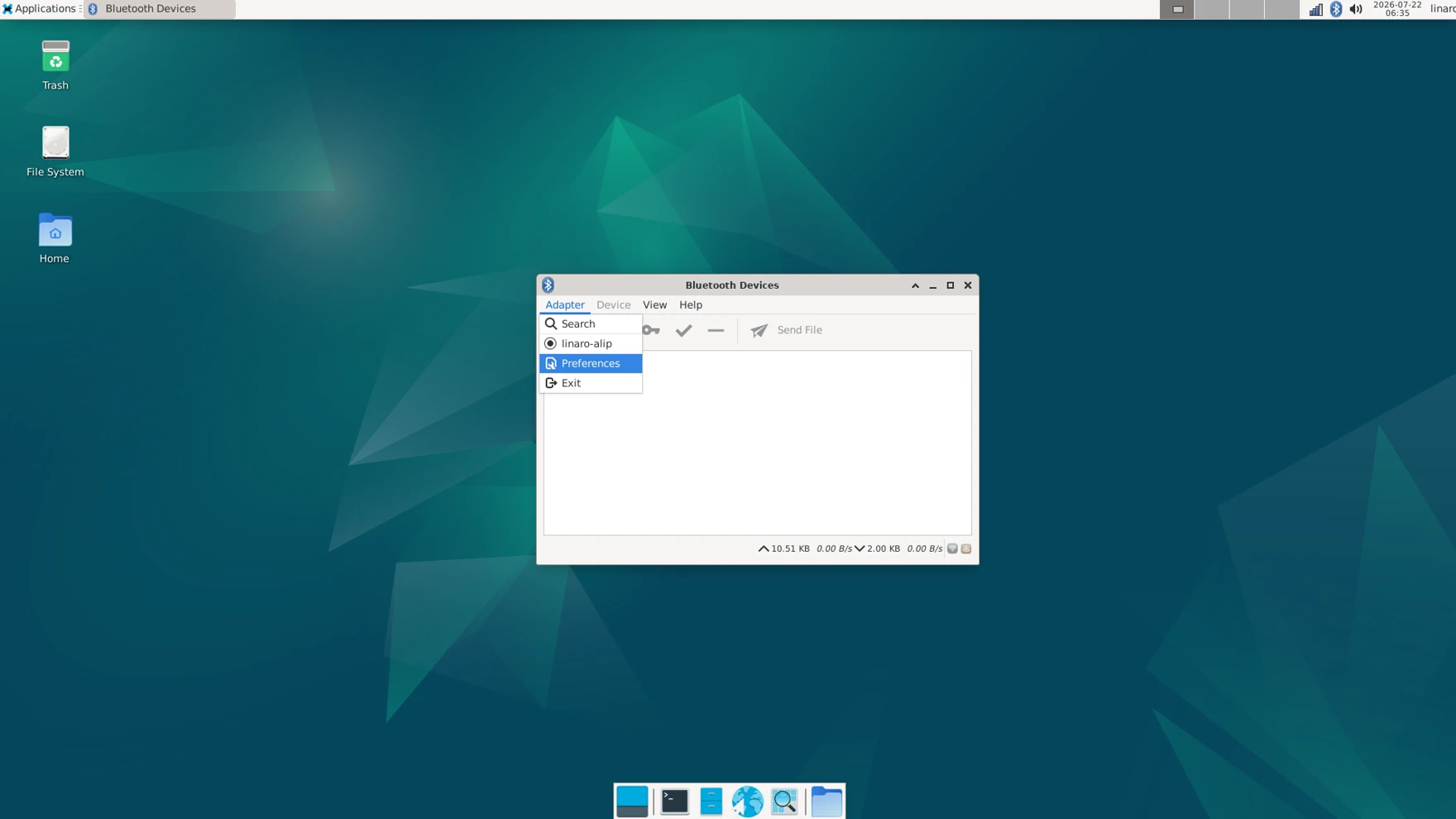
❸ Click Search to start searching and select the available device in the list to pair.
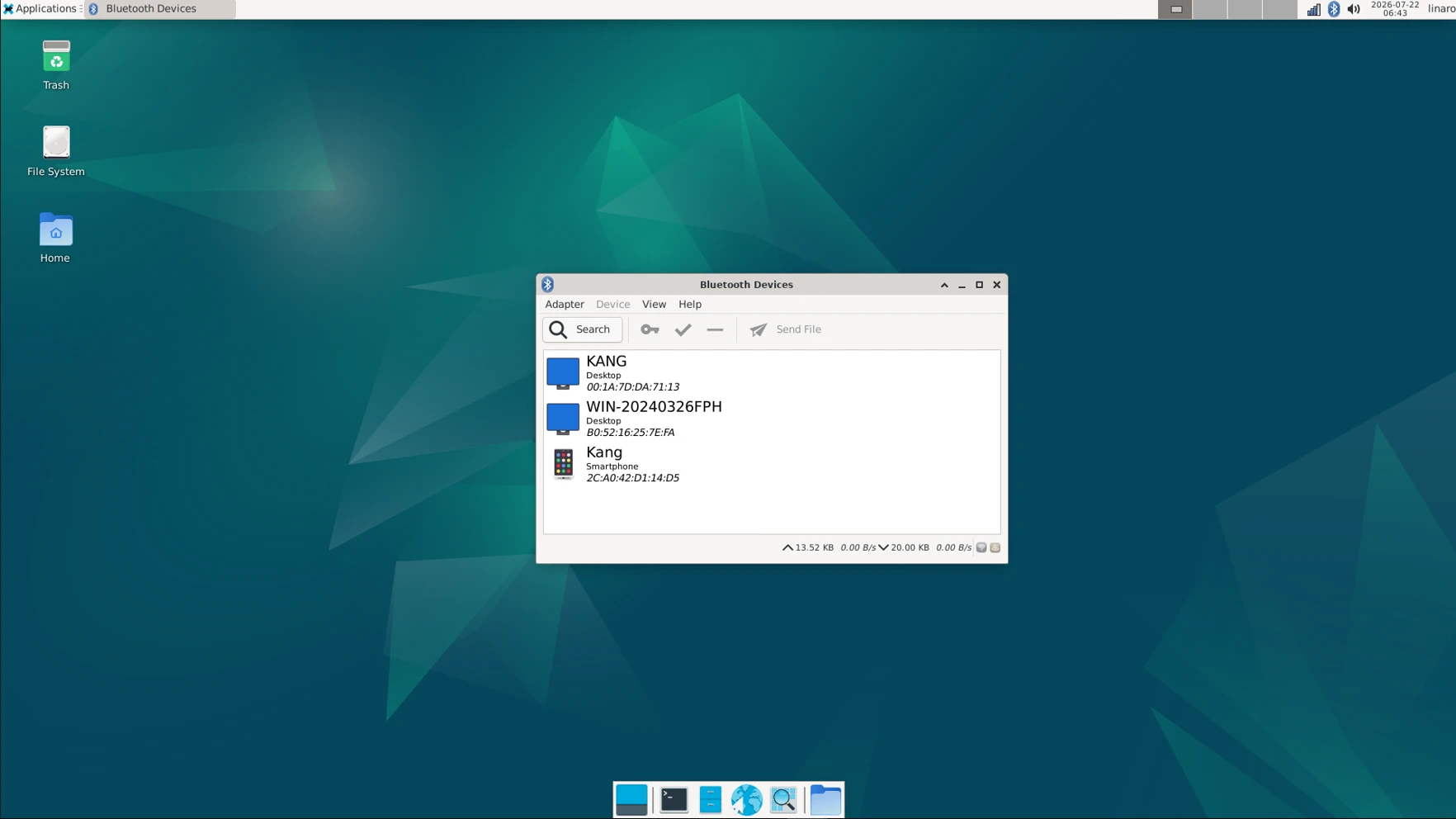
After pairing, devices can connect with each other automatically.
4.8 4G & GPS
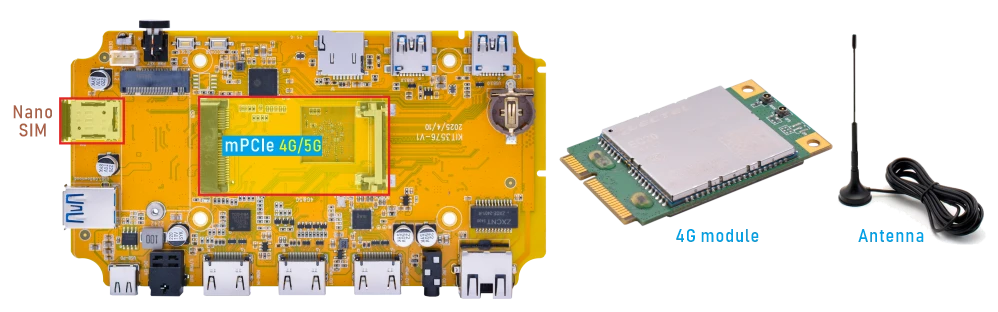
4.8.1 4G
❶ Insert 4G module to mPCIe slot (4G model: EC20/EC25).
❷ Connect antenna and insert SIM card.
❸ Power on.
After the 4G module is recognized successfully, the /dev/ttyUSB* device nodes will be generated.
1ls /dev/ttyUSB*
❹ Initiate the PPP connection.
1pppd call quectel-ppp &
❺ Test network.
1ifconfig ppp0
2ping -I ppp0 www.armdesigner.com
4.8.2 GPS
❶ Insert 4G module to mPCIe socket.
❷ Connect a passive GPS antenna (Active GPS antennas are not supported).
❸ Power on.
❹ Enable the GPS function.
1echo -e "AT+QGPS=1\r\n" > /dev/ttyUSB2
❺ Read the GPS data.
1cat /dev/ttyUSB1
root@linaro-alip:/# echo -e "AT+QGPS=1\r\n" > /dev/ttyUSB2
root@linaro-alip:/# cat /dev/ttyUSB1
$GPVTG,,T,,M,,N,,K,N*2C
$GPGSA,A,1,,,,,,,,,,,,,,,*1E
$GPGGA,,,,,,0,,,,,,,,*66
$GPRMC,,V,,,,,,,,,,N,V*29
$GPVTG,,T,,M,,N,,K,N*2C
$GPGSA,A,1,,,,,,,,,,,,,,,*1E
$GPGGA,,,,,,0,,,,,,,,*66
$GPRMC,,V,,,,,,,,,,N,V*29
$GPVTG,,T,,M,,N,,K,N*2C
$GPGSA,A,1,,,,,,,,,,,,,,,*1E
$GPGGA,,,,,,0,,,,,,,,*66
$GPRMC,,V,,,,,,,,,,N,V*29
$GPVTG,,T,,M,,N,,K,N*2C
$GPGSA,A,1,,,,,,,,,,,,,,,*1E
4.9 Audio

❶ Plug the Headphone into the 3.5mm Audio jack.
❷ View sound card.
1cat /proc/asound/cards
root@linaro-alip:/# cat /proc/asound/cards
 0 [rockchipes8390 ]: rockchip-es8390 - rockchip-es8390
                      rockchip-es8390
 1 [rkhdmiintc35874]: simple-card - rk,hdmiin-tc358749x-codec
                      rk,hdmiin-tc358749x-codec
 2 [rockchipspdiftx]: simple-card - rockchip,spdif-tx0
                      rockchip,spdif-tx0
 3 [rockchipdp0    ]: rockchip-dp0 - rockchip-dp0
                      rockchip-dp0
 4 [rockchiphdmi   ]: rockchip-hdmi - rockchip-hdmi
                      rockchip-hdmi
❸ Playback
1aplay -Dhw:0,0 test.wav
aplay -Dhw:2,0 test.wav   // S/PDIF out audio output
aplay -Dhw:3,0 test.wav   // DP AIT mode audio output
aplay -Dhw:4,0 test.wav   // HDMI TX audio output
4.10 RTC
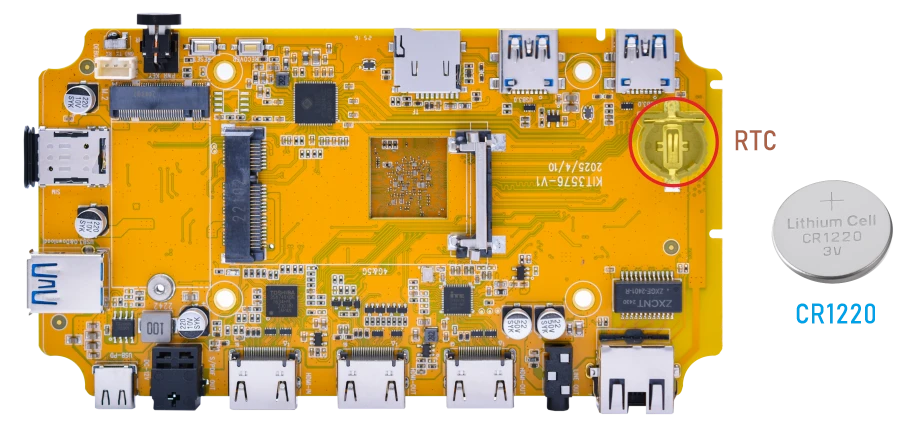
❶ Insert a 3V battery before test. It keeps the time running when the main power is off.
❷ Set date and time manually.
1date -s "2026-07-22 09:36:00"           //set system date
2hwclock -w                              //set the hardware clock to current system time
3hwclock
root@linaro-alip:/# date -s "2026-07-22 09:36:00"
Wed Jul 22 09:36:00 AM CST 2026
root@linaro-alip:/ # hwclock -w
root@linaro-alip:/# hwclock
2026-07-22 09:36:10.590534+08:00
root@linaro-alip:/# hwclock
2026-07-22 09:36:12.275688+08:00
❸ Power off the board and unplug the power adapter. Wait a while, then reapply power. If the RTC is functioning correctly, the clock should maintain its time and keep running while the board is powered off.
1hwclock
root@linaro-alip:/# hwclock
2026-07-22 09:40:49.133706+08:00
root@linaro-alip:/# hwclock
2026-07-22 09:40:50.781463+08:00
4.11 IR

❶ Open IR debugging print.
1echo 1 > /sys/module/rockchip_pwm_remotectl/parameters/code_print
❷ Press the Infrared controller, you can view the received datas on the terminal.
root@rk3576-buildroot:/# echo 1 > /sys/module/rockchip_pwm_remotectl/parameters/code_print
[ 3455.141358][    C1] USERCODE=0xb24d
[ 3455.167518][    C1] RMC_GETDATA=2
[ 3456.206876][    C1] USERCODE=0xb24d
[ 3456.233033][    C1] RMC_GETDATA=2
[ 3456.300413][    C1] USERCODE=0xb24d
4.12 Video Playback
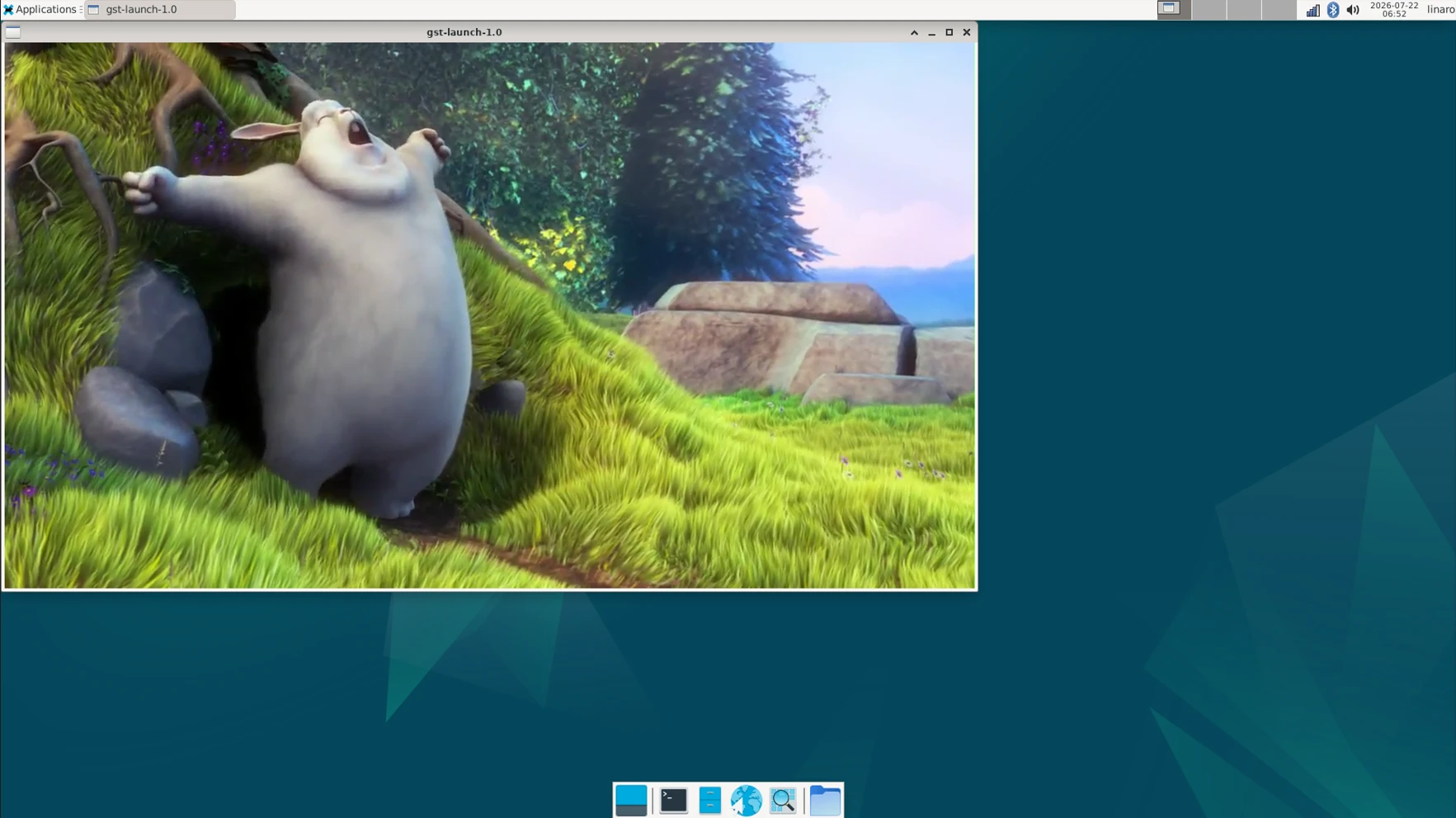
4.12.1 Built-in playback
The script instruction directory is in /rockchip-test/video/, just run it.
root@linaro-alip:/# ls /rockchip-test/video/
test_dec-gst.sh     test_enc-gst.sh           test_gst_video.sh
test_dec-mpv.sh     test_gst_multivideo.sh    video_stresstest.sh
test_dec-parole.sh  test_gst_video_fps.sh     video_test.sh
test_dec-qt.sh      test_gst_video_maxfps.sh
root@linaro-alip:/# ./rockchip-test/video/test_gst_video.sh
Setting pipeline to PAUSED ...
Pipeline is PREROLLING ...
Redistribute latency...
mpp[2281]: mpp_info: mpp version: 48962a10 author: Hongjin Li    2024-09-19 fix[avsd]: Fix attach dev error issue
mpp[2281]: mpp_info: mpp version: 48962a10 author: Hongjin Li    2024-09-19 fix[avsd]: Fix attach dev error issue
mpp[2281]: mpp_info: mpp version: 48962a10 author: Hongjin Li    2024-09-19 fix[avsd]: Fix attach dev error issue
mpp[2281]: mpp: unable to create enc vp8 for soc rk3576 unsupported
mpp[2281]: mpp_info: mpp version: 48962a10 author: Hongjin Li    2024-09-19 fix[avsd]: Fix attach dev error issue
mpp[2281]: mpp_info: mpp version: 48962a10 author: Hongjin Li    2024-09-19 fix[avsd]: Fix attach dev error issue
Redistribute latency...
mpp[2281]: h264d_api: is_avcC=1
Pipeline is PREROLLED ...
Prerolled, waiting for async message to finish...
Setting pipeline to PLAYING ...
Redistribute latency...
New clock: GstSystemClock
0:00:03.5 / 0:00:29.5 (12.1 %)
4.12.2 Browser playback
Google Chrome supports video playback up to 4K at 60Hz, with support for the following decoding formats: VP8, H.264, H.265, VP9, and AV1. However, it is only compatible with certain H.265 video files.
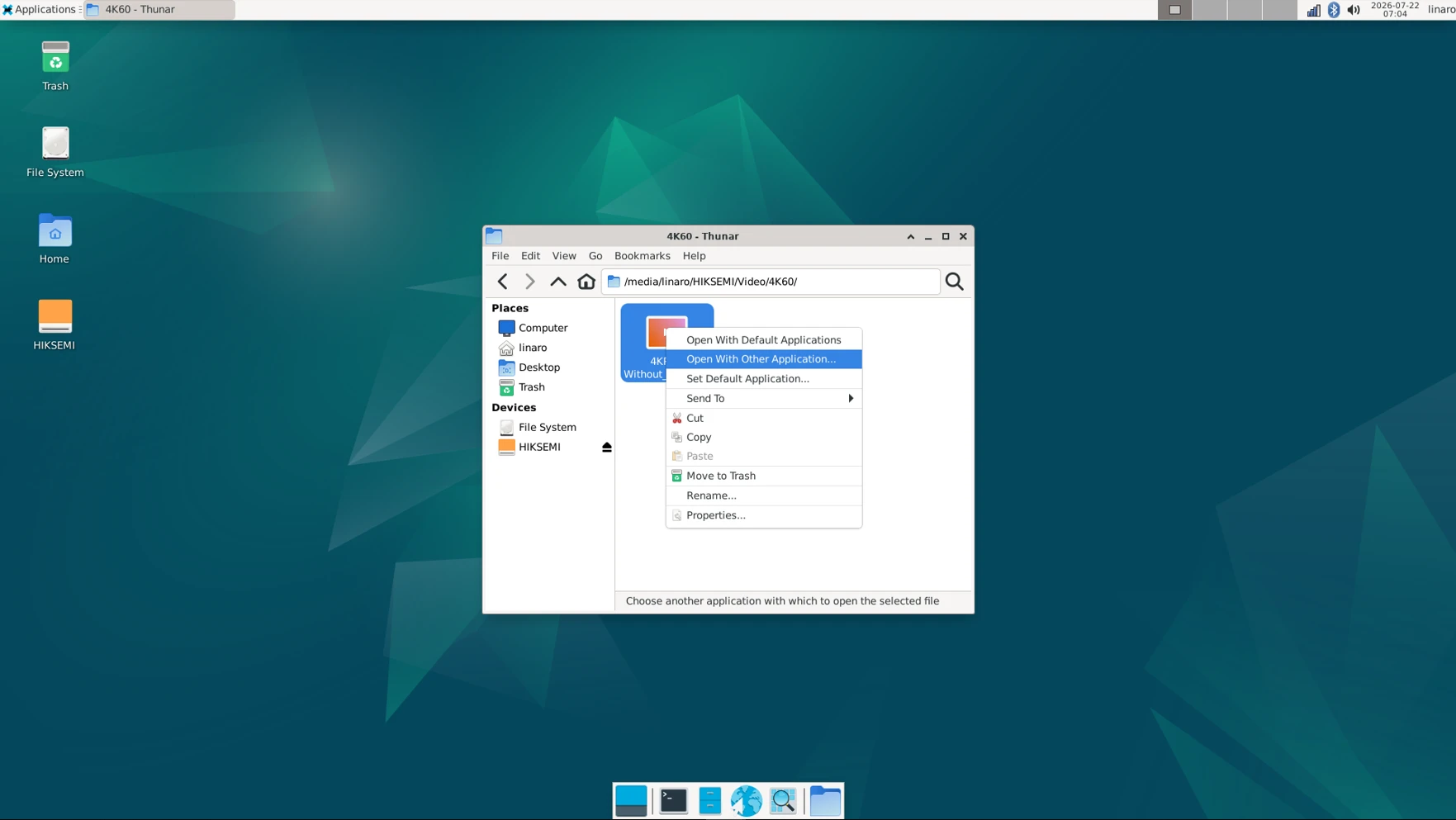
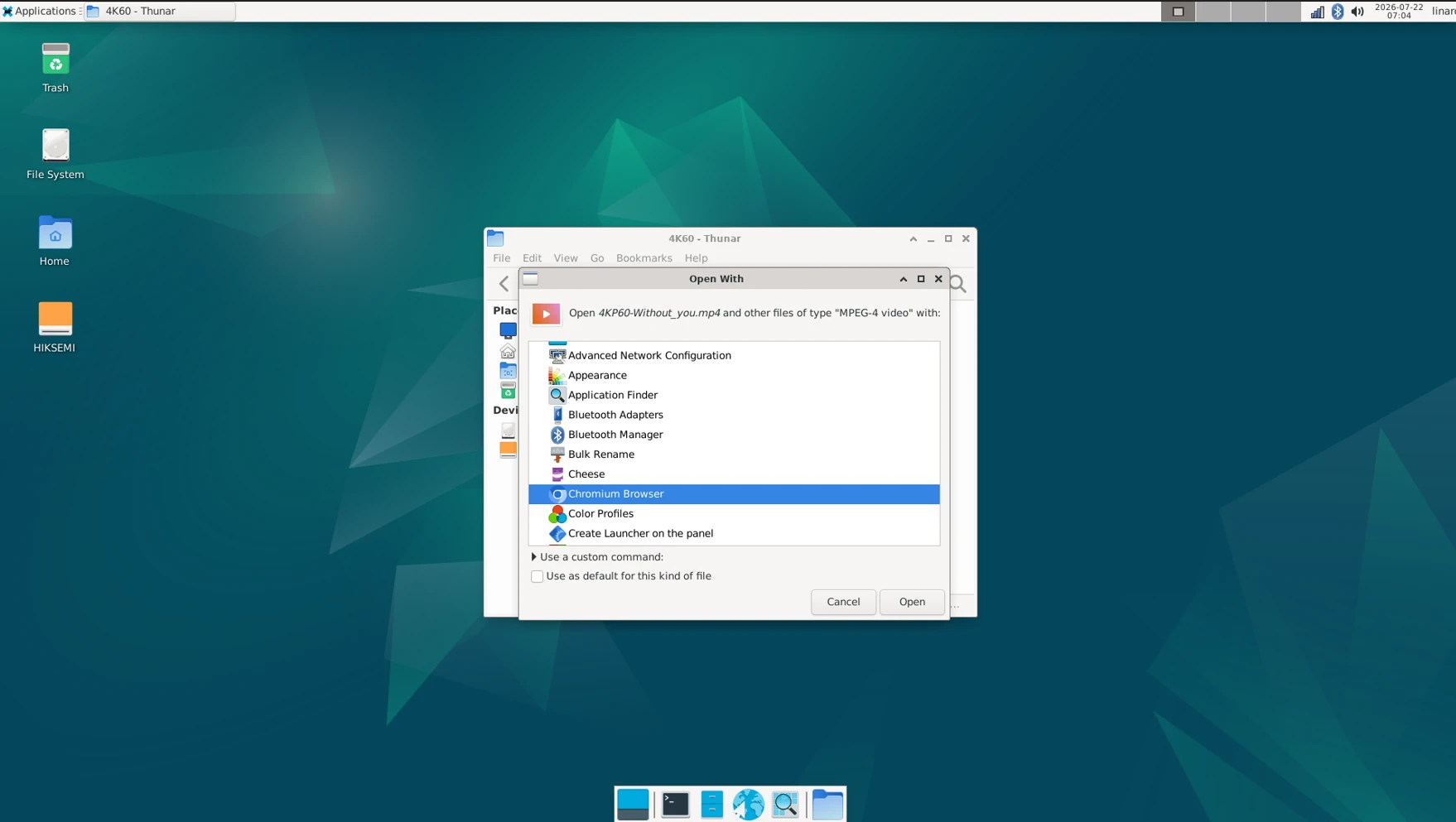
Select Video file, Right-click and select Open With Other Application… -> Chromium Browser -> Open to play.

4.12.3 Command line
1gst-play-1.0 --videosink=xvimagesink /media/linaro/HIKSEMI/8KP30.mp4 --audiosink="alsasink device=hw:0,0"
Command explanation:
/media/linaro/HIKSEMI/8KP30.mp4: The media file path to be played.--audiosink="alsasink device=hw:0,0": Specifies the audio output device as hw:0,0.
root@linaro-alip:/# gst-play-1.0 --videosink=xvimagesink  /media/linaro/HIKSEMI/Video/8KP30/8KP30-2.mp4 --audiosink="alsasink device=hwgst-play-1.0 --videosink=xvimagesink  /media/linaro/HIKSEMI/Video/8KP30/8KP30-2.mp4 --audiosink="alsasink device=hw:0,0"
Press 'k' to see a list of keyboard shortcuts.
Now playing /media/linaro/HIKSEMI/Video/8KP30/8KP30-2.mp4
Redistribute latency...
mpp[3813]: mpp_info: mpp version: 520ab553 author: Herman Chen   2025-12-16 fix[sys_cfg]: Fix decoder sys_cfg crash
mpp[3813]: mpp_info: mpp version: 520ab553 author: Herman Chen   2025-12-16 fix[sys_cfg]: Fix decoder sys_cfg crash
mpp[3813]: mpp_info: mpp version: 520ab553 author: Herman Chen   2025-12-16 fix[sys_cfg]: Fix decoder sys_cfg crash
mpp[3813]: mpp: unable to create enc vp8 for soc rk3576 unsupported
mpp[3813]: mpp_info: mpp version: 520ab553 author: Herman Chen   2025-12-16 fix[sys_cfg]: Fix decoder sys_cfg crash
mpp[3813]: mpp_info: mpp version: 520ab553 author: Herman Chen   2025-12-16 fix[sys_cfg]: Fix decoder sys_cfg crash
Redistribute latency...
mpp[3813]: H265D_PARSER: extradata is encoded as hvcC format
[  574.302893] dwhdmi-rockchip 27da0000.hdmi: Rate 533280000 missing; compute N dynamically
Redistribute latency...
Redistribute latency...
Redistribute latency...
0:00:13.7 / 0:13:10.5
4.13 HDMI IN

❶ Connect the output device’s HDMI_OUT to the Compact3576’s HDMI_IN, and the Compact3576’s HDMI_OUT to the HDMI monitor, then power on. The log will show:
[ 36.800368][ T165] m03_b_tc35874x 4-000f: tc35874x_format_change: New format: 1920x1080p60.00 (2200x1125)
❷ Perform streaming test using the gst-launch-1.0 command.
1gst-launch-1.0 v4l2src device=/dev/video0 ! \
2video/x-raw,format=NV12,width=1920,height=1080, \
3framerate=30/1 ! queue ! xvimagesink alsasrc device=hw:1,0 ! \
4 audio/x-raw,rate=48000,channels=2 ! queue ! alsasink device=hw:0,0
root@linaro-alip:/# gst-launch-1.0 v4l2src device=/dev/video0 ! video/x-raw,format=NV12,width=1920,height=1080,framerate=30/1 ! queue ! xvimagesink alsasrc device=hw:1,0 ! audio/x-raw,rate=48000,channels=2 ! queue ! alsasink device=hw:0,01080,framerate=30/1 ! queumpp[5434]: mpp_info: mpp version: 520ab553 author: Herman Chen   2025-12-16 fix[sys_cfg]: Fix decoder sys_cfg crash
mpp[5434]: mpp_info: mpp version: 520ab553 author: Herman Chen   2025-12-16 fix[sys_cfg]: Fix decoder sys_cfg crash
mpp[5434]: mpp_info: mpp version: 520ab553 author: Herman Chen   2025-12-16 fix[sys_cfg]: Fix decoder sys_cfg crash
mpp[5434]: mpp: unable to create enc vp8 for soc rk3576 unsupported
mpp[5434]: mpp_info: mpp version: 520ab553 author: Herman Chen   2025-12-16 fix[sys_cfg]: Fix decoder sys_cfg crash
Setting pipeline to PAUSED ...
Using mplane plugin for capture
Pipeline is live and does not need PREROLL ...
Pipeline is PREROLLED ...
Setting pipeline to PLAYING ...
New clock: GstAudioSrcClock
Redistribute latency...
Redistribute latency...
Redistribute latency...
[  340.345927] rkcif-mipi-lvds1: stream[0] start streaming
[  340.351073] rkcif-mipi-lvds1: Allocate dummy buffer, size: 0x003f5000
[  340.351129] rkcif-mipi-lvds1: get vblank fail, vblank_def 0, vblank_curr 0
[  340.367166] rockchip-mipi-csi2 mipi1-csi2: stream on, src_sd: 00000000c91f0bca, sd_name:rockchip-csi2-dphy1
[  340.367192] rockchip-mipi-csi2 mipi1-csi2: stream ON
[  340.367228] rockchip-csi2-dphy1: dphy1, data_rate_mbps 620
[  340.367253] rockchip-csi2-dphy csi2-dphy1: csi2_dphy_s_stream stream on:1, dphy0, ret 0
[  340.385714] rkcif-mipi-lvds1: ERROR: size err, intstat:0x1000011, size:0x40a0780,0x0,0x0,0x0, cnt 1
Redistribute latency...
0:00:37.5 / 99:99:99.