2. Compile Source
2.1 Android 14
❶ Extract Source Code
1tar xvf rk3576_android14_sdk-20260528.tar.gz
2cd rk3576_android14_sdk
❷ Configuration
1source build/envsetup.sh
2lunch boardcon_compact3576-userdebug
❸ Compile
1./build.sh -AUCKu
After the command is completed, the image files will be generated in the rockdev/Image-boardcon_compact3576 directory.
Step 1, Compile U-Boot
1./build.sh -U
Step 2, Compile Kernel
1./build.sh -K
Step 3, Compile Android
1./build.sh -A
2.2 Android 16
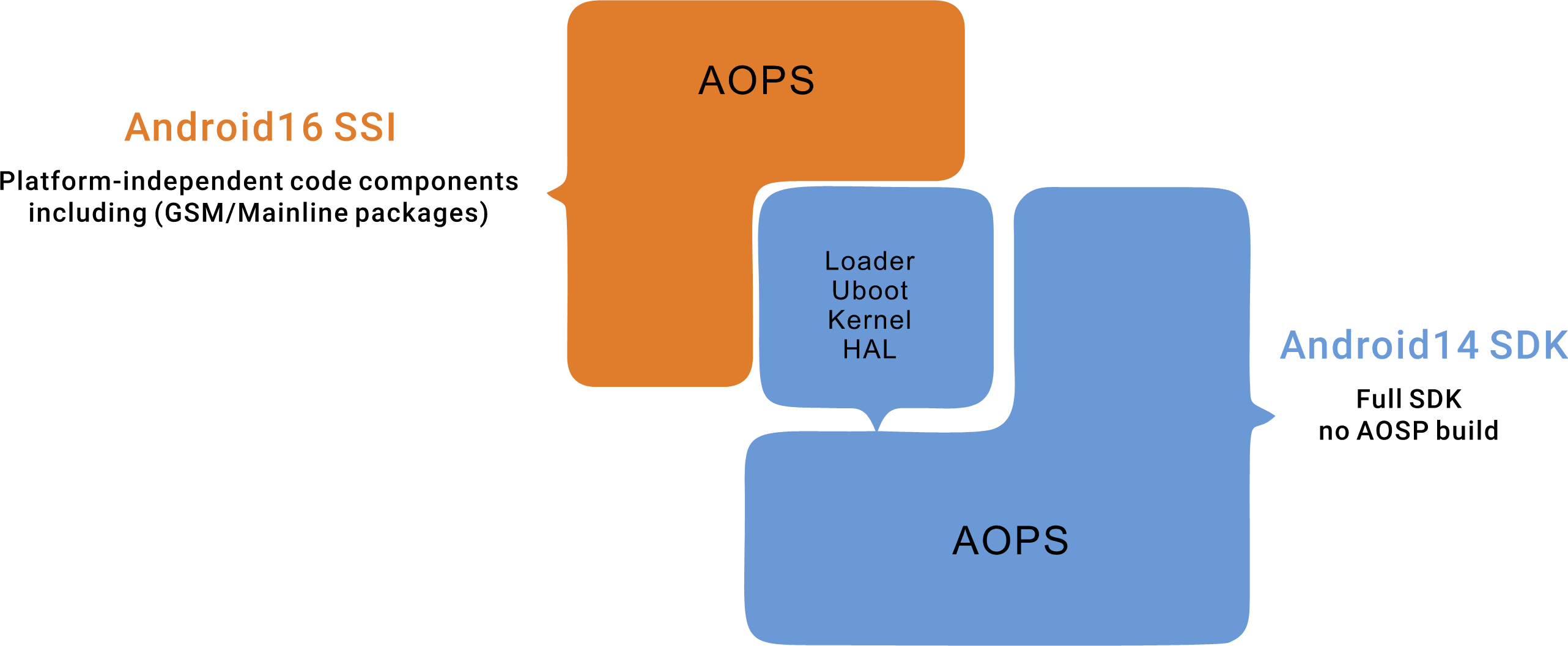
The Rockchip Android 16.0 SSI SDK provides only the AOSP codebase. After compilation, it generates only system-related images (system.img, system_ext.img, product.img), which are identical to Google’s GSI images. Other code modules must be compiled using the Android 14 SDK. Therefore, the Rockchip Android 16.0 SSI SDK must be used in conjunction with the Android 14 SDK. The architecture diagram of the complete SDK (comprising both the Rockchip Android 16 SSI SDK and the Android 14 SDK) is shown below:
❶ Extract Source Code
1mkdir RK3676_Android16.0
2tar xvf rk3576_android14_sdk-20260528.tar.gz -C RK3676_Android16.0
3tar xvf Rockchip_Android16.0_SDK_RELEASE.tar.gz -C RK3676_Android16.0
4cd RK3676_Android16.0/Rockchip_Android16.0_SDK_RELEASE/
❷ Configuration
1source build/envsetup.sh
2lunch ssi_16_arm64-bp2a-userdebug
❸ Link Android 14 SDK and configure compilation parameters
1rkbuild_setup
wuguankang@boardcon:~/opt/RK3576/RK3576_Android16.0/Rockchip_Android16.0_SDK_RELEASE$ rkbuild_setup
[WARN] rkbuild_setup -d <kernel_dts> -l <vendor_lunch> -f <build_number> -p <vendor_sdk_path> -j <build_thread>
Enter parameters in format or press Enter to input interactively:
/home/wuguankang/opt/RK3576/RK3576_Android16.0/RK3576_Android14_SDK_RKR8.1/wuguankang/opt/RK3576/RK3576_Android16.0/RK3576_Android14_SDK_RKR8.1
[WARN] Android_VENDOR_SDK available lunch options:
You're building on Linux
Lunch menu .. Here are the common combinations:
     1. aosp_arm-eng
     2. aosp_arm64-eng
     3. aosp_x86-eng
     4. aosp_x86_64-eng
     5. boardcon_compact3576-user
     6. boardcon_compact3576-userdebug
     7. boardcon_RK3676-user
     8. boardcon_RK3676-userdebug
     9. boardcon_idea3576-user
     10. boardcon_idea3576-userdebug
     11. rk3576_ebook-user
     12. rk3576_ebook-userdebug
     13. rk3576_ebookcolor-user
     14. rk3576_ebookcolor-userdebug
     15. rk3576_u-user
     16. rk3576_u-userdebug
     17. rk3576s_u-user
     18. rk3576s_u-userdebug

boardcon_compact3576-userdebugfor Android_VENDOR_SDK (e.g., rk3588_u-user): boardcon_compact3576-userdebug
Specify build number? (Press Enter to auto-generate, or input a specific build number):
Enter parameters in format or press Enter to input interactively: Enter the path of the Android 14 SDK.
boardcon_compact3576-userdebugfor Android_VENDOR_SDK (e.g., rk3588_u-user): Select
boardcon_compact3576-userdebugSpecify build number? (Press Enter to auto-generate, or input a specific build number): Enter the build number here. You can simply press Enter without filling it in.
❹ Compile
1rkbuild_build all
Once the command completes, the generated image files ( including update.img ) will be placed in the following directory Rockchip_Android16.0_SDK_RELEASE/rockdev/Image-boardcon_compact3576/