5. Buildroot Application
5.1 Serial Terminal
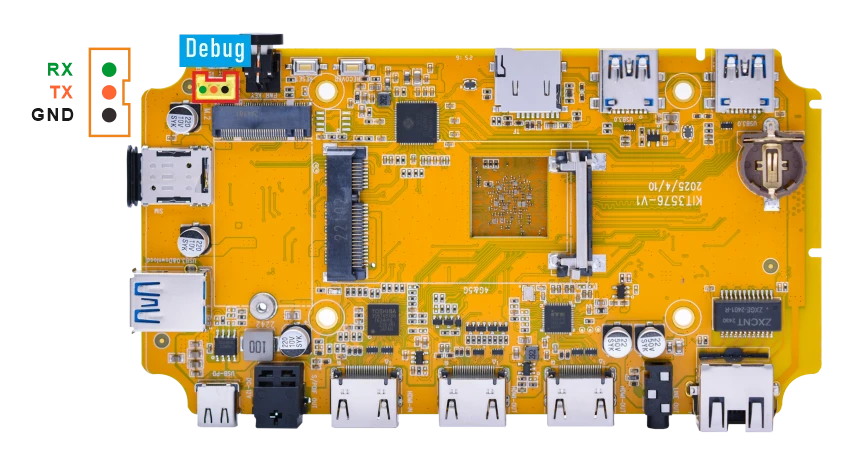
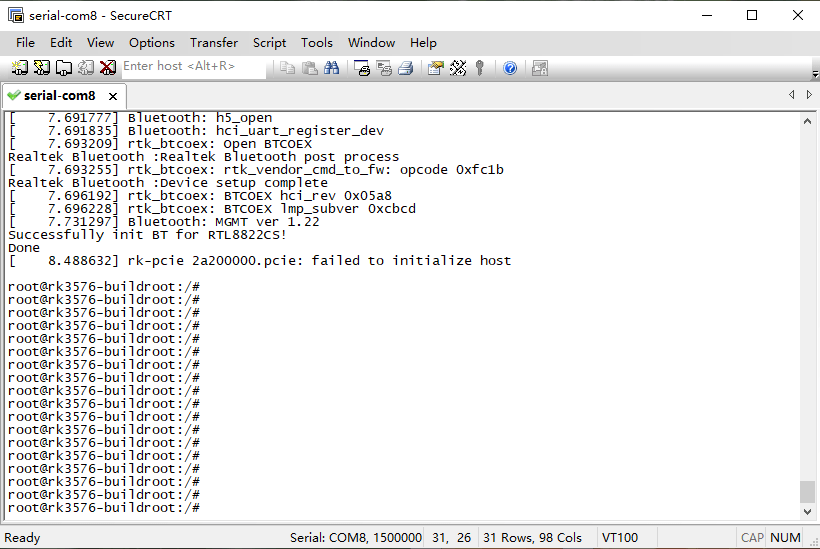
Connect the board and PC with USB Serial cable, then power on, the terminal will output boot information. The default baudrate is 1500000.
5.2 Display

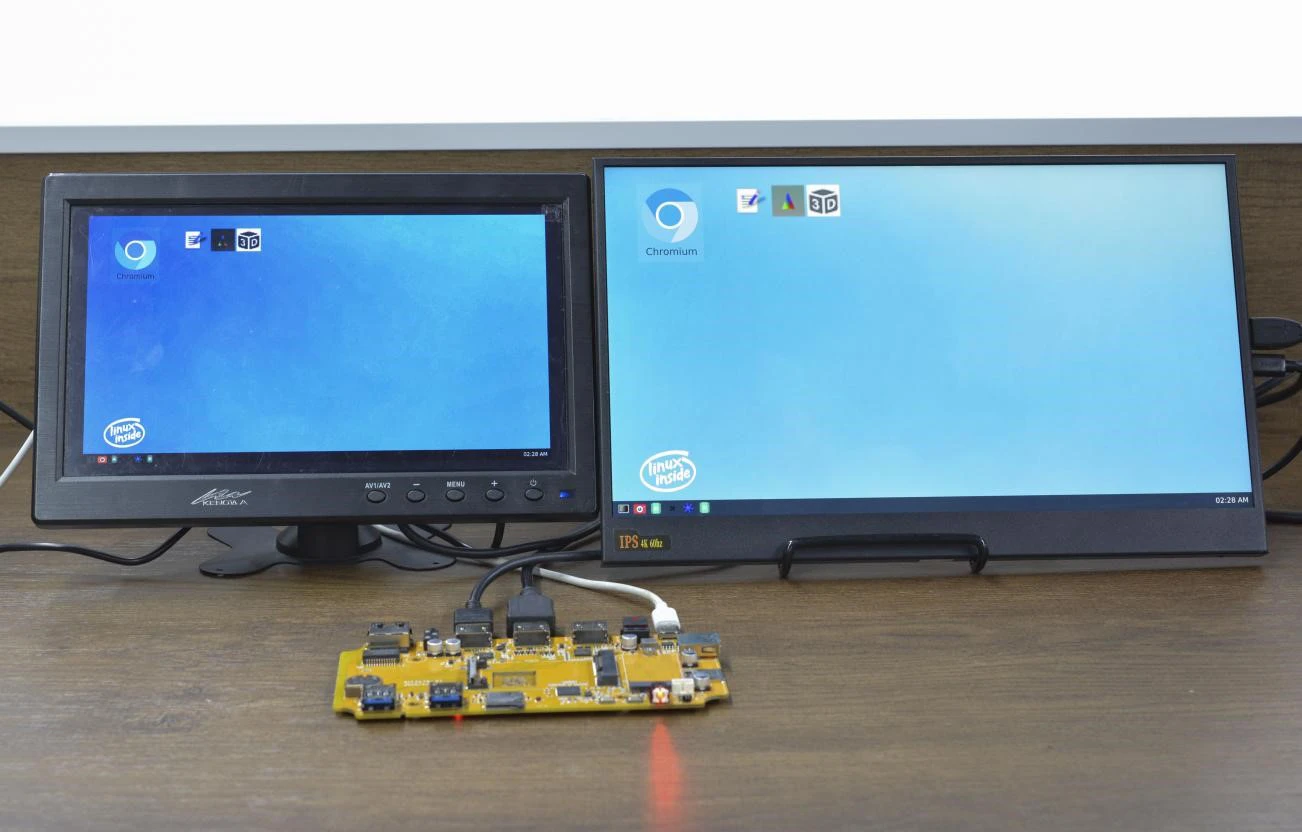
Compact3576 supports dual HDMI display synchronization.
5.3 USB
5.3.1 USB3.0 DRD
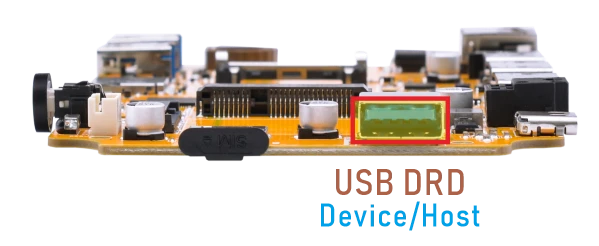
The Compact3576 USB3.0 DRD supports both Host and Device roles, with Device as the default configuration. ADB requires the USB3.0 port to be in Device mode.
ADB
❶ Connect the board and PC host with USB-A cable.
❷ Install ADB driver on Windows system.
❸ Press Windows + R to open the Run program. Type cmd and press Enter
❹ Execute the follow commands to enable ADB.
1adb root
2adb remount
3adb shell
USB3.0 Host
❶ Switch USB DRD to Host mode.
1echo host > /sys/kernel/debug/usb/23000000.usb/mode
❷ After inserting the USB flash drive, it will be automatically mounted.
USB3.0 Superspeed detectedroot@rk3576-buildroot:/# [ 389.429177] usb 4-1: new SuperSpeed USB device number 2 using xhci-hcd [ 389.459908] usb 4-1: New USB device found, idVendor=0dd8, idProduct=3b00, bcdDevice= 0.02 [ 389.459969] usb 4-1: New USB device strings: Mfr=1, Product=2, SerialNumber=3 [ 389.459998] usb 4-1: Product: OnlyDisk [ 389.460021] usb 4-1: Manufacturer: Netac [ 389.460044] usb 4-1: SerialNumber: C0E8BFA3EC38F796 [ 389.462272] usb-storage 4-1:1.0: USB Mass Storage device detected [ 389.463559] scsi host0: usb-storage 4-1:1.0 [ 391.053776] scsi 0:0:0:0: Direct-Access Netac OnlyDisk 8.01 PQ: 0 ANSI: 6 [ 391.058363] sd 0:0:0:0: [sda] 121610240 512-byte logical blocks: (62.3 GB/58.0 GiB) [ 391.058773] sd 0:0:0:0: [sda] Write Protect is off [ 391.058976] sd 0:0:0:0: [sda] Write cache: disabled, read cache: enabled, doesn't support DPO or FUA [ 391.063834] sda: sda1 [ 391.064693] sd 0:0:0:0: [sda] Attached SCSI removable disk
Switch USB3.0 DRD to USB device mode.
1echo device> /sys/kernel/debug/usb/23000000.usb/mode
5.3.2 USB3.0 Host
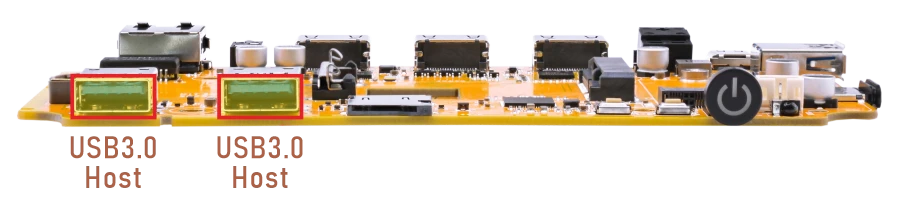
The USB3.0 Host can connect peripherals such as mouse, keyboards, and flash drives. After the USB flash drive is connected, the system will automatically mount it. Use the following command to check the device information.
1df -h
2ls /mnt/udisk
root@rk3576-buildroot:/# df -h
Filesystem      Size  Used Avail Use% Mounted on
/dev/root        14G  706M   13G   6% /
devtmpfs        1.9G  8.0K  1.9G   1% /dev
tmpfs           2.0G  140K  2.0G   1% /tmp
tmpfs           2.0G  384K  2.0G   1% /run
tmpfs           2.0G  200K  2.0G   1% /var/log
tmpfs           2.0G     0  2.0G   0% /dev/shm
/dev/sda7       123M   12M  108M  10% /oem
/dev/sda8       105G  364K  105G   1% /userdata
/dev/sde        3.6G  2.3G  1.4G  63% /mnt/udisk
root@rk3576-buildroot:/# ls /mnt/udisk
 720P.mp4
 Alarms
 Android
 Documents
 Download
 EM3288-POE
'ES File Explorer File Manager-4.1.6.6.2.apk'
 LOST.DIR
5.4 Ethernet

❶ Connect the Board and router with an Ethernet cable.
❷ View the status of the network interfaces.
1ifconfig
root@rk3576-buildroot:/# ifconfig
end1: flags=4163<UP,BROADCAST,RUNNING,MULTICAST>  mtu 1500
        inet 192.168.0.216  netmask 255.255.255.0  broadcast 192.168.0.255
        inet6 fe80::d9ee:fef5:287e:a836  prefixlen 64  scopeid 0x20<link>
        ether b2:ef:e7:4f:bf:85  txqueuelen 1000  (Ethernet)
        RX packets 370  bytes 41403 (40.4 KiB)
        RX errors 0  dropped 8  overruns 0  frame 0
        TX packets 153  bytes 13818 (13.4 KiB)
        TX errors 0  dropped 0 overruns 0  carrier 0  collisions 0
        device interrupt 64
❸ Ping URL to test Network.
1ping -I end1 www.armdesigner.com
root@rk3576-buildroot:/# ping -I end1 www.armdesigner.com
PING www.armdesigner.com (67.222.54.196) from 192.168.0.216 end1: 56(84) bytes of data.
64 bytes from 67-222-54-196.unifiedlayer.com (67.222.54.196): icmp_seq=1 ttl=48 time=194 ms
64 bytes from 67-222-54-196.unifiedlayer.com (67.222.54.196): icmp_seq=2 ttl=48 time=192 ms
64 bytes from 67-222-54-196.unifiedlayer.com (67.222.54.196): icmp_seq=3 ttl=48 time=193 ms
64 bytes from 67-222-54-196.unifiedlayer.com (67.222.54.196): icmp_seq=4 ttl=48 time=193 ms
64 bytes from 67-222-54-196.unifiedlayer.com (67.222.54.196): icmp_seq=5 ttl=48 time=192 ms
64 bytes from 67-222-54-196.unifiedlayer.com (67.222.54.196): icmp_seq=6 ttl=48 time=193 ms
64 bytes from 67-222-54-196.unifiedlayer.com (67.222.54.196): icmp_seq=7 ttl=48 time=196 ms
64 bytes from 67-222-54-196.unifiedlayer.com (67.222.54.196): icmp_seq=8 ttl=48 time=193 ms
64 bytes from 67-222-54-196.unifiedlayer.com (67.222.54.196): icmp_seq=9 ttl=48 time=193 ms
64 bytes from 67-222-54-196.unifiedlayer.com (67.222.54.196): icmp_seq=10 ttl=48 time=192 ms
64 bytes from 67-222-54-196.unifiedlayer.com (67.222.54.196): icmp_seq=11 ttl=48 time=193 ms
^C
--- www.armdesigner.com ping statistics ---
11 packets transmitted, 11 received, 0% packet loss, time 10015ms
rtt min/avg/max/mdev = 192.094/192.977/195.780/0.990 ms
5.5 SD Card
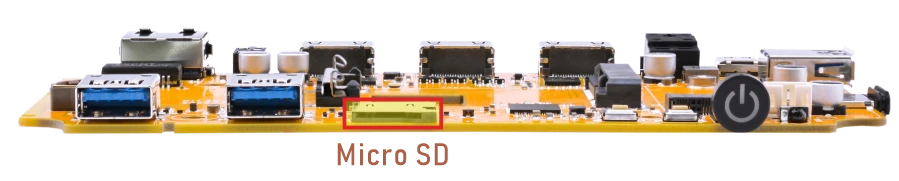
After the micro SD card is detected, it is auto-mounted. Use df -h to check the mount point.
1df -h
root@rk3576-buildroot:/# df -h
Filesystem      Size  Used Avail Use% Mounted on
/dev/root        14G  723M   13G   6% /
devtmpfs        1.9G  8.0K  1.9G   1% /dev
tmpfs           2.0G  396K  2.0G   1% /run
tmpfs           2.0G  212K  2.0G   1% /var/log
tmpfs           2.0G     0  2.0G   0% /dev/shm
tmpfs           2.0G  140K  2.0G   1% /tmp
/dev/mmcblk0p7  124M  5.3M  118M   5% /oem
/dev/mmcblk0p8   15G  320K   15G   1% /userdata
/dev/mmcblk1p1   30G  1.3M   30G   1% /mnt/sdcard
5.6 M.2(M-Key)
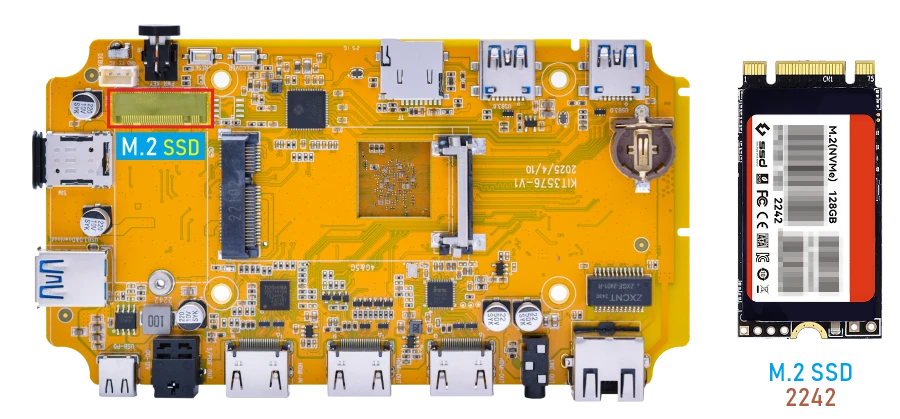
❶ Connect SSD to the development board before power on.
❷ Check the SSD device node.
After the SSD is recognized, the corresponding NVMe device node will be generated.
1ls /dev/nvme0*
❸ Check the SSD mount path.
After the SSD is recognized, it will be mounted automatically.
1df -h
root@rk3576-buildroot:/# df -h
Filesystem      Size  Used Avail Use% Mounted on
/dev/root        14G  723M   13G   6% /
devtmpfs        1.9G  8.0K  1.9G   1% /dev
tmpfs           2.0G  396K  2.0G   1% /run
tmpfs           2.0G  212K  2.0G   1% /var/log
tmpfs           2.0G     0  2.0G   0% /dev/shm
tmpfs           2.0G  140K  2.0G   1% /tmp
/dev/mmcblk0p7  124M  5.3M  118M   5% /oem
/dev/mmcblk0p8   15G  320K   15G   1% /userdata
/dev/nvme0n1p1  120G  864K  120G   1% /mnt/storage
Attention
If the target device is not formatted with the ext4 file system, you must format it as ext4 before proceeding. This operation will permanently erase all existing data on the selected partition. Before running the command below, double‑check that the device path is correct.
1mke2fs -t ext4 /dev/block/nvme0n1p1
(Replace /dev/block/nvme0n1p1 with the actual partition on your device.)
5.7 WiFi & Bluetooth
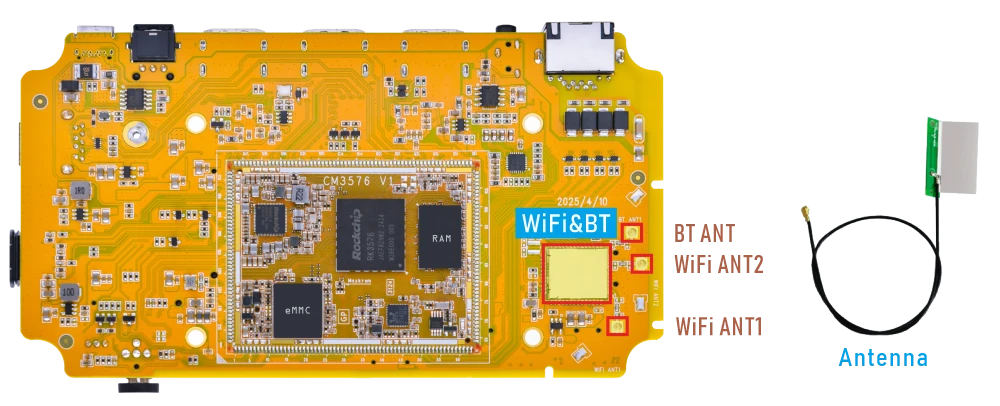
5.7.1 WiFi
❶ Connect the WiFi antenna.
❷ Check the Wi-Fi device information.
1ifconfig wlan0
root@rk3576-buildroot:/# ifconfig wlan0
wlan0     Link encap:Ethernet  HWaddr 84:FC:14:F9:69:1C
          UP BROADCAST MULTICAST  MTU:1500  Metric:1
          RX packets:0 errors:0 dropped:0 overruns:0 frame:0
          TX packets:0 errors:0 dropped:0 overruns:0 carrier:0
          collisions:0 txqueuelen:1000
          RX bytes:0 (0.0 B)  TX bytes:0 (0.0 B)
❸ Scan for available WiFi hotspots.
1iwlist wlan0 scan
❹ Connect hotspot.
1wifi-connect.sh SSID PSK //'SSID': user SSID, 'PSK': password
After connected, check the network status and ping URL to test.
1ifconfig wlan0
2ping -I wlan0 www.armdesigner.com
4.7.2 Bluetooth
1hciconfig -a            //view device status
2hciconfig hci0 piscan   //allow Bluetooth to be searched
3bluetoothctl            //allow Bluetooth to be pairable
4scan on                 //search for Bluetooth devices
After scanning for devices, turn off the scan, otherwise, the device will continue to search and refresh.
1scan off
Run devices to view the list of detected devices. Connect the device(eg. A8:35:12:9A:EB:4D). During the Bluetooth connection process, some permissions may be requested. Generally, just enter yes
1devices
2connect A8:35:12:9A:EB:4D
[bluetooth]# devices
Device A8:35:12:9A:EB:4D liuy
Device 88:68:4B:74:39:44 OPPO K10 5G
Device 4B:73:65:34:5F:5D 4B-73-65-34-5F-5D
Device D4:6C:27:DF:40:46 D4-6C-27-DF-40-46
Device 10:0E:A1:1C:13:A8 10-0E-A1-1C-13-A8
Device 7D:B8:B6:62:89:47 7D-B8-B6-62-89-47
Device 2C:A0:42:D1:14:D5 Kang
Device 5D:9A:E9:D5:D8:9B 5D-9A-E9-D5-D8-9B
Device 14:DE:39:72:B3:C3 Mate 40 Pro
Device 43:C7:3D:C0:16:E4 43-C7-3D-C0-16-E4
Device 7B:7E:22:4C:1B:08 7B-7E-22-4C-1B-08
[bluetooth]#
[bluetooth]# connect A8:35:12:9A:EB:4D
Attempting to connect to A8:35:12:9A:EB:4D
[  189.910955] rtk_btcoex: hci create connection, start paging
[  190.709669] rtk_btcoex: connected, handle 0002, status 0x00
[  190.709733] rtk_btcoex: Page success
hci0 A8:35:12:9A:EB:4D type BR/EDR connected eir_len 11
[CHG] Device A8:35:12:9A:EB:4D Connected: yes
[liuy]#
[  190.914878] rtk_btcoex: l2cap op 2, len 16, out 1
5.8 4G & GPS
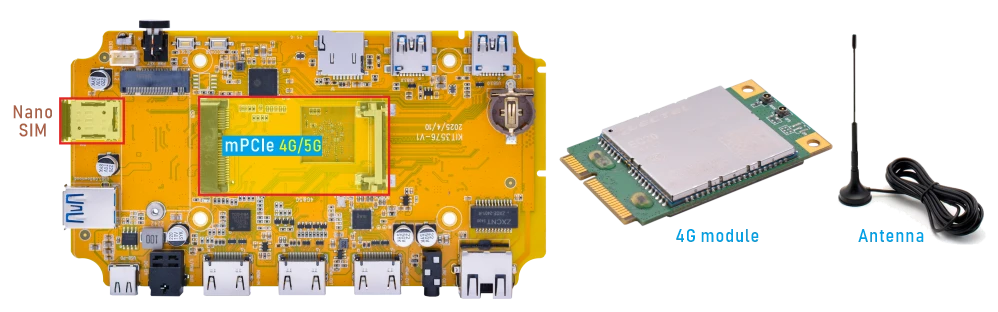
5.8.1 4G
❶ Insert 4G module to mPCIe slot (4G model: EC20/EC25).
❷ Connect antenna and insert SIM card.
❸ Power on.
After the 4G module is recognized successfully, the /dev/ttyUSB* device nodes will be generated.
1ls /dev/ttyUSB*
root@rk3576-buildroot:/# ls /dev/ttyUSB*
/dev/ttyUSB0  /dev/ttyUSB1  /dev/ttyUSB2  /dev/ttyUSB3
❹ Initiate the PPP connection.
1mkdir -p var/run/pppd/lock
2pppd call quectel-ppp &
❺ Test network.
1ifconfig ppp0
2ping -I ppp0 www.armdesigner.com
5.8.2 GPS
❶ Insert 4G module to mPCIe socket.
❷ Connect a passive GPS antenna (Active GPS antennas are not supported).
❸ Power on.
❹ Enable the GPS function.
1echo -e "AT+QGPS=1\r\n" > /dev/ttyUSB2
❺ Read the GPS data.
1cat /dev/ttyUSB1
rk3576-buildroot:/# echo -e "AT+QGPS=1\r\n" > /dev/ttyUSB2
rk3576-buildroot:/# cat /dev/ttyUSB1
$GPVTG,,T,,M,,N,,K,N*2C
$GPGSA,A,1,,,,,,,,,,,,,,,*1E
$GPGGA,,,,,,0,,,,,,,,*66
$GPRMC,,V,,,,,,,,,,N,V*29
$GPVTG,,T,,M,,N,,K,N*2C
$GPGSA,A,1,,,,,,,,,,,,,,,*1E
$GPGGA,,,,,,0,,,,,,,,*66
$GPRMC,,V,,,,,,,,,,N,V*29
$GPVTG,,T,,M,,N,,K,N*2C
$GPGSA,A,1,,,,,,,,,,,,,,,*1E
$GPGGA,,,,,,0,,,,,,,,*66
$GPRMC,,V,,,,,,,,,,N,V*29
$GPVTG,,T,,M,,N,,K,N*2C
$GPGSA,A,1,,,,,,,,,,,,,,,*1E
5.9 Audio

❶ Plug the Headphone into the 3.5mm Audio jack.
❷ View sound card.
1cat /proc/asound/cards
root@rk3576-buildroot:/# cat /proc/asound/cards
 0 [rockchipes8390 ]: rockchip-es8390 - rockchip-es8390
                      rockchip-es8390
 1 [rkhdmiintc35874]: simple-card - rk,hdmiin-tc358749x-codec
                      rk,hdmiin-tc358749x-codec
 2 [rockchipspdiftx]: simple-card - rockchip,spdif-tx0
                      rockchip,spdif-tx0
 3 [rockchipdp0    ]: rockchip-dp0 - rockchip-dp0
                      rockchip-dp0
 4 [rockchiphdmi   ]: rockchip-hdmi - rockchip-hdmi
                      rockchip-hdmi
❸ Playback.
1aplay -Dhw:0,0 test.wav
aplay -Dhw:2,0 test.wav   // S/PDIF out audio output
aplay -Dhw:3,0 test.wav   // DP AIT mode audio output
aplay -Dhw:4,0 test.wav   // HDMI TX audio output
5.10 RTC
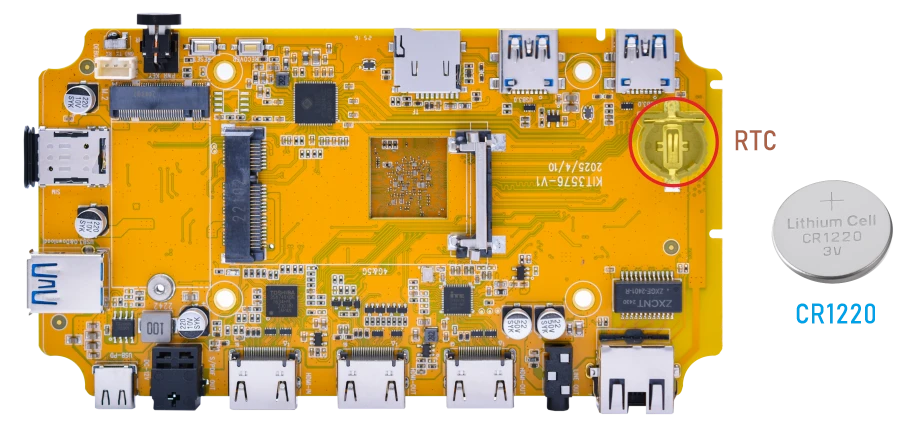
❶ Insert a 3V battery before test. It keeps the time running when the main power is off.
❷ Set date and time manually.
1date -s "2026-07-22 09:36:00"           //set system date
2hwclock -w                              //set the hardware clock to current system time
3hwclock
root@rk3576-buildroot:/# date -s "2026-07-22 09:36:00"
Wed Jul 22 09:36:00 AM CST 2026
root@linaro-alip:/ # hwclock -w
root@rk3576-buildroot:/# hwclock
2026-07-22 09:36:10.590534+08:00
root@rk3576-buildroot:/# hwclock
2026-07-22 09:36:12.275688+08:00
root@rk3576-buildroot:/# hwclock
2026-07-22 09:37:24.507269+08:00
root@rk3576-buildroot:/# hwclock
2026-07-22 09:37:26.284128+08:00
root@rk3576-buildroot:/# hwclock
2026-07-22 09:37:27.862867+08:00
root@rk3576-buildroot:/# hwclock
2026-07-22 09:37:29.194016+08:00
❸ Power off the board and unplug the power adapter. Wait a while, then reapply power. If the RTC is functioning correctly, the clock should maintain its time and keep running while the board is powered off.
1hwclock
root@rk3576-buildroot:/# hwclock
2026-07-22 09:40:49.133706+08:00
root@rk3576-buildroot:/# hwclock
2026-07-22 09:40:50.781463+08:00
root@rk3576-buildroot:/# hwclock
2026-07-22 09:40:51.855327+08:00
root@rk3576-buildroot:/# hwclock
2026-07-22 09:40:52.815323+08:00
If the network is connected, the RTC can synchronize with the network time.
5.11 IR

❶ Open IR debugging print.
1echo 1 > /sys/module/rockchip_pwm_remotectl/parameters/code_print
❷ Press the Infrared controller, you can view the received datas on the terminal.
root@rk3576-buildroot:/# echo 1 > /sys/module/rockchip_pwm_remotectl/parameters/code_print
[ 3455.141358][    C1] USERCODE=0xb24d
[ 3455.167518][    C1] RMC_GETDATA=2
[ 3456.206876][    C1] USERCODE=0xb24d
[ 3456.233033][    C1] RMC_GETDATA=2
[ 3456.300413][    C1] USERCODE=0xb24d
[ 3456.326573][    C1] RMC_GETDATA=2
[ 3457.927422][    C1] USERCODE=0xb24d
[ 3457.953580][    C1] RMC_GETDATA=2
[ 3458.020950][    C1] USERCODE=0xb24d
[ 3458.047108][    C1] RMC_GETDATA=2
[ 3459.012683][    C1] USERCODE=0xb24d
[ 3459.038839][    C1] RMC_GETDATA=2
[ 3459.106130][    C1] USERCODE=0xb24d
[ 3459.132361][    C1] RMC_GETDATA=2
5.12 Video Playback
5.12.1 Built-in playback
The script instruction directory is in /rockchip-test/video/, just run it.
root@rk3576-buildroot:/# ls /rockchip-test/video/
test_gst_multivideo.sh  test_gst_video_fps.sh     video_stresstest.sh
test_gst_video.sh       test_gst_video_maxfps.sh  video_test.sh
root@rk3576-buildroot:/# ./rockchip-test/video/test_gst_video.sh
Setting pipeline to PAUSED ...
Pipeline is PREROLLING ...
Redistribute latency...
mpp[2115]: mpp_info: mpp version: 53ff3d39 author: Yandong Lin   2025-12-23 fix[hal_vepu]: poll max set to 1 on split out lowdelay mode
mpp[2115]: mpp_info: mpp version: 53ff3d39 author: Yandong Lin   2025-12-23 fix[hal_vepu]: poll max set to 1 on split out lowdelay mode
mpp[2115]: mpp_info: mpp version: 53ff3d39 author: Yandong Lin   2025-12-23 fix[hal_vepu]: poll max set to 1 on split out lowdelay mode
mpp[2115]: mpp: unable to create enc vp8 for soc rk3576 unsupported
mpp[2115]: mpp_info: mpp version: 53ff3d39 author: Yandong Lin   2025-12-23 fix[hal_vepu]: poll max set to 1 on split out lowdelay mode
mpp[2115]: mpp_info: mpp version: 53ff3d39 author: Yandong Lin   2025-12-23 fix[hal_vepu]: poll max set to 1 on split out lowdelay mode
Redistribute latency...
mpp[2115]: h264d_api: is_avcC=1
Pipeline is PREROLLED ...
Prerolled, waiting for async message to finish...
Setting pipeline to PLAYING ...
Redistribute latency...
New clock: GstSystemClock
0:00:04.8 / 0:00:29.5 (16.5 %)
5.12.2 Browser playback
Google Chrome supports video playback up to 4K at 60Hz, with support for the following decoding formats: VP8, H.264, H.265, VP9, and AV1. However, it is only compatible with certain H.265 video files.
1chromium /mnt/udisk/Video/4K60/4KP60-Without_you.mp4
Command explanation:
chromium: Launches the Chromium browser./mnt/udisk/Video/4K60/4KP60-Without_you.mp4: The media file path to be played.
 1root@rk3576-buildroot:/# chromium  /mnt/udisk/Video/4K60/4KP60-Without_you.mp4
 2[2278:2297:0722/085525.281598:ERROR:bus.cc(407)] Failed to connect to the bus: Could not parse server address: Unkn                   own address type (examples of valid types are "tcp" and on UNIX "unix")
 3[2278:2297:0722/085525.281918:ERROR:bus.cc(407)] Failed to connect to the bus: Could not parse server address: Unkn                   own address type (examples of valid types are "tcp" and on UNIX "unix")
 4[2278:2297:0722/085525.281979:ERROR:bus.cc(407)] Failed to connect to the bus: Could not parse server address: Unkn                   own address type (examples of valid types are "tcp" and on UNIX "unix")
 5[2278:2297:0722/085525.282035:ERROR:bus.cc(407)] Failed to connect to the bus: Could not parse server address: Unkn                   own address type (examples of valid types are "tcp" and on UNIX "unix")
 6[2278:2297:0722/085525.282093:ERROR:object_proxy.cc(576)] Failed to call method: org.freedesktop.DBus.NameHasOwner:                    object_path= /org/freedesktop/DBus: unknown error type:
 7[2278:2297:0722/085525.300441:ERROR:bus.cc(407)] Failed to connect to the bus: Could not parse server address: Unkn                   own address type (examples of valid types are "tcp" and on UNIX "unix")
 8[2278:2297:0722/085525.331944:ERROR:bus.cc(407)] Failed to connect to the bus: Could not parse server address: Unkn                   own address type (examples of valid types are "tcp" and on UNIX "unix")
 9[2278:2297:0722/085525.332026:ERROR:object_proxy.cc(576)] Failed to call method: org.freedesktop.DBus.NameHasOwner:                    object_path= /org/freedesktop/DBus: unknown error type:
10(process:2278): GLib-GIO-CRITICAL **: 08:55:25.360: g_settings_schema_source_lookup: assertion 'source != NULL' fai                   led
5.12.3 Command line
1gst-play-1.0 --videosink="waylandsink fullscreen=true" /mnt/udisk/Video/8KP30/8KP30-2.mp4 --audiosink="alsasink device=hw:0,0"
Command explanation:
/mnt/udisk/Video/8KP30/8KP30-2.mp4: The media file path to be played.--audiosink="alsasink device=hw:0,0": Specifies the audio output device as hw:0,0.
root@rk3576-buildroot:/# gst-play-1.0 --videosink="waylandsink fullscreen=true" /mnt/udisk/Video/8KP30/8KP30-2.mp4 --audiosink="alsasink device=hw:0,0"
Press 'k' to see a list of keyboard shortcuts.
Now playing /mnt/udisk/Video/8KP30/8KP30-2.mp4
Redistribute latency...
Redistribute latency...
mpp[2093]: mpp_info: mpp version: 53ff3d39 author: Yandong Lin   2025-12-23 fix[hal_vepu]: poll max set to 1 on split out lowdelay mode
mpp[2093]: mpp_info: mpp version: 53ff3d39 author: Yandong Lin   2025-12-23 fix[hal_vepu]: poll max set to 1 on split out lowdelay mode
mpp[2093]: mpp_info: mpp version: 53ff3d39 author: Yandong Lin   2025-12-23 fix[hal_vepu]: poll max set to 1 on split out lowdelay mode
mpp[2093]: mpp: unable to create enc vp8 for soc rk3576 unsupported
mpp[2093]: mpp_info: mpp version: 53ff3d39 author: Yandong Lin   2025-12-23 fix[hal_vepu]: poll max set to 1 on split out lowdelay mode
mpp[2093]: mpp_info: mpp version: 53ff3d39 author: Yandong Lin   2025-12-23 fix[hal_vepu]: poll max set to 1 on split out lowdelay mode
mpp[2093]: H265D_PARSER: extradata is encoded as hvcC format
Redistribute latency...
Redistribute latency...
Redistribute latency...
0:00:07.9 / 0:13:10.5
5.13 HDMI IN

❶ Connect the output device’s HDMI_OUT to the Compact3576’s HDMI_IN, and the Compact3576’s HDMI_OUT to the HDMI monitor, then power on. The log will show:
[ 36.800368][ T165] m03_b_tc35874x 4-000f: tc35874x_format_change: New format: 1920x1080p60.00 (2200x1125)
❷ Perform streaming test using the gst-launch-1.0 command.
1gst-launch-1.0 v4l2src device=/dev/video0 ! \
2video/x-raw,format=NV12,width=1920,height=1080, \
3framerate=30/1 ! queue ! waylandsink alsasrc device=hw:1,0 ! \
4 audio/x-raw,rate=48000,channels=2 ! queue ! alsasink device=hw:0,0
root@rk3576-buildroot:/# gst-launch-1.0 v4l2src device=/dev/video0 ! \
video/x-raw,format=NV12,width=1920,height=1080, \
framerate=30/1 ! queue ! waylandsink alsasrc device=hw:1,0 ! \
 audio/x-raw,rate=48000,channels=2 ! queue ! alsasink device=hw:0,0
Setting pipeline to PAUSED ...
Using mplane plugin for capture
Pipeline is live and does not need PREROLL ...
Pipeline is PREROLLED ...
Setting pipeline to PLAYING ...
New clock: GstAudioSrcClock
Redistribute latency...
[  482.673740] rkcif-mipi-lvds1: stream[0] start streaming
[  482.675669] rkcif-mipi-lvds1: Allocate dummy buffer, size: 0x003f5000
[  482.675697] rkcif-mipi-lvds1: get vblank fail, vblank_def 0, vblank_curr 0
[  482.691189] rockchip-mipi-csi2 mipi1-csi2: stream on, src_sd: 000000005486973f, sd_name:rockchip-csi2-dphy1
[  482.691223] rockchip-mipi-csi2 mipi1-csi2: stream ON
[  482.691297] rockchip-csi2-dphy1: dphy0, data_rate_mbps 620
[  482.691329] rockchip-csi2-dphy csi2-dphy1: csi2_dphy_s_stream stream on:1, dphy0, ret 0
[  482.704017] rkcif-mipi-lvds1: ERROR: size err, intstat:0x1000011, size:0x2830780,0x0,0x0,0x0, cnt 1
Redistribute latency...
Redistribute latency...
Redistribute latency...
0:00:35.2 / 99:99:99.