4. Debian Application
4.1 Serial Terminal
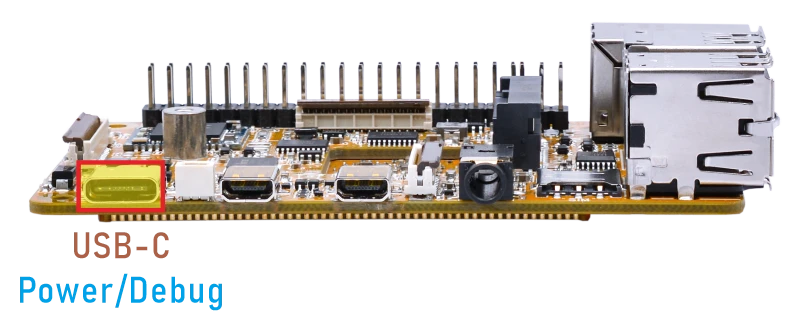
Connect the board to the PC via a USB-C cable, and open a serial terminal with the baud rate set to 1500000. The boot log will appear on the terminal.
4.2 Display
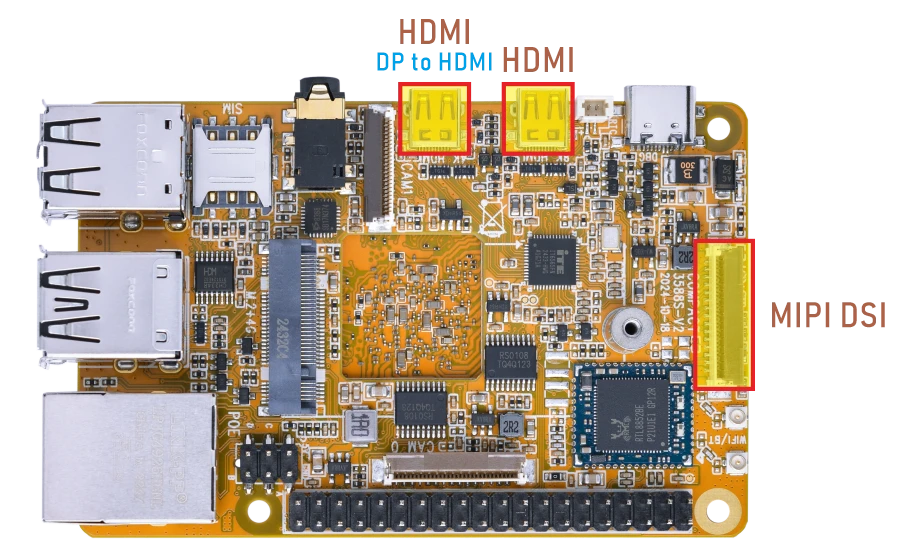
Display Ports
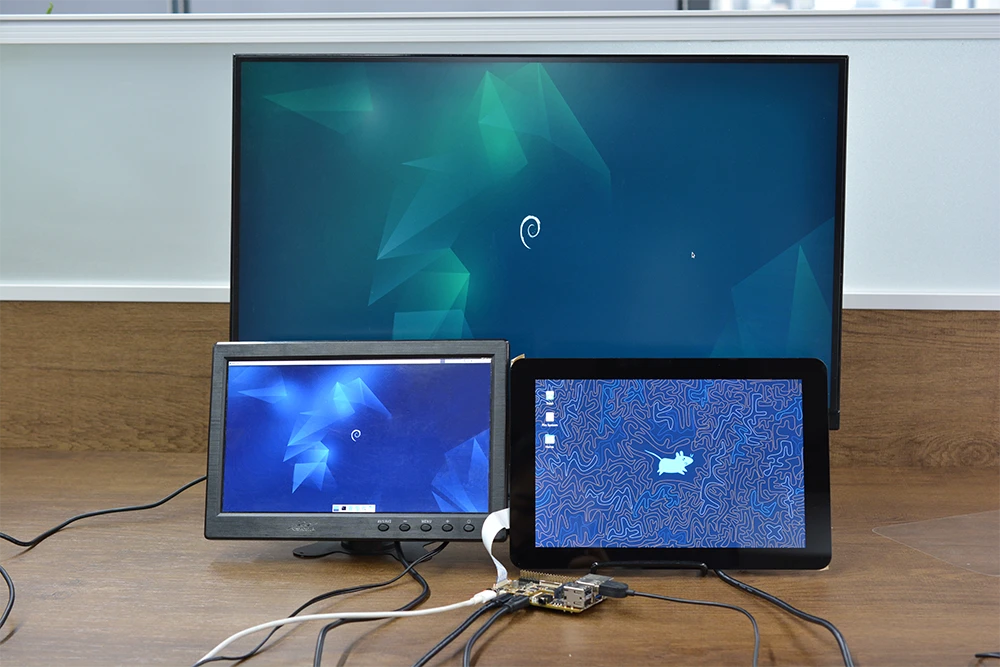
Compact3588S supports MIPI LCD, HDMI and DP-to-HDMI triple-display.
Warning
MIPI LCD hot swapping is not allowed.
4.3 USB
4.3.1 USB3.0
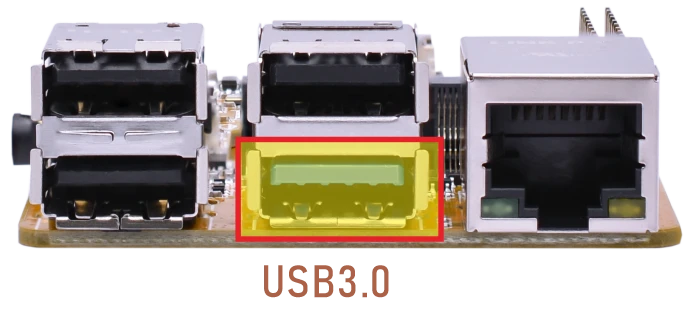
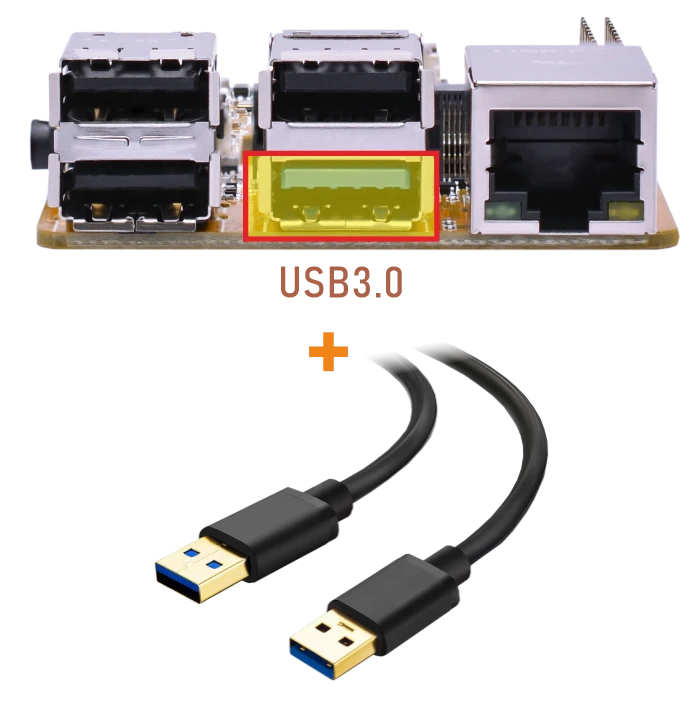
The Compact3588S USB3.0 supports both Host and Device roles. ADB requires the USB3.0 port to be in Device mode.
ADB
❶ Connect the board and PC host with USB-A cable.
❷ Install ADB driver on Windows system.
❸ Press Windows + R to open the Run program. Type cmd and press Enter
❹ Execute the follow commands to enable ADB.
1adb root
2adb remount
3adb shell
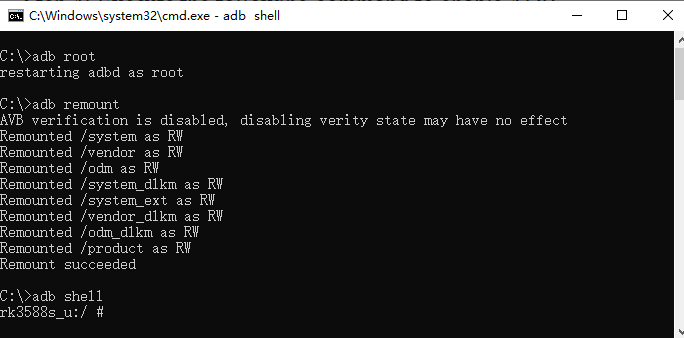
enable ADB
USB3.0 Host
❶ Switch the USB Host mode on the serial port CLI.
1echo host > /sys/kernel/debug/usb/fc000000.usb/mode
❷ After inserting the USB flash drive, an icon will appear on the desktop. Click the icon to automatically mount the device.
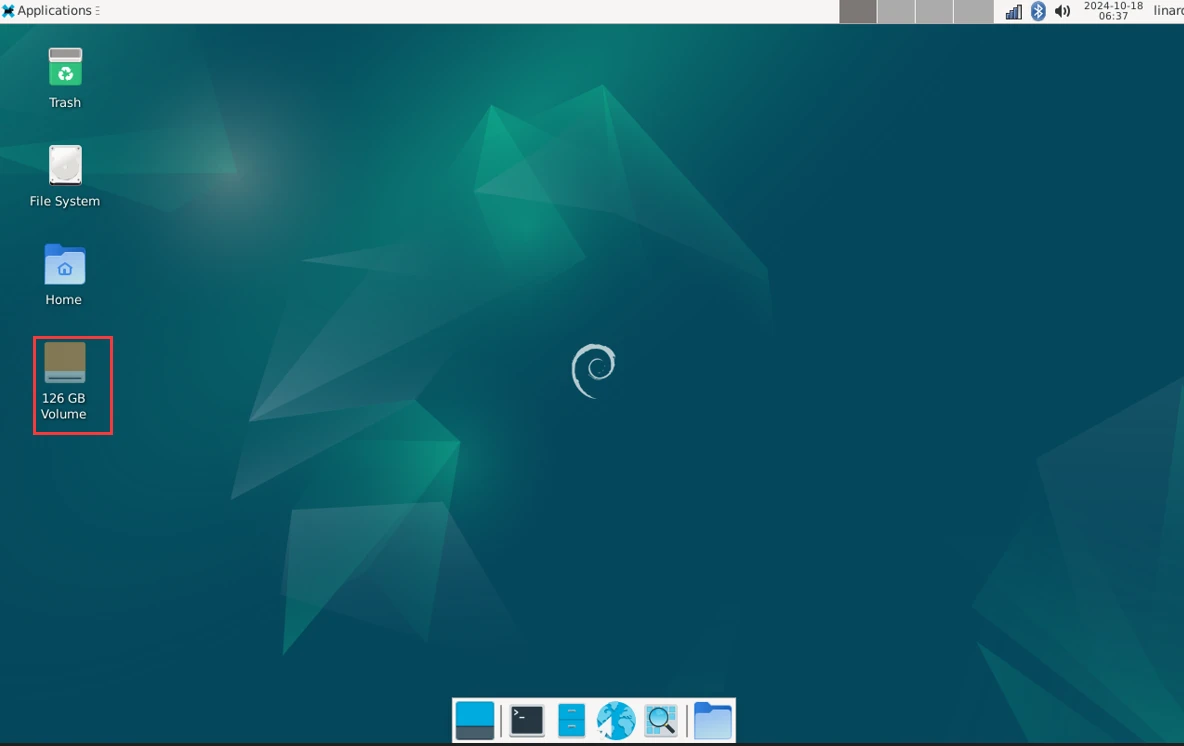
The current USB connection speed can be checked from the kernel log. When the device operates in USB3.0 mode, the log usually shows SuperSpeed.
4.3.2 USB2.0
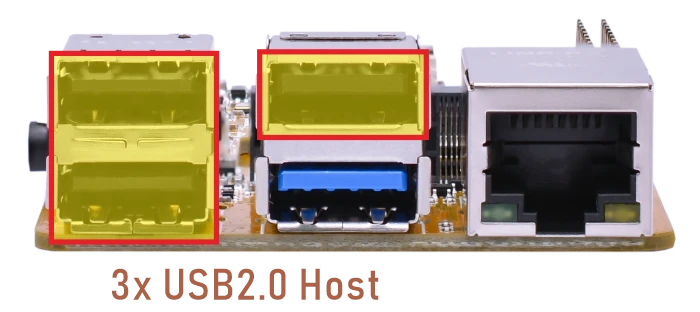
The USB2.0 Host can connect peripherals such as mouse, keyboards, and flash drives.
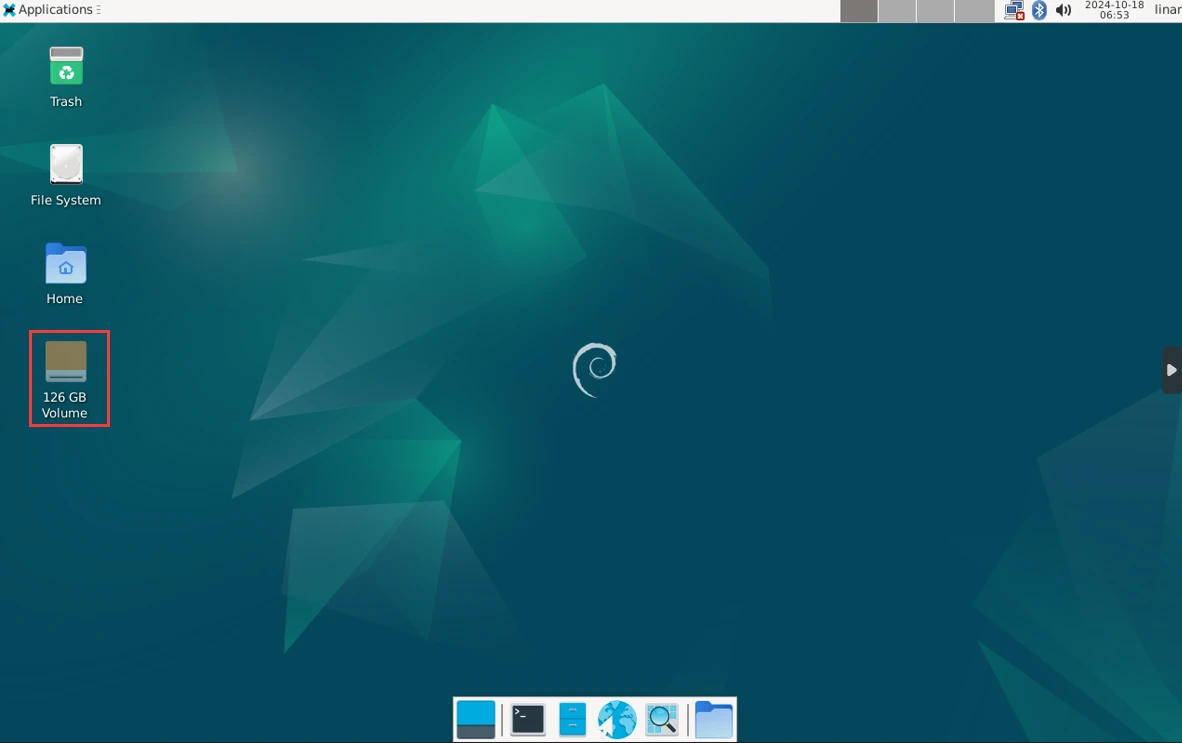
The current USB connection speed can be checked from the kernel log. When the device operates in USB2.0 mode, the log usually shows high-speed.
4.4 Ethernet
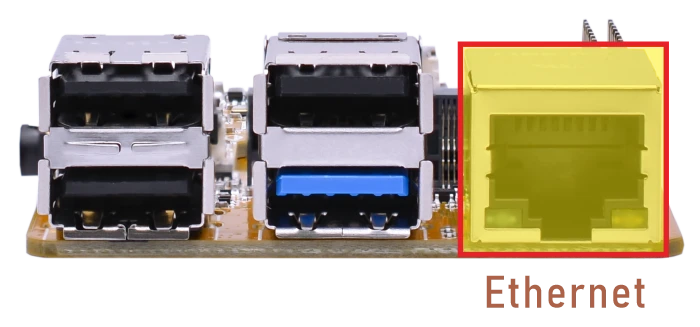
Connect the Board and router with an Ethernet cable.
1ifconfig //view the status of the network interfaces
root@linaro-alip:/# ifconfig
end1: flags=4163<UP,BROADCAST,RUNNING,MULTICAST>  mtu 1500
     inet 192.168.0.133  netmask 255.255.255.0  broadcast 192.168.0.255
     inet6 fe80::b17c:eee1:d8ef:346d  prefixlen 64  scopeid 0x20<link>
     ether 3a:3b:7b:e4:37:fa  txqueuelen 1000  (Ethernet)
     RX packets 292  bytes 39618 (38.6 KiB)
     RX errors 0  dropped 15  overruns 0  frame 0
     TX packets 119  bytes 10989 (10.7 KiB)
     TX errors 0  dropped 0 overruns 0  carrier 0  collisions 0
     device interrupt 69
1ping -I eth0 www.armdesigner.com //ping URL to test Network
root@linaro-alip:/# ping -I eth0 www.armdesigner.com
PING www.armdesigner.com (67.222.54.196) from 192.168.0.133 end1: 56(84) bytes of data.
64 bytes from 67-222-54-196.unifiedlayer.com (67.222.54.196): icmp_seq=1 ttl=48 time=194 ms
64 bytes from 67-222-54-196.unifiedlayer.com (67.222.54.196): icmp_seq=2 ttl=48 time=194 ms
64 bytes from 67-222-54-196.unifiedlayer.com (67.222.54.196): icmp_seq=3 ttl=48 time=195 ms
64 bytes from 67-222-54-196.unifiedlayer.com (67.222.54.196): icmp_seq=4 ttl=48 time=194 ms
64 bytes from 67-222-54-196.unifiedlayer.com (67.222.54.196): icmp_seq=5 ttl=48 time=203 ms
64 bytes from 67-222-54-196.unifiedlayer.com (67.222.54.196): icmp_seq=6 ttl=48 time=194 ms
64 bytes from 67-222-54-196.unifiedlayer.com (67.222.54.196): icmp_seq=7 ttl=48 time=194 ms
64 bytes from 67-222-54-196.unifiedlayer.com (67.222.54.196): icmp_seq=8 ttl=48 time=194 ms
64 bytes from 67-222-54-196.unifiedlayer.com (67.222.54.196): icmp_seq=9 ttl=48 time=197 ms
64 bytes from 67-222-54-196.unifiedlayer.com (67.222.54.196): icmp_seq=10 ttl=48 time=194 ms
^C
--- www.armdesigner.com ping statistics ---
10 packets transmitted, 10 received, 0% packet loss, time 9012ms
rtt min/avg/max/mdev = 193.668/195.281/203.010/2.687 ms
4.5 WiFi & Bluetooth
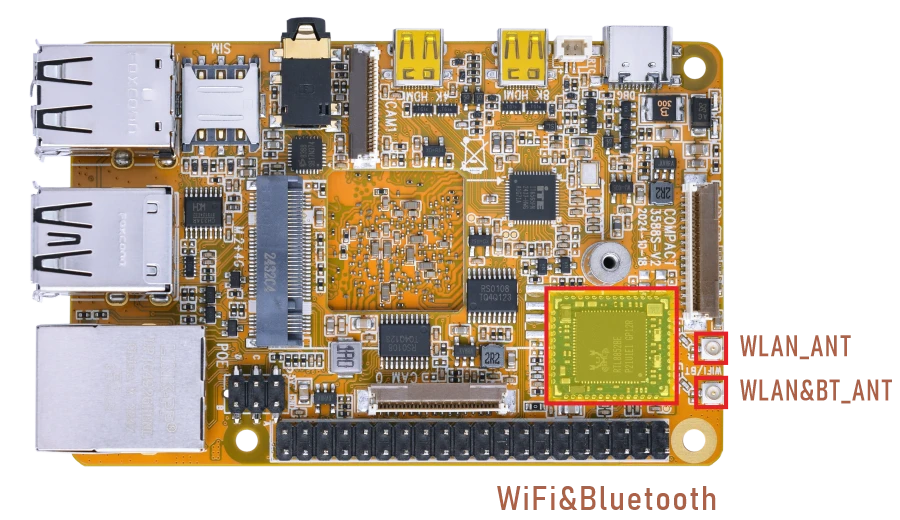
4.5.1 WiFi
❶ Connect the antennas.
❷ Click the network icon in the top right corner of the UI interface.
❸ Select the SSID from the list of available networks and enter the password.
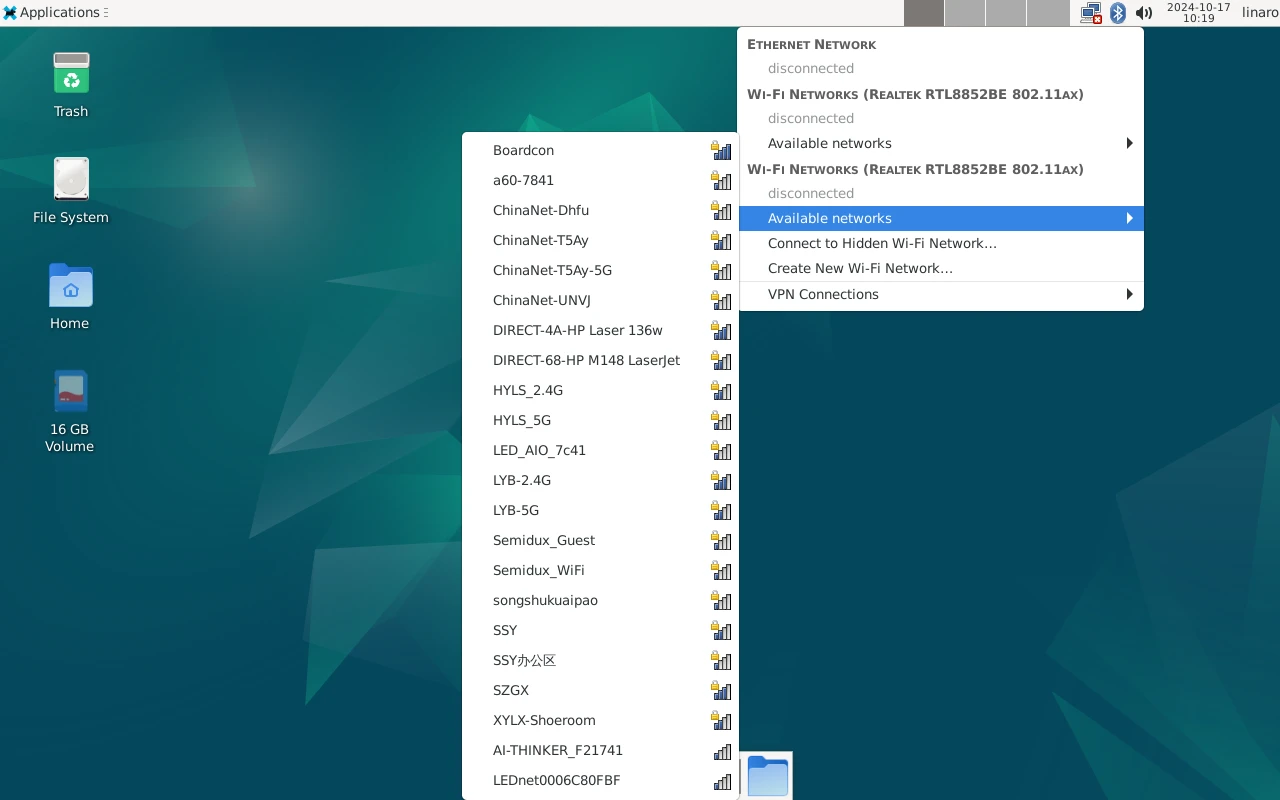
SSID
After connected, user can open Browser or ping URL/IP at terminal to test network.
1ifconfig
2ping -I wlan0 www.armdesigner.com
root@linaro-alip:/# ifconfig
wlan0: flags=4163<UP,BROADCAST,RUNNING,MULTICAST>  mtu 1500
        inet 192.168.0.141  netmask 255.255.255.0  broadcast 192.168.0.255
        inet6 fe80::2970:d932:4830:11bf  prefixlen 64  scopeid 0x20<link>
        ether d4:9c:dd:f5:e7:22  txqueuelen 1000  (Ethernet)
        RX packets 89  bytes 8169 (7.9 KiB)
        RX errors 0  dropped 2  overruns 0  frame 0
        TX packets 72  bytes 6243 (6.0 KiB)
        TX errors 0  dropped 0 overruns 0  carrier 0  collisions 0

root@linaro-alip:/# ping -I wlan0 www.armdesigner.com
PING www.armdesigner.com (67.222.54.196) from 192.168.0.141 wlan0: 56(84) bytes of data.
64 bytes from 67-222-54-196.unifiedlayer.com (67.222.54.196): icmp_seq=1 ttl=48 time=342 ms
64 bytes from 67-222-54-196.unifiedlayer.com (67.222.54.196): icmp_seq=2 ttl=48 time=197 ms
64 bytes from 67-222-54-196.unifiedlayer.com (67.222.54.196): icmp_seq=3 ttl=48 time=197 ms
64 bytes from 67-222-54-196.unifiedlayer.com (67.222.54.196): icmp_seq=4 ttl=48 time=197 ms
64 bytes from 67-222-54-196.unifiedlayer.com (67.222.54.196): icmp_seq=5 ttl=48 time=197 ms
64 bytes from 67-222-54-196.unifiedlayer.com (67.222.54.196): icmp_seq=6 ttl=48 time=197 ms
64 bytes from 67-222-54-196.unifiedlayer.com (67.222.54.196): icmp_seq=7 ttl=48 time=198 ms
64 bytes from 67-222-54-196.unifiedlayer.com (67.222.54.196): icmp_seq=8 ttl=48 time=201 ms
64 bytes from 67-222-54-196.unifiedlayer.com (67.222.54.196): icmp_seq=9 ttl=48 time=216 ms
64 bytes from 67-222-54-196.unifiedlayer.com (67.222.54.196): icmp_seq=10 ttl=48 time=197 ms
^C
--- www.armdesigner.com ping statistics ---
4.5.2 Bluetooth
❶ Click the Bluetooth icon in the top right corner of the UI interface.
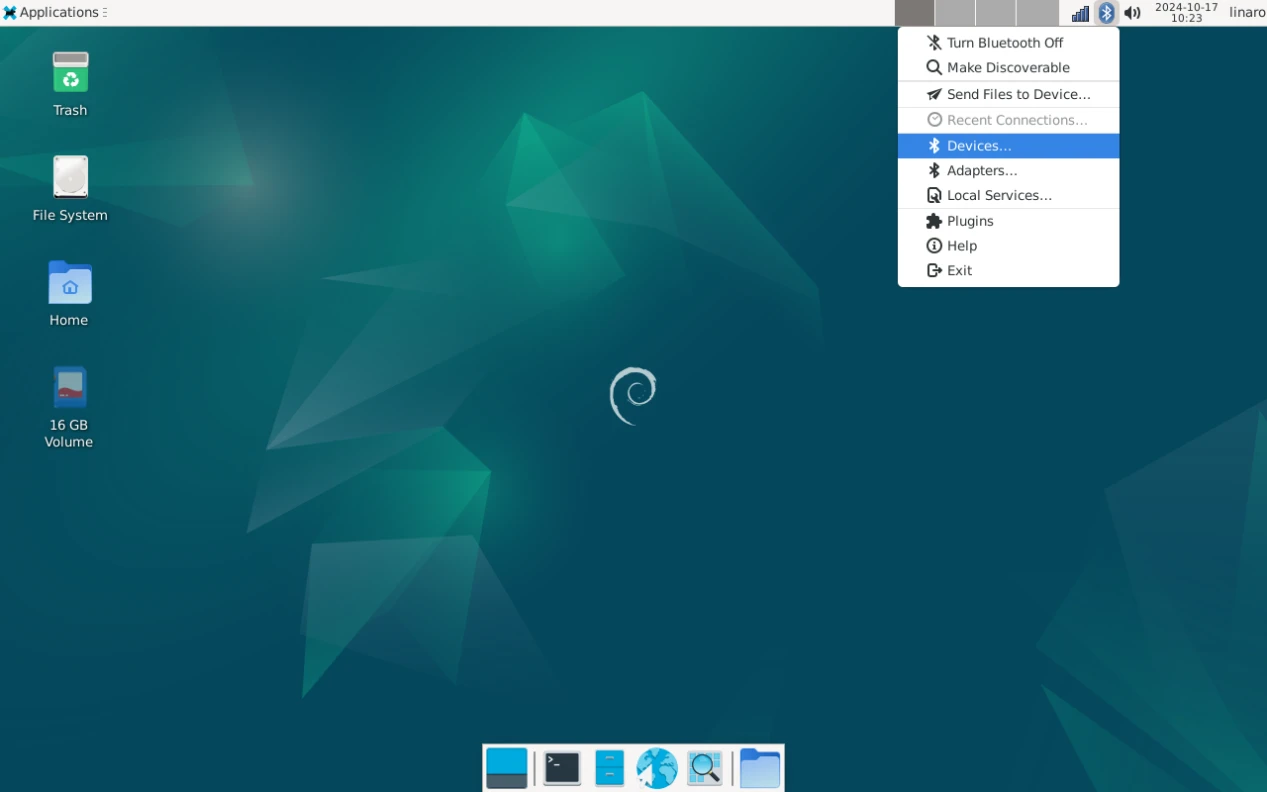
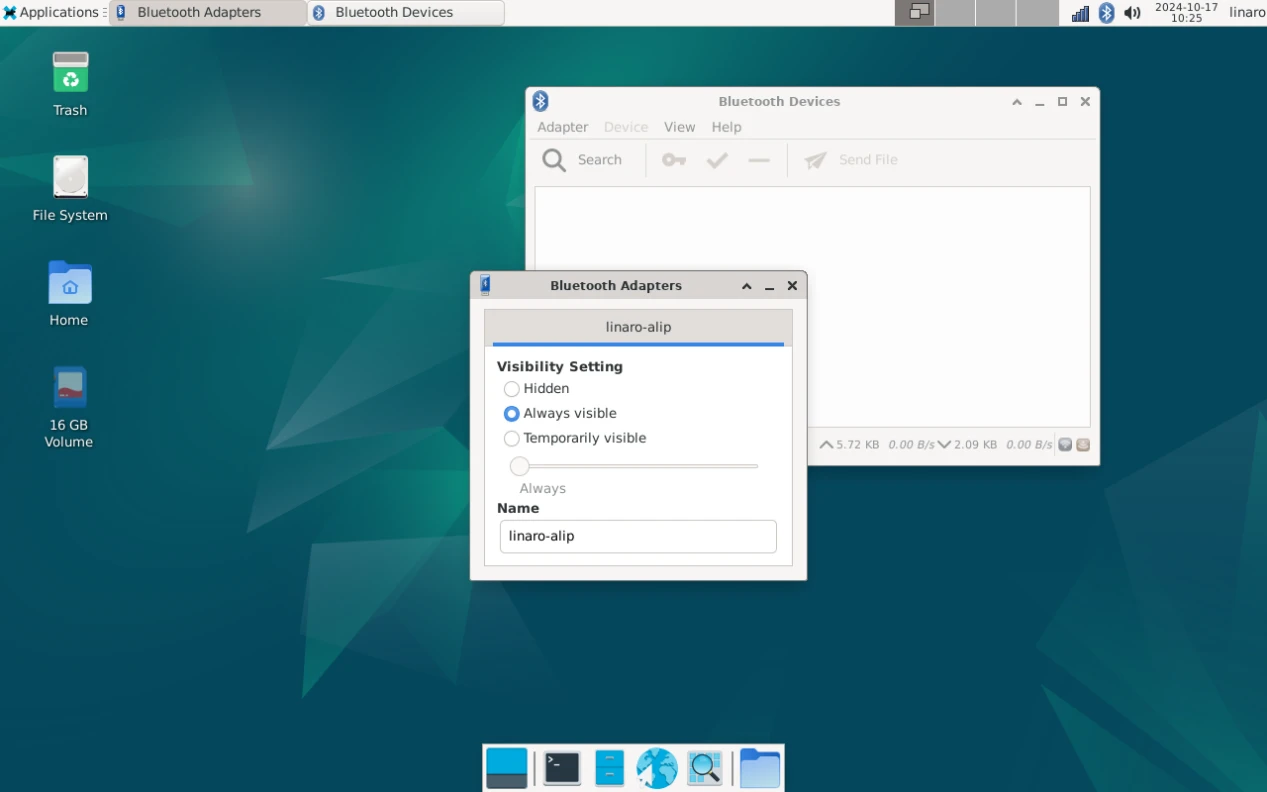
❷ The Bluetooth device name is hidden by default. Set the Bluetooth device name to be visible.
Click Adapter -> Preferences -> Always visible
❸ Click Search to start searching and select the available device in the list to pair.
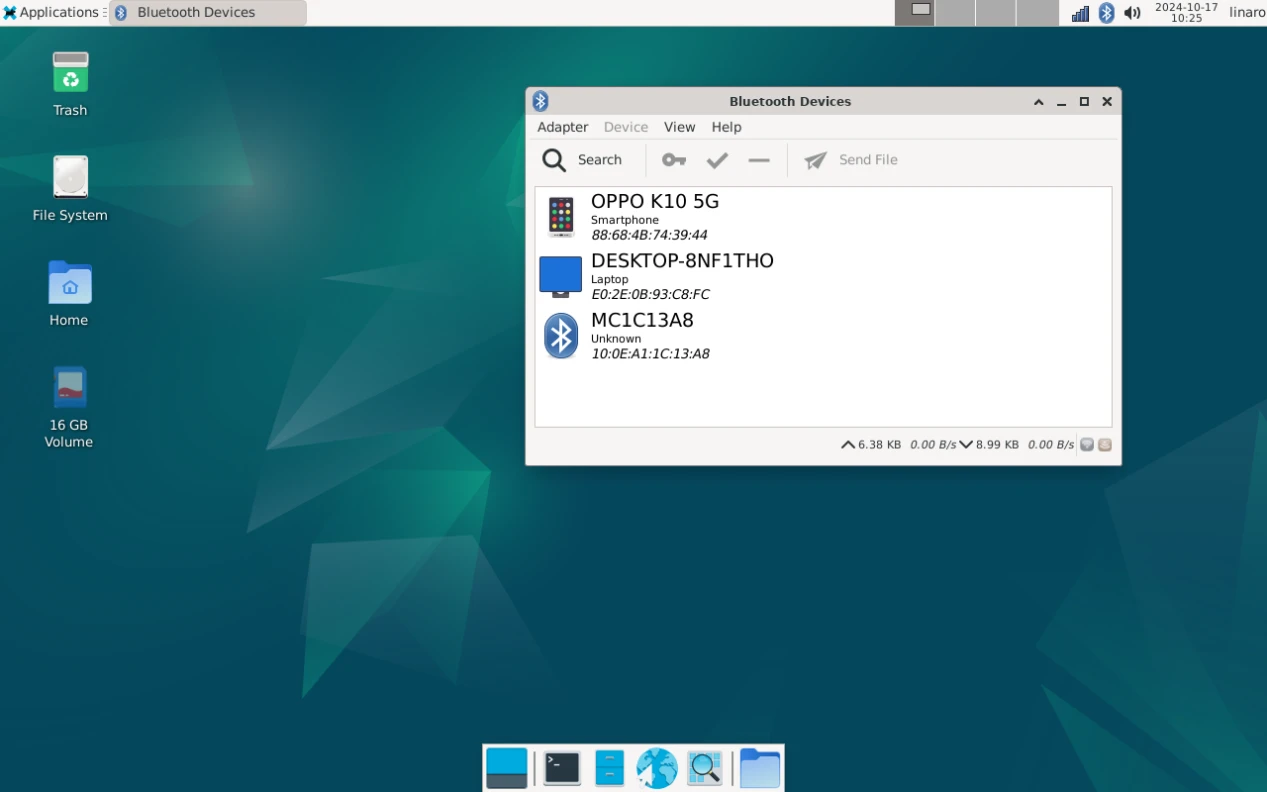
After pairing, devices can connect with each other automatically.
4.6 UART
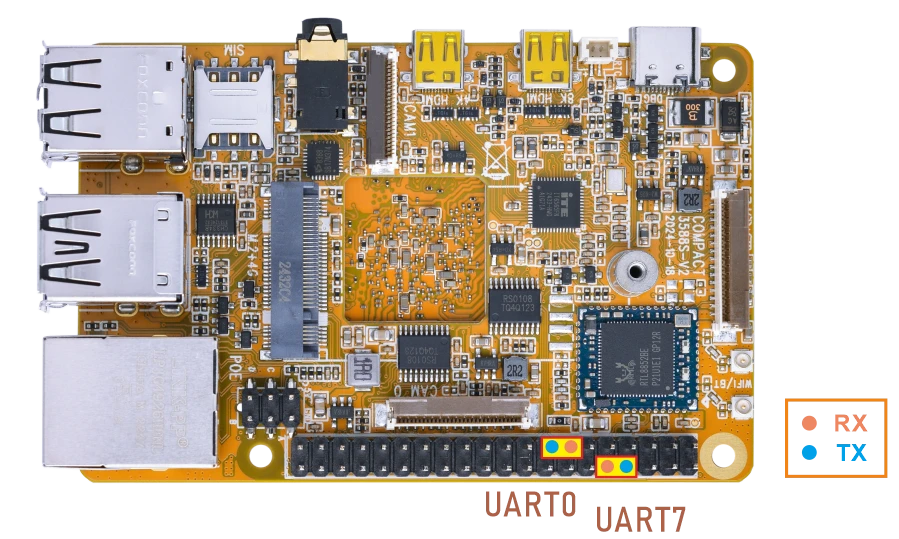
❶ Connect RX and TX of UART.
❷ Execute command and input character to test.
1com /dev/ttyS0 115200 8 0 1 //UART0
root@linaro-alip:/# com /dev/ttyS0 115200 8 0 1
port = /dev/ttyS0
baudrate = 115200
cs = 8
parity = 0
stopb = 1
123456abcd
RECV: 123456abcd
The tests for UART7 are similar to those for UART0. Simply replace ttyS0 with ttyS7.
4.7 4G
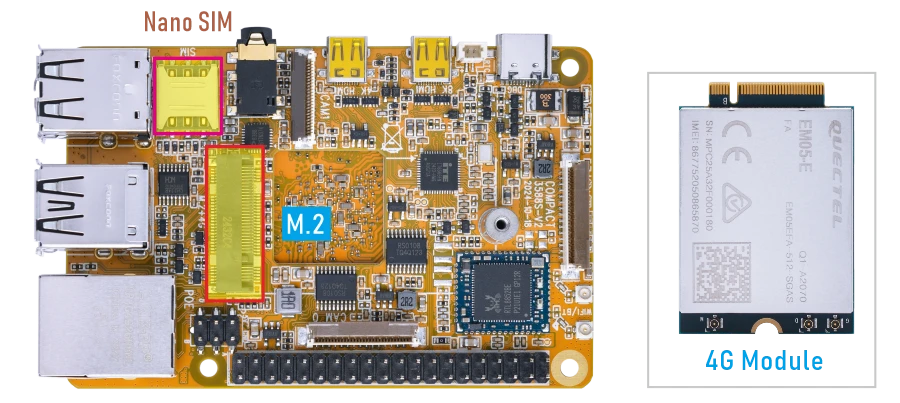
❶ Insert 4G module to M.2 slot (4G model: EM05).
❷ Connect antenna and insert SIM card.
❸ Power on.
❹ Connect to 4G network.
1pppd call quectel-ppp &
❺ Test network.
1ifconfig                        //Check network status
2ping -I ppp0 www.armdesigner.com
4.8 Audio I/O
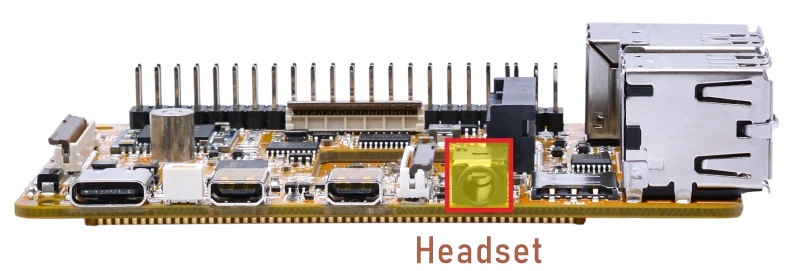
❶ Plug the Headset into the Audio jack.
❷ View sound card.
1cat /proc/asound/cards
root@linaro-alip:/# cat /proc/asound/cards
0 [rockchipes8388 ]: rockchip-es8388 - rockchip-es8388
                     rockchip-es8388
1 [rockchipdp0    ]: rockchip_dp0 - rockchip-dp0
                     rockchip-dp0
2 [rockchiphdmi0  ]: rockchip-hdmi0 - rockchip-hdmi0
                     rockchip-hdmi0
❸ Record
1arecord -Dhw:0,0 -f cd record.wav
❹ Playback
1aplay -Dhw:0,0 record.wav //Audio output via headset
aplay -Dhw:0,0 record.wav   //output via Headset
aplay -Dhw:1,0 record.wav   //output via DP-to-HDMI
aplay -Dhw:2,0 record.wav   //output via HDMI
4.9 SD Card
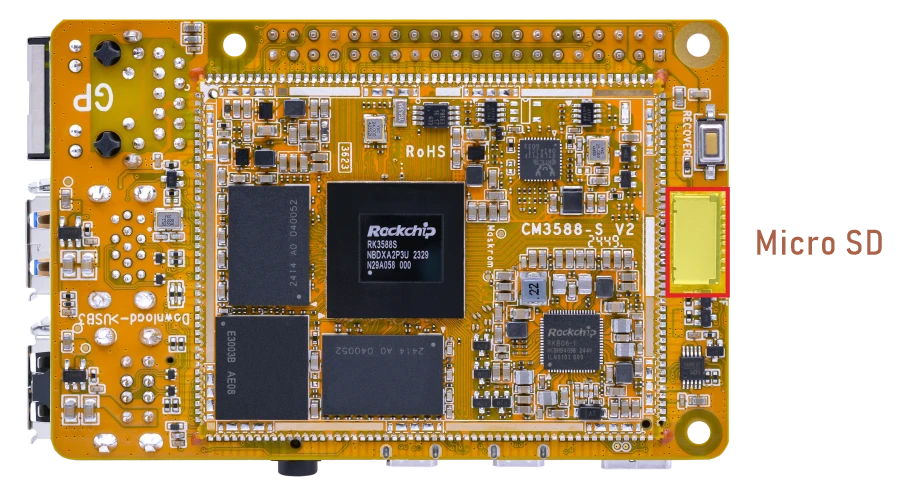
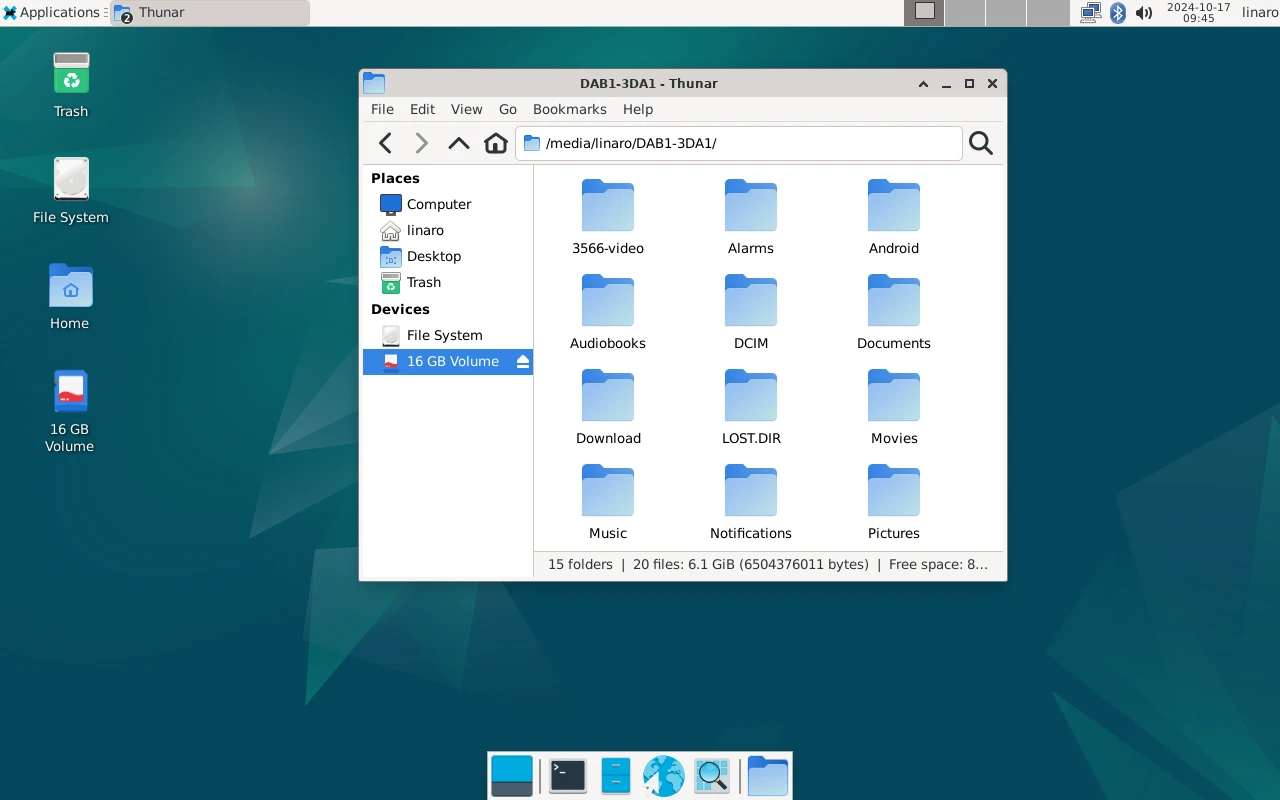
After inserting the SD Card, an icon will appear on the desktop. Click the icon to automatically mount the device.
4.10 RTC
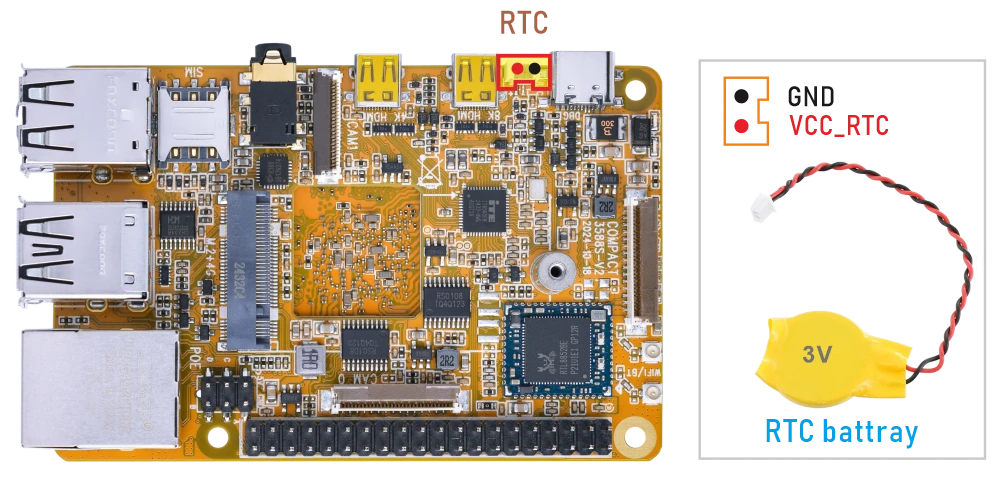
❶ Insert a 3V battery before test. It keeps the time running when the main power is off.
❷ Set date and time manually.
1date -s "2024-11-06 10:15:30"           //set system date
2hwclock -w                              //set the hardware clock to current system time
3hwclock
root@linaro-alip:/# date -s "2024-11-06 10:15:30"
Wed Nov  6 10:15:30 UTC 2024
root@linaro-alip:/# hwclock -w
root@linaro-alip:/# hwclock
2024-11-06 10:15:43.492278+00:00
root@linaro-alip:/# hwclock
2024-11-06 10:15:56.176138+00:00
root@linaro-alip:/# hwclock
2024-11-06 10:16:05.824220+00:00
root@linaro-alip:/#
❸ Power off the board and disconnect the main power supply. Wait for a period of time, then power on the board again. If the RTC is working properly, the hardware clock time should be retained and continue running after power-off.
1hwclock
root@linaro-alip:/# hwclock
2024-11-06 10:25:15.428013+00:00
root@linaro-alip:/#
4.11 Camera
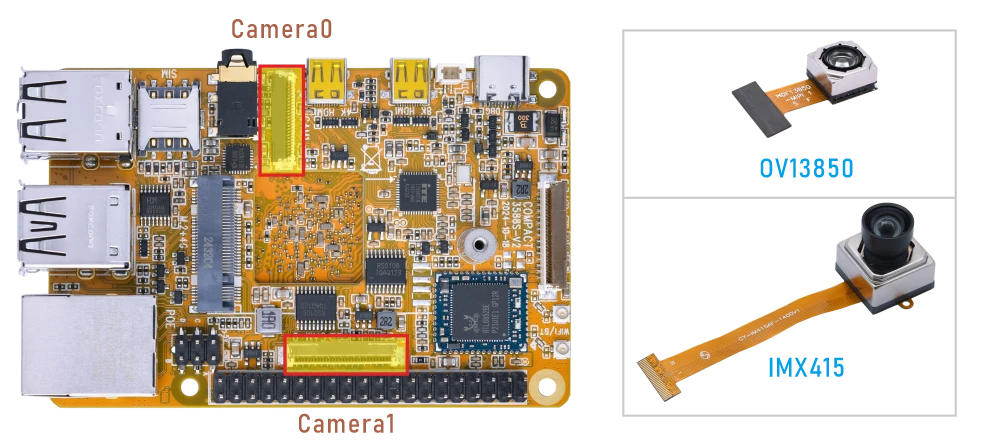
Compact3588s camera0 and camera1 share the signal I2C3, Boardcon Debian firmware default camera0 and camera1 are enabled.
❶ Connect the OV13850 to camera0, and IMX415 to camera1 before power on .
❷ Power on.
❸ Preview.
1cd /rockchip-test/camera/
2./camera0_rkisp_test.sh        //camera0
3./camera1_rkisp_test.sh        //camera1
4.12 SPI
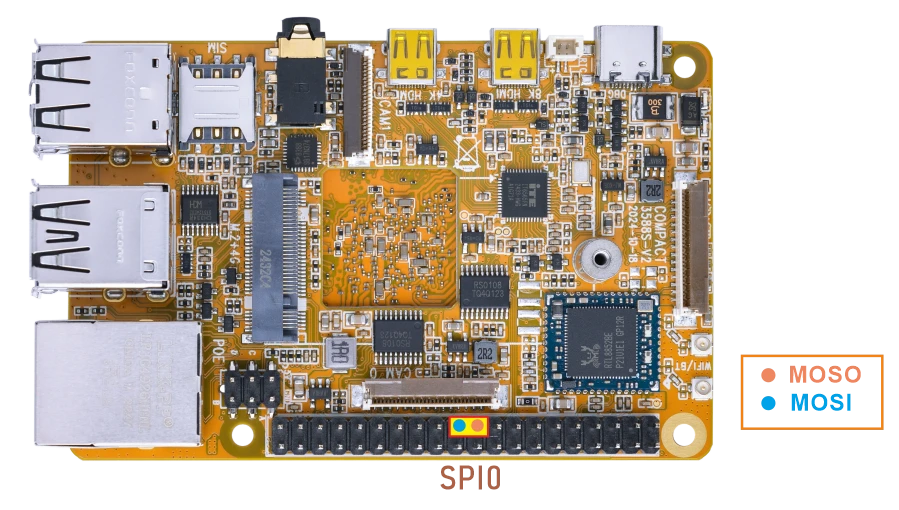
❶ Connect MOSI and MISO of SPI.
❷ SPI loopback test.
1spidev_test
root@linaro-alip:/# spidev_test
spi mode: 0
bits per word: 8
max speed: 10000000 Hz (10000 KHz)

FF FF FF FF FF FF
40 00 00 00 00 95
FF FF FF FF FF FF
FF FF FF FF FF FF
FF FF FF FF FF FF
DE AD BE EF BA AD
F0 0D
4.13 GPIO
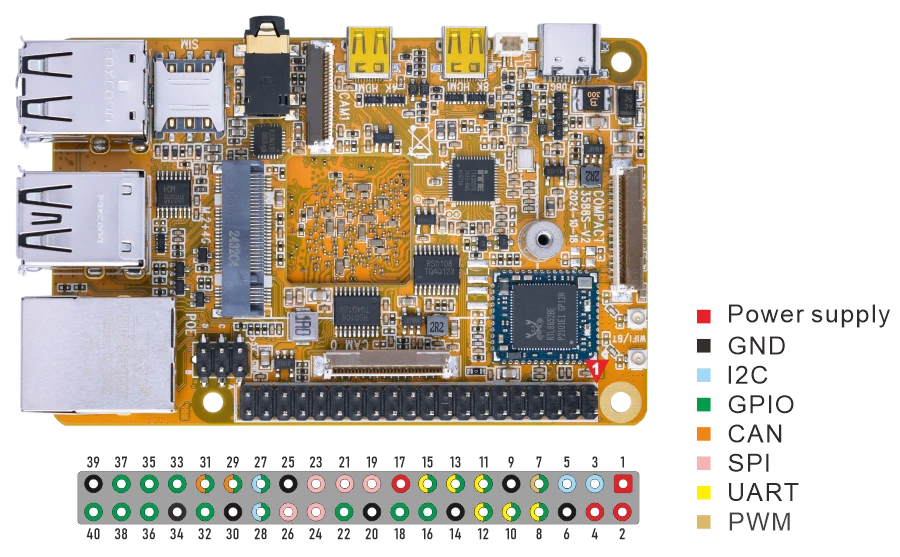
pin |
GPIO |
Device number |
pin |
GPIO |
Device number |
|---|---|---|---|---|---|
3 |
I2C3_SDA_M0_3V3 |
48 |
12 |
GPIO4_B5_d |
141 |
5 |
I2C3_SCL_M0_3V3 |
49 |
16 |
GPIO1_A2_d |
34 |
7 |
GPIO3_D5_d |
125 |
18 |
GPIO1_A3_d |
35 |
11 |
GPIO4_A6_d |
134 |
22 |
GPIO1_D0_d |
56 |
15 |
GPIO4_A3_d |
131 |
28 |
GPIO3_D2_d |
122 |
27 |
GPIO3_D3_d |
123 |
32 |
GPIO3_C6_u |
118 |
29 |
GPIO3_C4_u |
116 |
36 |
GPIO3_B7_d |
111 |
31 |
GPIO3_C5_u |
117 |
38 |
GPIO1_C2_d |
50 |
33 |
GPIO1_C6_d |
54 |
37 |
GPIO1_B0_u |
40 |
35 |
GPIO1_D5_d |
61 |
40 |
GPIO4_A7_d |
135 |
Test GPIO4_B5 for example.
1echo 141 > /sys/class/gpio/export
2echo "out" > /sys/class/gpio/gpio141/direction
3echo 1 > /sys/class/gpio/gpio141/value
4echo 0 > /sys/class/gpio/gpio141/value
5echo 141> /sys/class/gpio/unexport
The tests for other GPIOs are similar to those for GPIO4_B5.
4.14 Video Playback
4.14.1 Built-in playback
The script instruction directory is in /rockchip-test/video/, just run it.
root@linaro-alip:/# /rockchip-test/video/test_gst_video.sh
[  145.071183] dw9714 3-000c: cmd 0x80685600 not supported
Setting pipeline to PAUSED ...
Pipeline is PREROLLING ...
Redistribute latency...
mpp[2175]: mpp_info: mpp version: 239e15ea author: Herman Chen   2024-06-12 docs: Update 1.0.6 CHANGELOG.md
mpp[2175]: mpp_platform: client 12 driver is not ready!
mpp[2175]: mpp_info: mpp version: 239e15ea author: Herman Chen   2024-06-12 docs: Update 1.0.6 CHANGELOG.md
mpp[2175]: mpp_info: mpp version: 239e15ea author: Herman Chen   2024-06-12 docs: Update 1.0.6 CHANGELOG.md
mpp[2175]: mpp_info: mpp version: 239e15ea author: Herman Chen   2024-06-12 docs: Update 1.0.6 CHANGELOG.md
mpp[2175]: mpp_info: mpp version: 239e15ea author: Herman Chen   2024-06-12 docs: Update 1.0.6 CHANGELOG.md
Redistribute latency...
mpp[2175]: h264d_api: is_avcC=1
Pipeline is PREROLLED ...
Prerolled, waiting for async message to finish...
Setting pipeline to PLAYING ...
Redistribute latency...
New clock: GstSystemClock
Got EOS from element "pipeline0".
Execution ended after 0:00:29.560919972
Setting pipeline to NULL ...
Freeing pipeline ...
4.14.2 Browser playback
Select Video file, Right-click and select Chromium Browser to play.
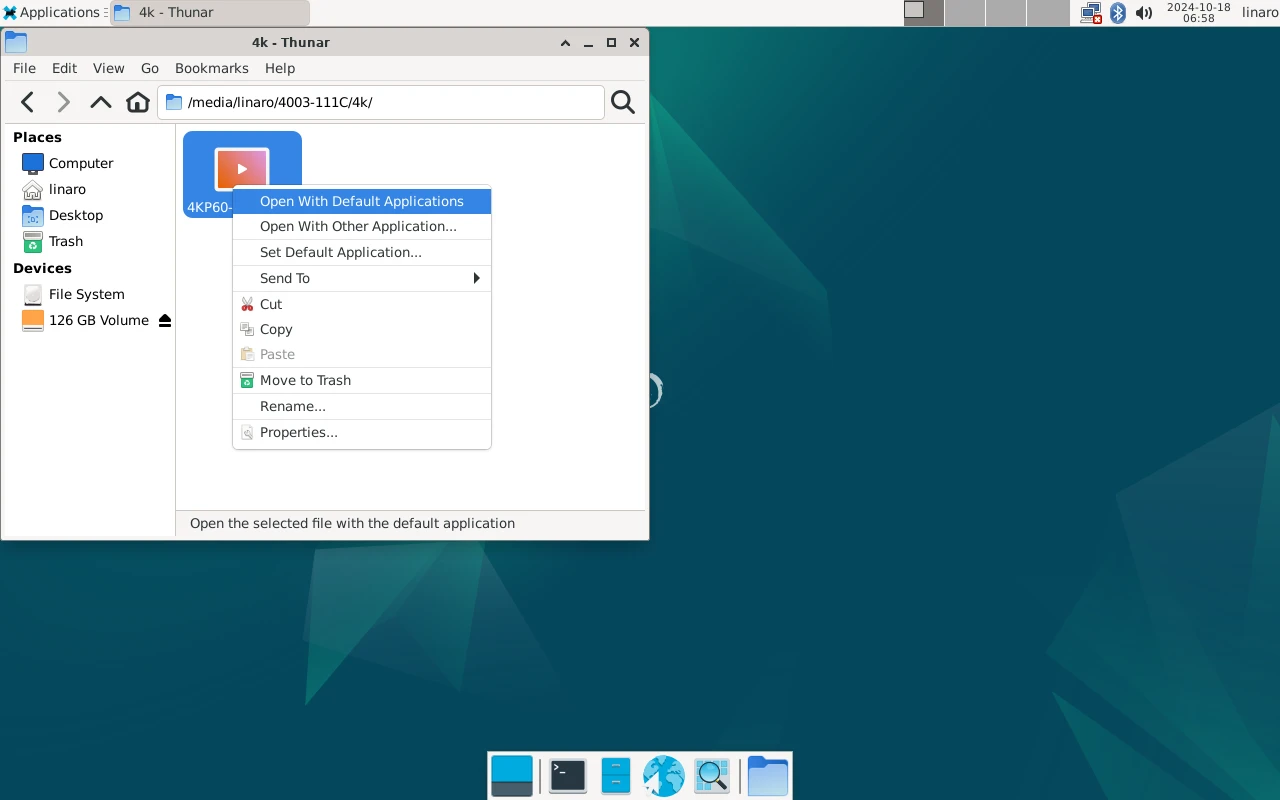
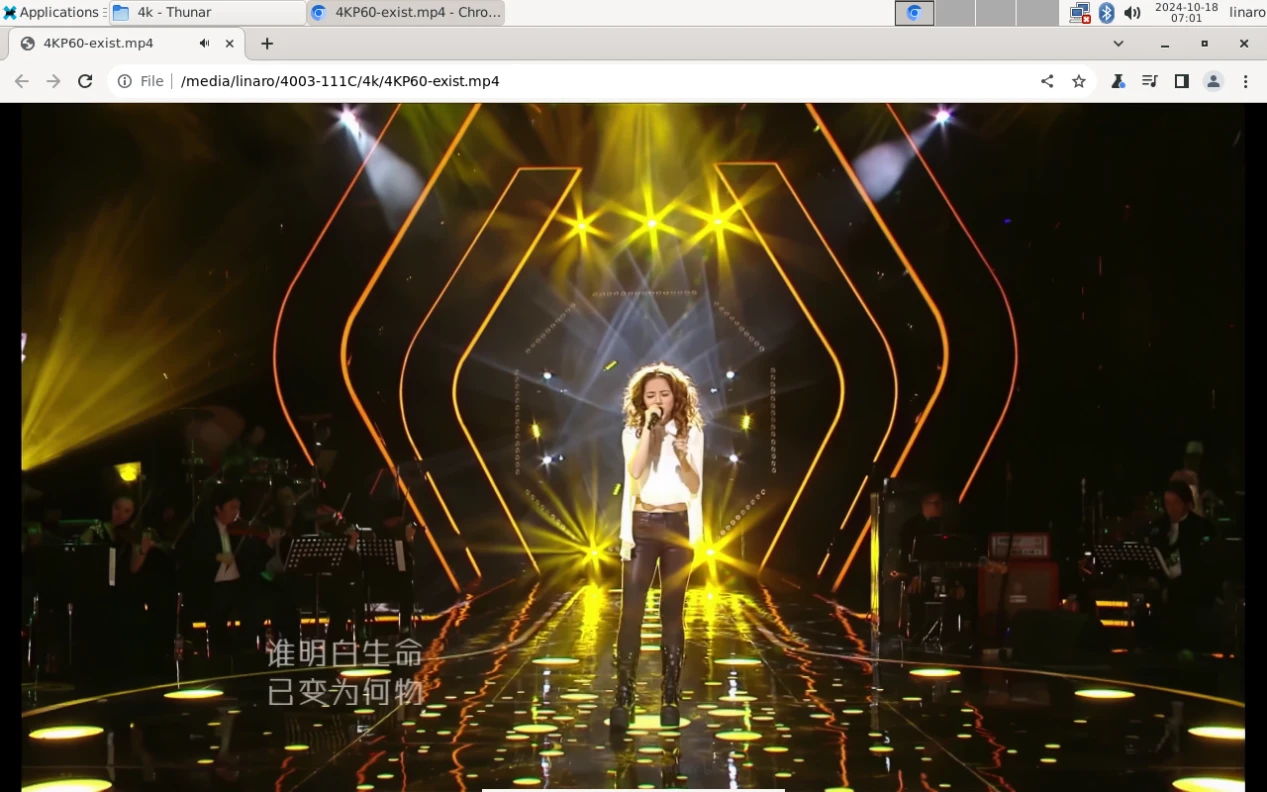
Play video in Chromium Browser
4.14.3 Command line
1gst-play-1.0 --videosink=xvimagesink /media/linaro/5488-0CF6/video/8KP30/H265_8KP30-2.mp4
1echo performance | tee $(find /sys/ -name *governor)
2export GST_MPP_VIDEODEC_DEFAULT_ARM_AFBC=1
3gst-play-1.0 --flags=3 --videosink="xvimagesink sync=false" --audiosink="alsasink device=hw:0,0 sync=false" Great-Colors_8K_VP9_HDR_OLED_60FPS.mkv