5. Buildroot Application
5.1 Serial Terminal
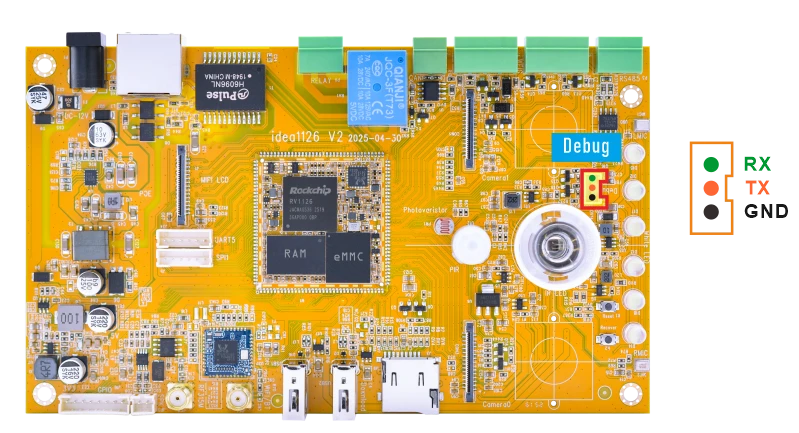
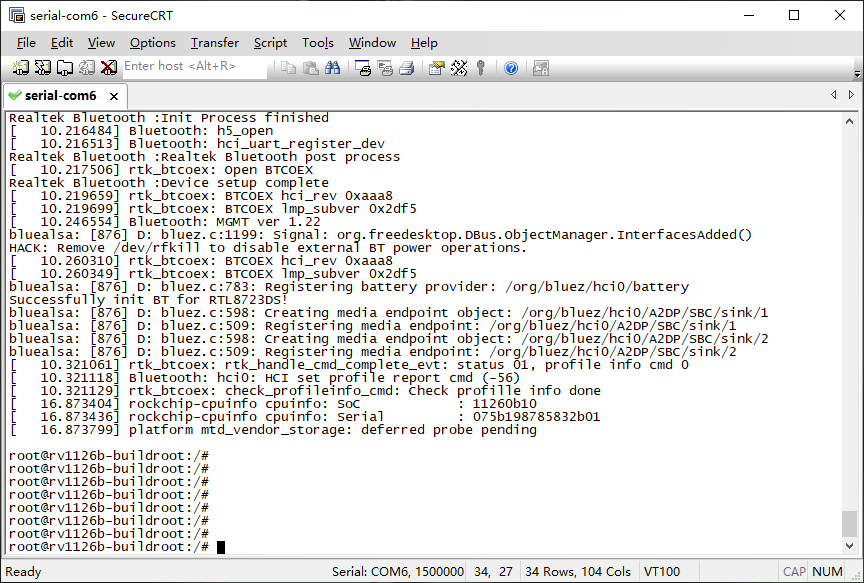
Connect the board and PC with USB Serial cable, then power on, the terminal will output boot information. The default baudrate is 1500000.
5.2 Display(MIPI)
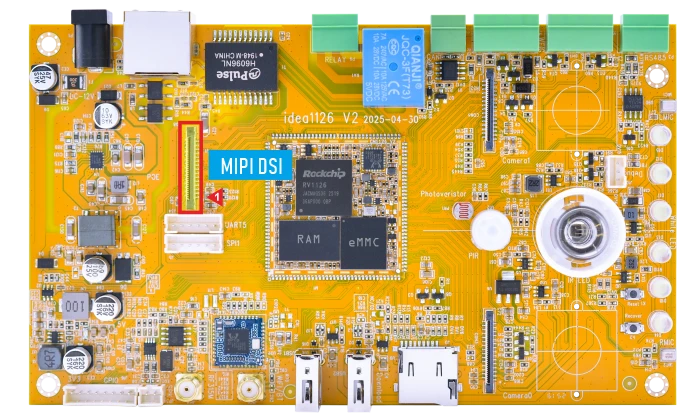
The default MIPI display resolution of the Idea1126B-P is 800×1280@60Hz. The Buildroot system provides two versions: GStreamer and Rockit. The display output may vary depending on the firmware version.
5.2.1 GStreamer Version
Connect the board and MIPI LCD, then power on. After the GStreamer version is started, the display output is shown in the following figure:
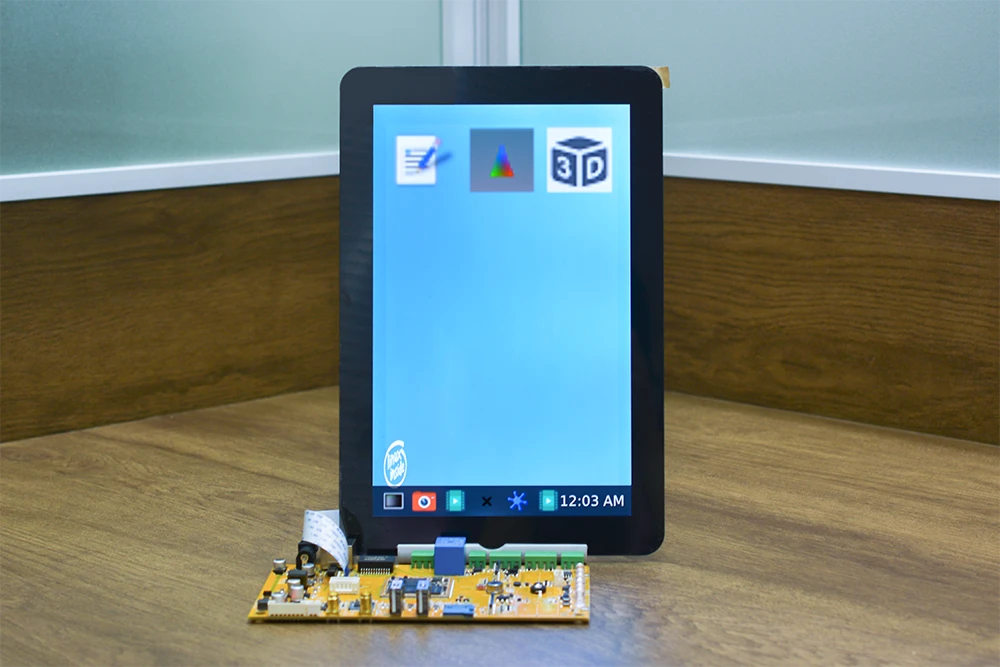
5.2.1 GStreamer Version
After the system boots with the Rockit version, if two cameras are connected before power-on, the system displays a combined preview of the two camera channels on the screen by default. If the two cameras are not connected, the desktop UI will not be displayed after boot-up.
5.3 USB
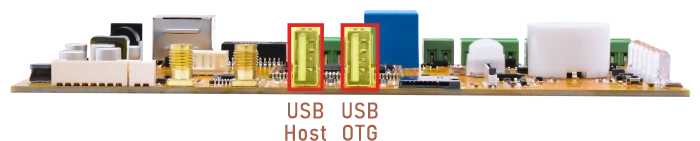
5.3.1 USB OTG
The USB OTG port of Idea1126B-P is configured as host mode by default at startup.
echo device > /sys/kernel/debug/usb/21500000.usb/mode
usbdevice start
echo host > /sys/kernel/debug/usb/21500000.usb/mode
5.3.2 USB Host
The USB2.0 Host can connect peripherals such as mouse, keyboards, and flash drives.
When a USB flash drive is inserted, the system will automatically mount it.
1df -h
root@rv1126b-buildroot:/# df -h
Filesystem      Size  Used Avail Use% Mounted on
/dev/root       5.9G  450M  5.3G   8% /
devtmpfs        959M     0  959M   0% /dev
tmpfs           987M  528K  987M   1% /run
tmpfs           987M  216K  987M   1% /var/log
tmpfs           987M     0  987M   0% /dev/shm
tmpfs           987M  140K  987M   1% /tmp
/dev/mmcblk0p7  124M  5.3M  118M   5% /oem
/dev/mmcblk0p8  881M  324K  880M   1% /userdata
/dev/sda1        28G   20G  8.7G  69% /mnt/udisk
/dev/sda2       448M  327M  121M  74% /media/udisk1
5.4 Audio
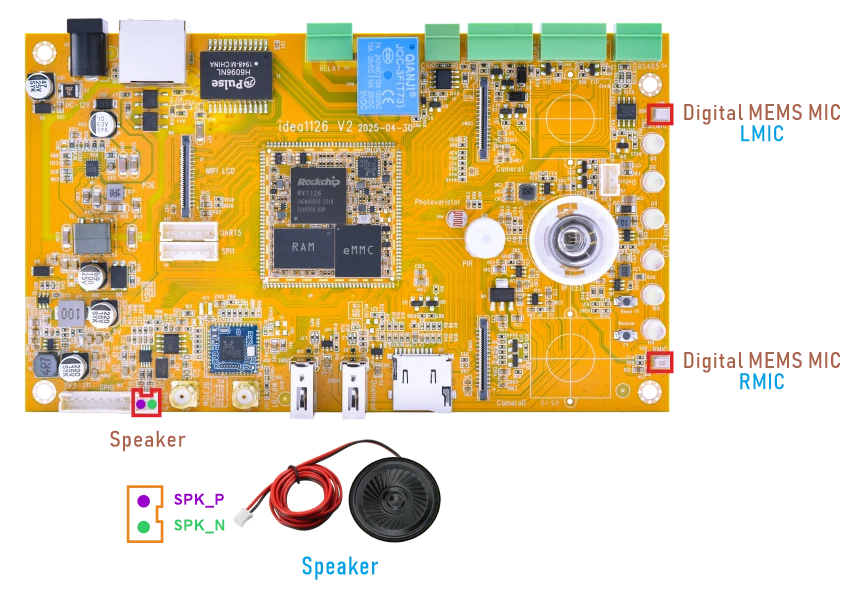
❶ Connect the Speaker to the connector (2-pin/2.0mm pitch).
❷ Check the sound card information.
1cat /proc/asound/cards
root@rv1126b-buildroot:/# cat /proc/asound/cards
 0 [rockchiprv1126b]: rockchip_rv1126 - rockchip,rv1126b-acodec
                      rockchip,rv1126b-acodec
 1 [rockchippdmmica]: simple-card - rockchip,pdm-mic-array
                      rockchip,pdm-mic-array
❸ Record audio through the Digital MEMS MIC.
Note
For the Rockit version, the audio recording test may conflict with the rkipc service. Before performing the audio input test, stop rkipc first.
1killall -9 rkipc
1rkipc &
1arecord -D hw:1,0 -f s16_le -c 2 -r 16000 cap.wav
❹ Play audio through the Speaker.
Configure the speaker output path and volume.
1amixer -c 0 cset name='Power Amplifier' 1
2amixer -c 0 cset name='Speaker Switch' on
3amixer -c 0 cset name='DAC Digital Volume' 250,250
Play the recorded audio file.
1aplay -Dhw:0,0 cap.wav
5.5 Ethernet

❶ Connect the board to the router via Ethernet.
root@rv1126b-buildroot:/#
[ 2678.825363] rk_gmac-dwmac 21c70000.ethernet eth0: Link is Up - 1Gbps/Full - flow control rx/tx
[ 2678.825419] IPv6: ADDRCONF(NETDEV_CHANGE): eth0: link becomes ready
❷ Check the network interface information.
1ifconfig eth0
root@rv1126b-buildroot:/# ifconfig eth0
eth0      Link encap:Ethernet  HWaddr 7A:B1:AC:2D:53:6F
          inet addr:192.168.0.102  Bcast:192.168.0.255  Mask:255.255.255.0
          inet6 addr: fe80::3ffa:7401:7324:d8e2/64 Scope:Link
          UP BROADCAST RUNNING MULTICAST  MTU:1500  Metric:1
          RX packets:175 errors:0 dropped:23 overruns:0 frame:0
          TX packets:11 errors:0 dropped:0 overruns:0 carrier:0
          collisions:0 txqueuelen:1000
          RX bytes:15472 (15.1 KiB)  TX bytes:1410 (1.3 KiB)
          Interrupt:80
❸ Ping URL to test Network.
1ping -I eth0 www.armdesigner.com
root@rv1126b-buildroot:/# ping -I eth0 www.armdesigner.com
PING www.armdesigner.com (3.174.46.103) from 192.168.0.102 eth0: 56(84) bytes of data.
64 bytes from www.armdesigner.com (3.174.46.103): icmp_seq=1 ttl=246 time=186 ms
64 bytes from www.armdesigner.com (3.174.46.103): icmp_seq=2 ttl=246 time=193 ms
64 bytes from www.armdesigner.com (3.174.46.103): icmp_seq=3 ttl=246 time=187 ms
64 bytes from www.armdesigner.com (3.174.46.103): icmp_seq=4 ttl=246 time=185 ms
64 bytes from www.armdesigner.com (3.174.46.103): icmp_seq=5 ttl=246 time=187 ms
64 bytes from www.armdesigner.com (3.174.46.103): icmp_seq=6 ttl=246 time=193 ms
64 bytes from www.armdesigner.com (3.174.46.103): icmp_seq=7 ttl=246 time=187 ms
^C
--- www.armdesigner.com ping statistics ---
7 packets transmitted, 7 received, 0% packet loss, time 6008ms
rtt min/avg/max/mdev = 185.361/188.288/193.056/2.981 ms
5.6 SD Card

Insert the SD card into the development board, and it will be automatically mounted.
View the device mount path.
1df -h
root@rv1126b-buildroot:/# df -h
Filesystem      Size  Used Avail Use% Mounted on
/dev/root       5.9G  450M  5.3G   8% /
devtmpfs        959M     0  959M   0% /dev
tmpfs           987M  532K  987M   1% /run
tmpfs           987M  196K  987M   1% /var/log
tmpfs           987M     0  987M   0% /dev/shm
tmpfs           987M  140K  987M   1% /tmp
/dev/mmcblk0p8  881M  396K  864M   1% /userdata
/dev/mmcblk0p7  124M  5.3M  115M   5% /oem
/dev/sda1        58G   38G   21G  65% /mnt/udisk
/dev/mmcblk1p1   60G   13G   48G  21% /mnt/sdcard
5.7 WiFi & Bluetooth
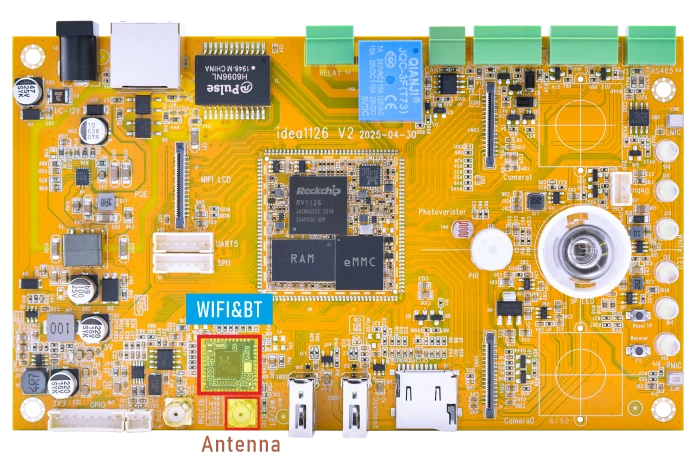
5.7.1 WiFi
❶ Connect the WiFi antenna.
❷ View the device information.
1ifconfig wlan0
root@rv1126b-buildroot:/# ifconfig wlan0
wlan0     Link encap:Ethernet  HWaddr A8:B5:8E:CA:27:50
          UP BROADCAST MULTICAST  MTU:1500  Metric:1
          RX packets:0 errors:0 dropped:0 overruns:0 frame:0
          TX packets:0 errors:0 dropped:0 overruns:0 carrier:0
          collisions:0 txqueuelen:1000
          RX bytes:0 (0.0 B)  TX bytes:0 (0.0 B)
❸ Search for available WiFi hotspots.
1iwlist wlan0 scan
root@rv1126b-buildroot:/# iwlist wlan0 scan
wlan0     Scan completed :
          Cell 01 - Address: C8:3A:35:51:1E:98
                        ESSID:"Tenda_511E98"
                        Protocol:IEEE 802.11bgn
                        Protocol:IEEE 802.11bgn
                        Protocol:IEEE 802.11bgn
                        Mode:Master
                        Protocol:IEEE 802.11bgn
                        Frequency:2.412 GHz (Channel 1)
                        Protocol:IEEE 802.11bgn
                        Encryption key:on
                        Bit Rates:150 Mb/s
                        Extra:wpa_ie=dd180050f20101000050f20401000050f20401000050f2020c00
                        IE: WPA Version 1
                            Group Cipher : CCMP
                            Pairwise Ciphers (1) : CCMP
                            Authentication Suites (1) : PSK
                        Quality=96/100  Signal level=30/100
                        Extra:fm=0003
          Cell 02 - Address: B4:F1:8C:6D:D1:24
                        ESSID:"Boardcon"
                        Protocol:IEEE 802.11bgn
                        Mode:Master
                        Frequency:2.462 GHz (Channel 11)
                        Encryption key:on
                        Bit Rates:300 Mb/s
                        Extra:wpa_ie=dd1a0050f20101000050f20202000050f2040050f20201000050f202
1wpa_cli -i wlan0 scan
2wpa_cli -i wlan0 scan_results
root@rv1126b-buildroot:/# wpa_cli -i wlan0 scan
OK
root@rv1126b-buildroot:/# wpa_cli -i wlan0 scan_results
bssid / frequency / signal level / flags / ssid
b4:f1:8c:6d:d1:24       2462    -50     [WPA-PSK-CCMP+TKIP][WPA2-PSK-CCMP+TKIP][WPS][ESS]       Boardcon
b4:f1:8c:6d:d1:29       2462    -50     [WPA2-PSK-CCMP][WPS][ESS]
b4:f1:8c:fd:d1:29       2462    -58     [WPA-PSK-CCMP+TKIP][WPA2-PSK-CCMP+TKIP][WPS][ESS]       Boardcon_Wi-Fi5
d8:32:14:25:b7:a8       2437    -69     [WPA-PSK-CCMP][WPA2-PSK-CCMP][WPS][ESS] LYB-2.4G
b2:22:7a:5a:b6:4a       2462    -51     [WPA2-PSK-CCMP][ESS]    DIRECT-4A-HP Laser 136w
44:6a:2e:20:83:60       2412    -67     [WPA-PSK-CCMP][WPA2-PSK-CCMP][ESS]      ydsz
9c:a6:15:10:e5:57       2437    -74     [WPA-PSK-CCMP+TKIP][WPA2-PSK-CCMP+TKIP][ESS]    TP
b4:f1:8c:6d:d1:25       2462    -58     [WPS][ESS]
38:20:28:50:1e:a1       2437    -68     [WPA2-PSK-CCMP][ESS][UTF-8]     Casvi
50:0f:f5:a7:bb:e0       2417    -78     [WPA-PSK-CCMP][WPA2-PSK-CCMP][ESS]      1960
38:20:28:50:0f:81       2412    -70     [WPA2-PSK-CCMP][ESS][UTF-8]     Casvi
d8:fe:42:ce:ee:d3       2432    -81     [WPA2-PSK-CCMP][WPS][ESS][P2P]  DIRECT-zb-HUAWEI CV81-WDMa
9c:a6:15:10:da:c5       2437    -71     [WPA-PSK-CCMP+TKIP][WPA2-PSK-CCMP+TKIP][ESS]    TP
9c:a6:15:10:dd:6f       2412    -81     [WPA-PSK-CCMP+TKIP][WPA2-PSK-CCMP+TKIP][ESS]    TP
8c:ee:fd:1a:a4:fb       2437    -77     [WPA-PSK-CCMP][WPA2-PSK-CCMP][ESS]      ChinaNet-AQ74
d8:fe:42:ce:f2:58       2437    -75     [WPA2-PSK-CCMP][WPS][ESS]       DIRECT-A1-HUAWEI CV81-WDMa
❹ Connect hotspot.
1wifi-connect.sh SSID PSK //'SSID': user SSID, 'PSK': password
After connected, ping URL/IP at terminal to test network.
1ifconfig wlan0
2ping -I wlan0 www.armdesigner.com
root@rv1126b-buildroot:/# ifconfig wlan0
wlan0     Link encap:Ethernet  HWaddr 84:FC:14:8A:A6:45
          inet addr:192.168.0.160  Bcast:192.168.0.255  Mask:255.255.255.0
          inet6 addr: fe80::6f7b:f84c:8a62:ec99/64 Scope:Link
          UP BROADCAST RUNNING MULTICAST  MTU:1500  Metric:1
          RX packets:272 errors:0 dropped:38 overruns:0 frame:0
          TX packets:22 errors:0 dropped:0 overruns:0 carrier:0
          collisions:0 txqueuelen:1000
          RX bytes:35070 (34.2 KiB)  TX bytes:4072 (3.9 KiB)
root@rv1126b-buildroot:/# ping -I wlan0 www.armdesigner.com
PING d3dsoj86mhwkk6.cloudfront.net (3.174.46.103) from 192.168.0.160 wlan0: 56(84) bytes of data.
64 bytes from www.armdesigner.com (3.174.46.103): icmp_seq=1 ttl=246 time=219 ms
64 bytes from www.armdesigner.com (3.174.46.103): icmp_seq=2 ttl=246 time=1278 ms
64 bytes from www.armdesigner.com (3.174.46.103): icmp_seq=3 ttl=246 time=265 ms
64 bytes from www.armdesigner.com (3.174.46.103): icmp_seq=4 ttl=246 time=343 ms
64 bytes from www.armdesigner.com (3.174.46.103): icmp_seq=5 ttl=246 time=215 ms
64 bytes from www.armdesigner.com (3.174.46.103): icmp_seq=6 ttl=246 time=229 ms
64 bytes from www.armdesigner.com (3.174.46.103): icmp_seq=7 ttl=246 time=204 ms
^C
--- d3dsoj86mhwkk6.cloudfront.net ping statistics ---
7 packets transmitted, 7 received, 0% packet loss, time 6027ms
rtt min/avg/max/mdev = 203.982/393.118/1277.518/363.724 ms, pipe 2
5.7.2 Bluetooth
Bluetooth is configured to work as a Bluetooth speaker by default.
❶ Start the BlueALSA A2DP sink service.
1bluealsa -p a2dp-sink &
❷ Enter the Bluetooth control tool.
1bluetoothctl
❸ Enable Bluetooth and set it to discoverable mode.
1power on
2discoverable on
[bluetooth]# power on
Changing power on succeeded
[bluetooth]# discoverable on
[bluetooth]#
[  410.688521] Bluetooth: hu 00000000b31dfeb1 retransmitting 1 pkts
hci0 new_settings: powered connectable bondable ssp br/edr le secure-conn
hci0 new_settings: powered connectable discoverable bondable ssp br/edr le secure-conn
Changing discoverable on succeeded
[CHG] Controller 84:FC:14:8A:A6:46 Discoverable: yes
[bluetooth]#
After this step, the Bluetooth device can be discovered by the phone.
❹ Pair and connect the Bluetooth device.
On the phone, find the Bluetooth device named BlueZ 5.77 in the Bluetooth device list, then tap it to pair and connect.
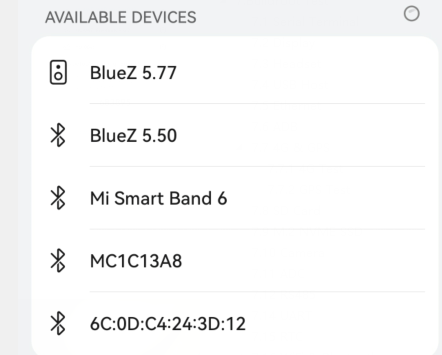
If a pairing confirmation message appears, confirm it on both the phone and the board.
[bluetooth]#
[  432.300087] rtk_btcoex: hci accept conn req
[  432.493911] rtk_btcoex: connected, handle 0002, status 0x00
[  432.493952] rtk_btcoex: Page success
[  432.548448] rtk_btcoex: io capability request
hci0 A8:35:12:9A:EB:4D type BR/EDR connected eir_len 11
[bluetooth]# bluealsa: [854] D: bluez.c:1199: Signal: org.freedesktop.DBus.ObjectManager.InterfacesAdded()
[NEW] Device A8:35:12:9A:EB:4D liuy
Request confirmation
[agent] Confirm passkey 585345 (yes/no): yes
[liuy]# [  439.265025] rtk_btcoex: link key notify
hci0 new_link_key A8:35:12:9A:EB:4D type 0x05 pin_len 0 store_hint 1
hci0 device_flags_changed: A8:35:12:9A:EB:4D (BR/EDR)
     supp: 0x00000000  curr: 0x00000000
[CHG] Device A8:35:12:9A:EB:4D INFO: 0x0007 (7)
[CHG] Device A8:35:12:9A:EB:4D Bonded: yes
[CHG] Device A8:35:12:9A:EB:4D UUIDs: 00001112-0000-1000-8000-00805f9b34fb
[  440.083762] rtk_btcoex: PSM(0x0001) do not need parse
[liuy]# [  440.100325] rtk_btcoex: l2cap op 3, len 20, out 0
[  440.100393] rtk_btcoex: RX l2cap conn rsp, hndl 0x0002, dcid 0x0052, scid 0x0041, result 0x0000
bluealsa: [854] D: bluez.c:1199: Signal: org.freedesktop.DBus.ObjectManager.InterfacesAdded()
[CHG] Device A8:35:12:9A:EB:4D Modalias: bluetooth:v010Fp107Ed1436
[CHG] Device A8:35:12:9A:EB:4D ServicesResolved: yes
[CHG] Device A8:35:12:9A:EB:4D INFO: 0x000f (15)
[CHG] Device A8:35:12:9A:EB:4D Paired: yes
Authorize service
[agent] Authorize service 00001108-0000-1000-8000-00805f9b34fb (yes/no): [  440.996577] rtk_btcoex: count_pan_packet_timeout: pan_packet_count 10
[agent] Authorize service 00001108-0000-1000-8000-00805f9b34fb (yes/no): yes
[liuy]# [  448.562980] rtk_btcoex: l2cap op 2, len 16, out 0
Authorize service
[agent] Authorize service 0000110d-0000-1000-8000-00805f9b34fb (yes/no): [  448.764668] rtk_btcoex: TX l2cap conn rsp, hndl 0x0002, dcid 0x0041, scid 0x005f, result 0x0001
W: [pulseaudio] module-loopback.c: Configured latency of 200.00 ms is smaller than minimum latency, using minimum instead
W: [pulseaudio] module-loopback.c: Cannot set requested sink latency of 66.67 ms, adjusting to 250.00 ms
W: [pulseaudio] module-loopback.c: Cannot set requested source latency of 16.00 ms, adjusting to 39.91 ms
W: [pulseaudio] module-loopback.c: Configured latency of 200.00 ms is smaller than minimum latency, using minimum instead
W: [pulseaudio] module-loopback.c: Cannot set requested sink latency of 35.20 ms, adjusting to 39.91 ms
W: [pulseaudio] module-loopback.c: Cannot set requested source latency of 66.67 ms, adjusting to 250.00 ms
[agent] Authorize service 0000110d-0000-1000-8000-00805f9b34fb (yes/no): yes
[liuy]#
Check the log output to confirm the MAC address. In this example, the MAC address of the mobile phone is A8:35:12:9A:EB:4D.
❺ Exit bluetoothctl.
1exit
❻ Start Bluetooth audio playback.
1bluealsa-aplay A8:35:12:9A:EB:4D &
[liuy]# exit
root@rv1126b-buildroot:/#
root@rv1126b-buildroot:/# bluealsa-aplay A8:35:12:9A:EB:4D &
[1] 1360
root@rv1126b-buildroot:/# bluealsa-aplay: [1360] D: aplay.c:1194: Starting main loop
After the Bluetooth connection is established, play audio on the phone. The audio should be output from the board.
5.8 IR LED
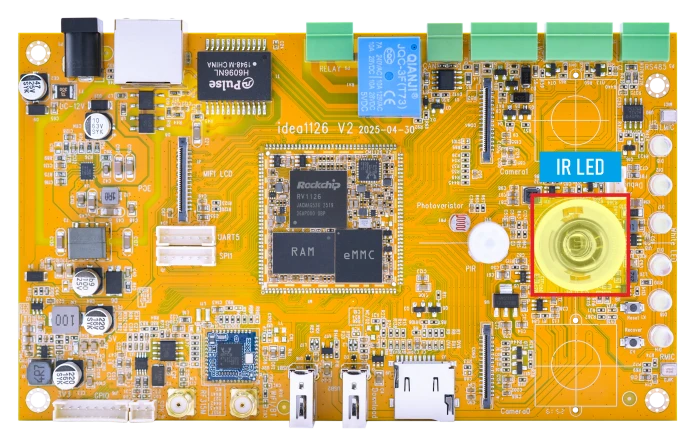
❶ Turn on the IR LED.
1echo 1 > /sys/class/leds/ir_led/brightness
❷ Turn off the IR LED.
1echo 0 > /sys/class/leds/ir_led/brightness
5.9 PIR
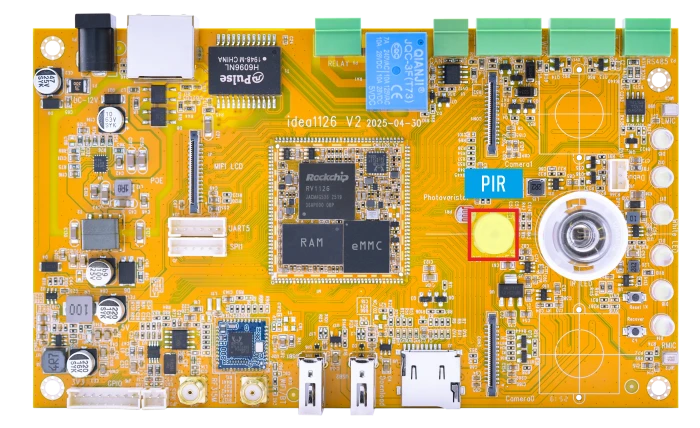
The PIR sensor is used to detect human motion by sensing changes in infrared radiation.
Test the PIR sensor:
1pir_test.sh
When human motion is detected, the output is 1. When no motion is detected, the output is 0.
root@rv1126b-buildroot:/# pir_test.sh
1
1
1
1
1
1
1
1
1
0
0
1
0
0
5.10 Photoresistor
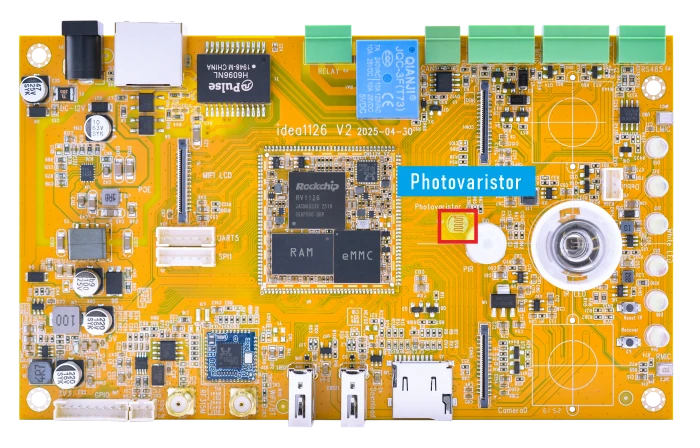
The photoresistor is used to detect ambient light intensity.
Read the raw ADC value.
1cat /sys/bus/iio/devices/iio\:device0/in_voltage1_raw
root@rv1126b-buildroot:/# cat /sys/bus/iio/devices/iio\:device0/in_voltage1_raw
2318
root@rv1126b-buildroot:/# cat /sys/bus/iio/devices/iio\:device0/in_voltage1_raw
2323
root@rv1126b-buildroot:/# cat /sys/bus/iio/devices/iio\:device0/in_voltage1_raw
1017
root@rv1126b-buildroot:/# cat /sys/bus/iio/devices/iio\:device0/in_voltage1_raw
636
root@rv1126b-buildroot:/# cat /sys/bus/iio/devices/iio\:device0/in_voltage1_raw
438
The output value changes with the ambient light intensity.
5.11 Relay

The relay has three terminals: NO, NC, and COM. By default, the relay is energized after power-on, and NO is connected to COM.
Release the relay:
1echo 1 > /sys/class/leds/raley_power/brightness
After execution, the relay is released, and NC is connected to COM.
To energize the relay again:
1echo 0 > /sys/class/leds/raley_power/brightness
After execution, NO is connected to COM again.
5.12 RF315
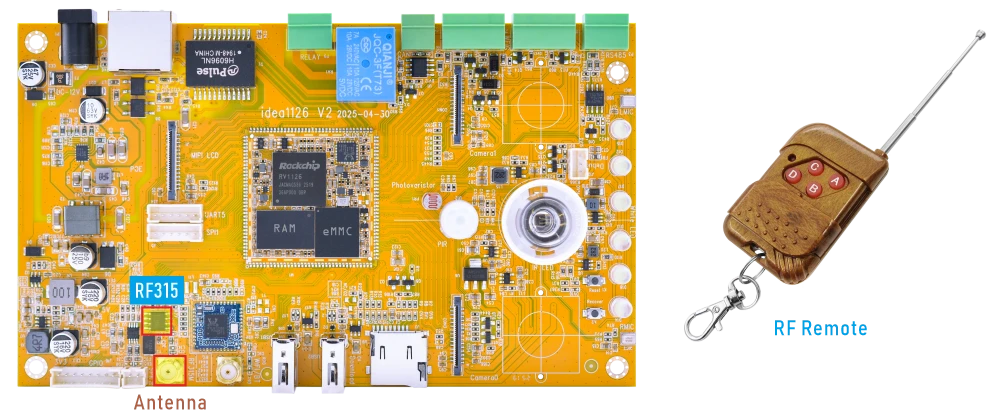
❶ Connect the RF315 antenna.
❷ Enable RF315 debug output.
1echo 1 > /sys/module/rf315_decode/parameters/code_print
❸ Press a key on the RF315 remote control.
If the signal is received correctly, the received key value will be printed in the serial console or system log.
root@rv1126b-buildroot:/# echo 1 > /sys/module/rf315_decode/parameters/code_print
root@rv1126b-buildroot:/#
[ 8909.453775] RF315 data=0xadf488
[ 8909.490630] RF315 data=0xadf488
[ 8911.531192] RF315 data=0xadf484
[ 8911.568093] RF315 data=0xadf484
[ 8913.331031] RF315 data=0xadf482
[ 8913.367931] RF315 data=0xadf482
[ 8914.712698] RF315 data=0xadf481
[ 8914.749613] RF315 data=0xadf481
[ 8916.782097] RF315 data=0xadf484
[ 8917.765258] RF315 data=0xadf482
[ 8917.802131] RF315 data=0xadf482
[ 8923.601151] RF315 data=0xadf488
5.13 Wiegand

The Wiegand interface is commonly used for access control devices, such as card readers and keypads.
The board provides two Wiegand interfaces: Wieg_OUT and Wieg_IN. A loopback test can be performed by connecting Wieg_OUT to Wieg_IN.
❶ Connect the Wiegand pins.
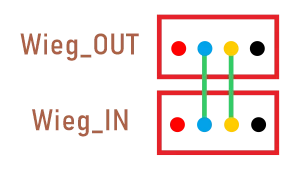
❷ Open a terminal through the serial port, run the Wiegand output test program.
1wg_out_test
root@rv1126b-buildroot:/# wg_out_test
hid is 0xa26f
pid is 0x8b5c
####Setup Wiegand output 26bit or 34bit.####
[1] Wiegand output 26bit
[2] Wiegand output 34bit
[0] quit
-------------------Select-------------------
Enter your Selection:
❸ Open another terminal through ADB and run the Wiegand input test program.
1wg_input_test
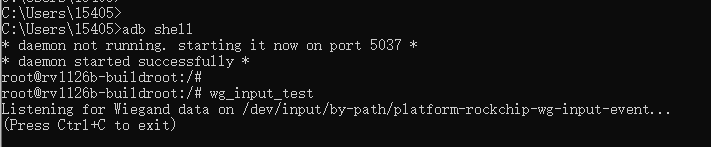
❹ Check whether the data received by wg_input_test matches the data sent by wg_out_test.
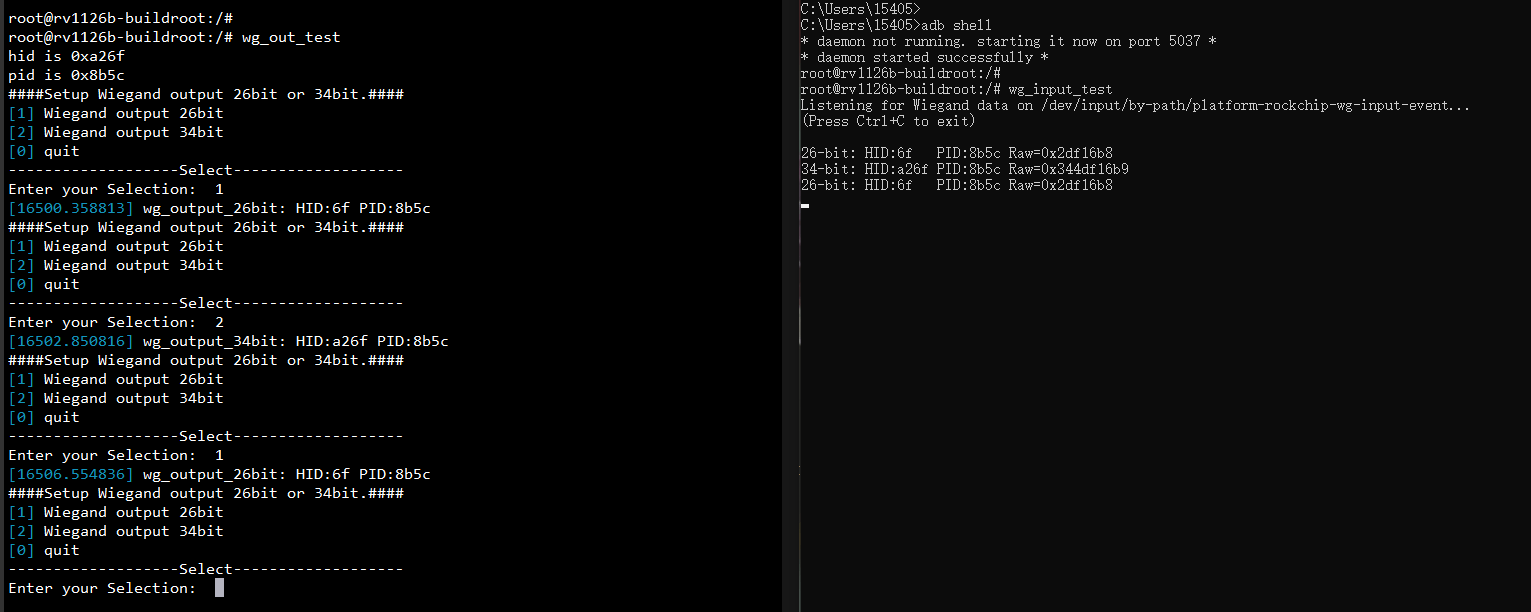
- Parameter Description:
The following uses the 26-bit Wiegand data HID: 6f PID: 8b5c Raw=0x2df16b8 as an example to describe the meaning of each parameter.
26-bit: HID:6f   PID:8b5c Raw=0x2df16b8

(1)Bit Grouping Structure:

1 | 01101111 | 1000101101011100 | 0
^
   Facility    Card Number         ^

(2)Breakdown:

P1 (Leading parity bit):1

Facility Code/HID:01101111 = 0x6F

Card Number/PID:1000101101011100 = 0x8B5C

P2 (Trailing parity bit):0
5.14 RS485

❶ Connect PC and board with USB-to-RS485 adapter.
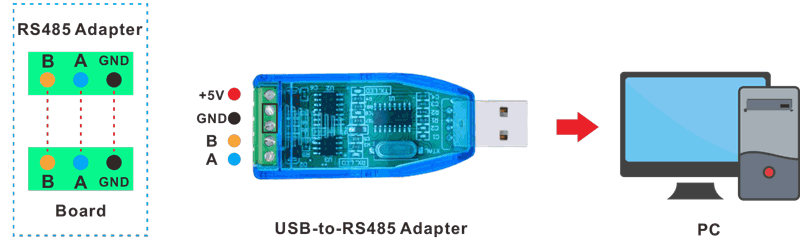
RS485 connection
❷ Open the Serial Terminal and set baud rate for the board and RS485 adapter respectively.
Baud rate: board - 1500000; RS485 adapter - 115200
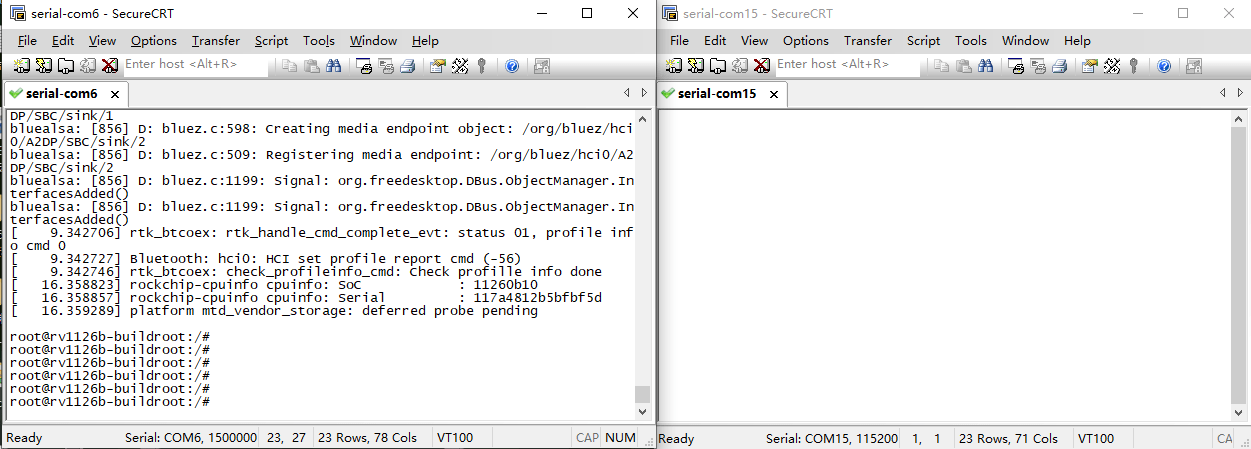
❸ Execute a command through the terminal serial port of the board.
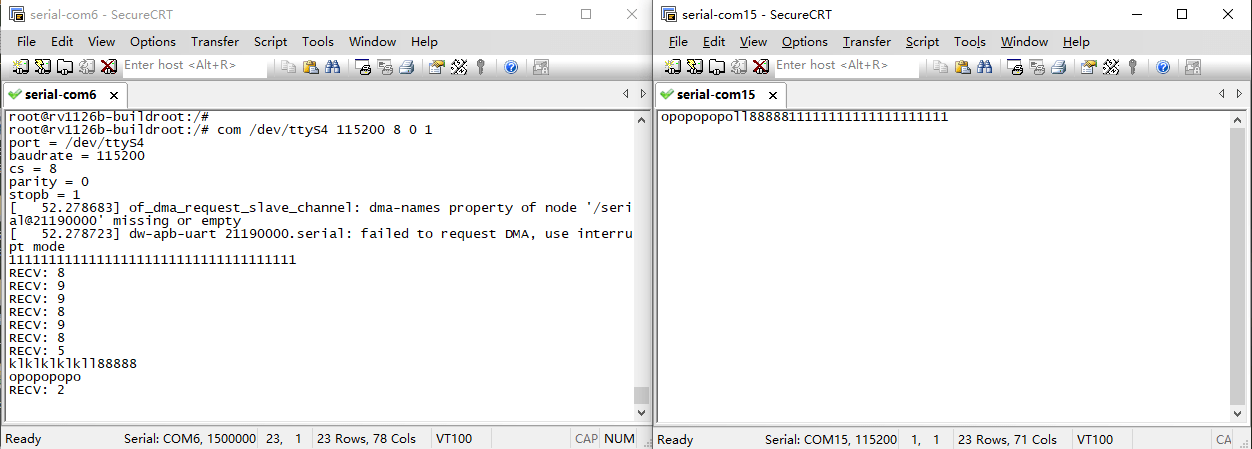
1com /dev/ttyS4 115200 8 0 1
❹ Input character to test RS485 communication.
5.15 UART
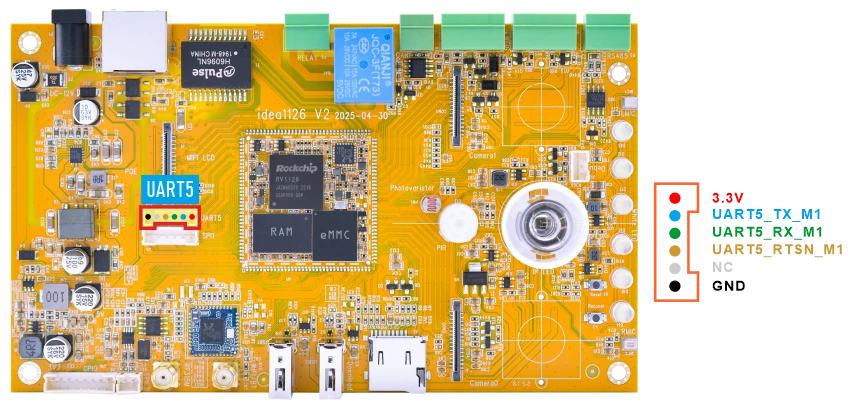
❶ Connect RX and TX of UART.
❷ Execute command and input character to test.
1com /dev/ttyS5 115200 8 0 1
root@rv1126b-buildroot:/# com /dev/ttyS5 115200 8 0 1
port = /dev/ttyS5
baudrate = 115200
cs = 8
parity = 0
stopb = 1
klklklkl123
RECV: klklklkl123
5.16 CAN

❶ Connect PC and board with USB-to-CAN adapter.
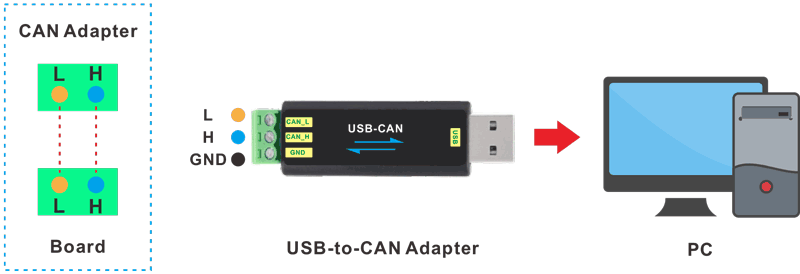
CAN connection
❷ Open the CAN application and set the baudrate to 500000 on PC.
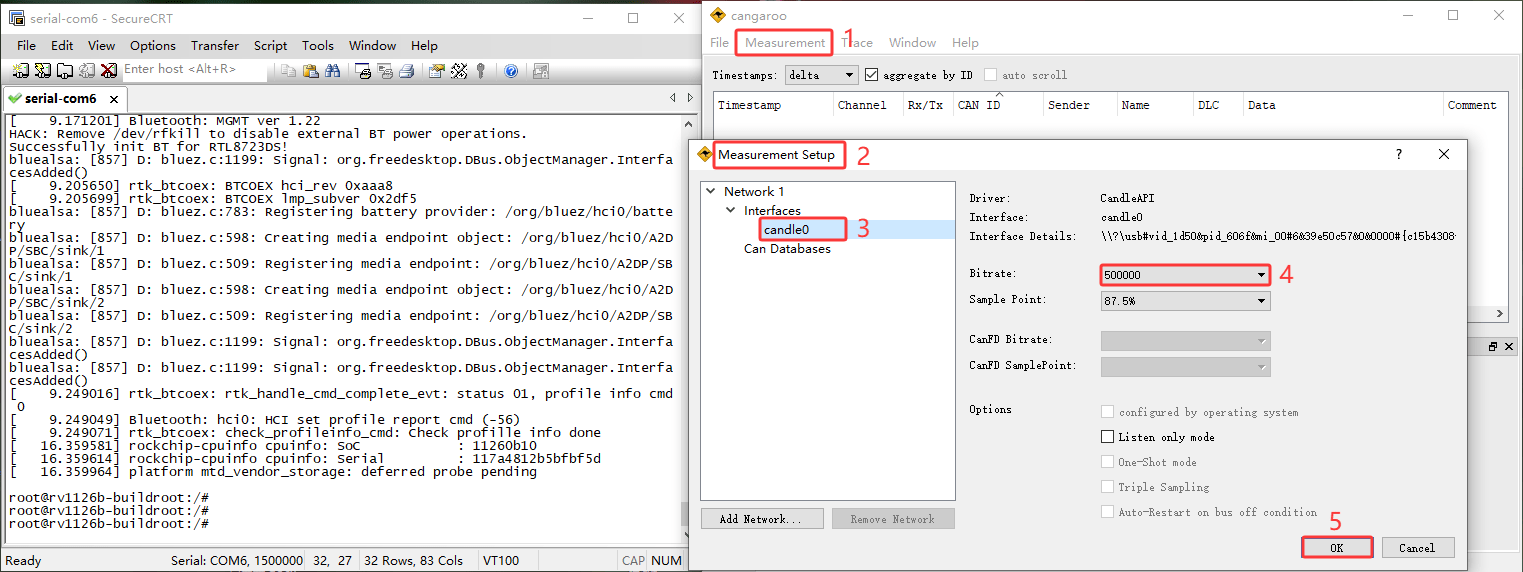
❸ Configure and enable the CAN0 interface on the board with a bitrate of 500000.
1ip link set can0 down
2ip link set can0 type can bitrate 500000 dbitrate 500000 fd on
3ip link set can0 up
❹ Configure the CAN test tool as the sender, and configure CAN0 on the board as the receiver.
1candump can0
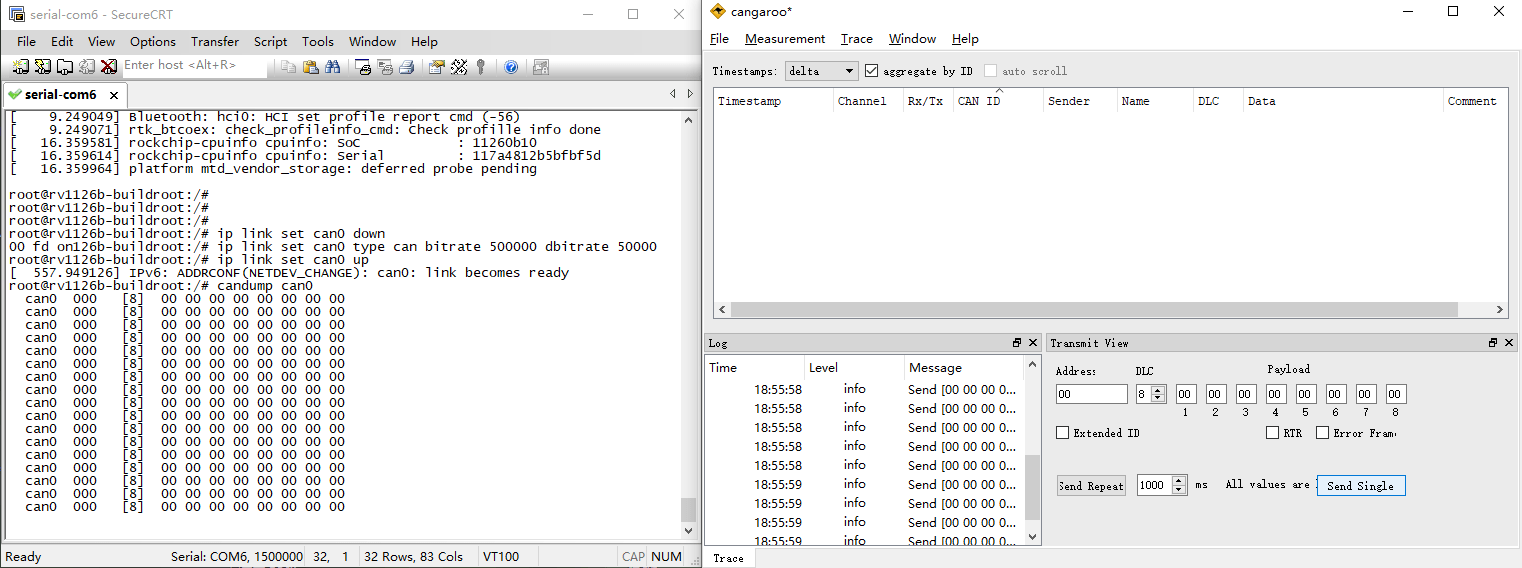
❺ Set CAN0 as Transmitter.
1cansend can0 123#11223344556677
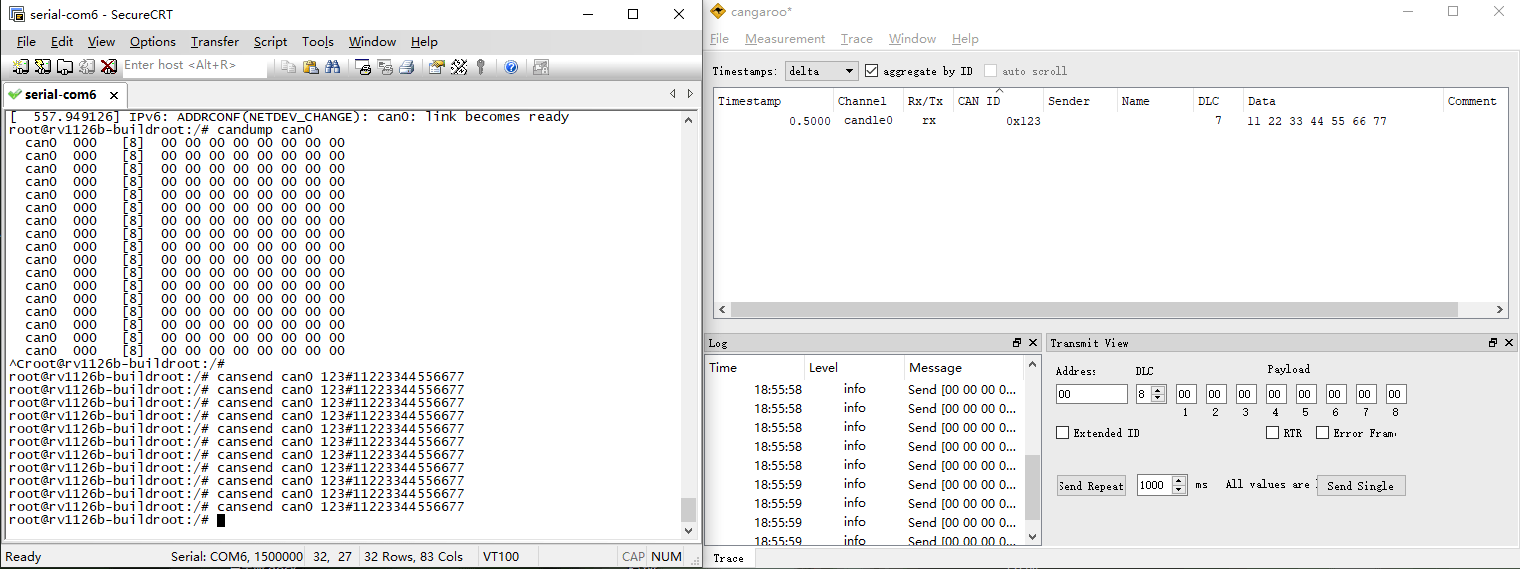
5.17 SPI
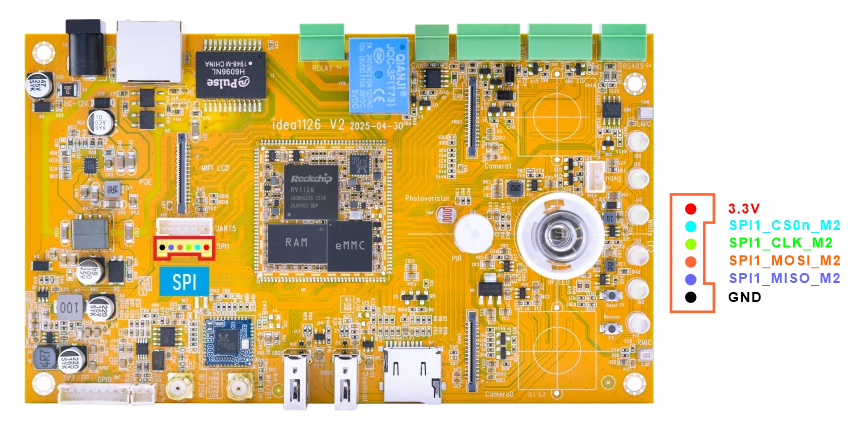
❶ Connect MOSI and MISO of SPI.
❷ SPI loopback test.
1spidev_test -D /dev/spidev1.0 -v
root@rv1126b-buildroot:/# spidev_test -D /dev/spidev1.0 -v
spi mode: 0x0
bits per word: 8
max speed: 500000 Hz (500 kHz)
TX | FF FF FF FF FF FF 40 00 00 00 00 95 FF FF FF FF FF FF FF FF FF FF FF FF FF FF FF FF FF FF F0 0D  |......@.........................|
RX | FF FF FF FF FF FF 40 00 00 00 00 95 FF FF FF FF FF FF FF FF FF FF FF FF FF FF FF FF FF FF F0 0D  |......@.........................|
root@rv1126b-buildroot:/#
5.18 White LED
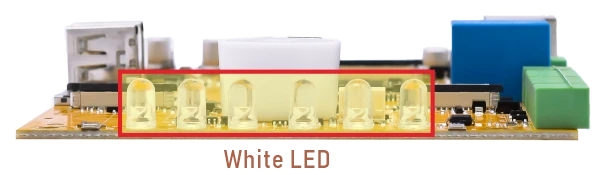
❶ Turn on the LED.
1echo 1 > /sys/class/leds/user_led/brightness
❷ Turn on the LED.
1echo 0 > /sys/class/leds/user_led/brightness
5.19 Camera
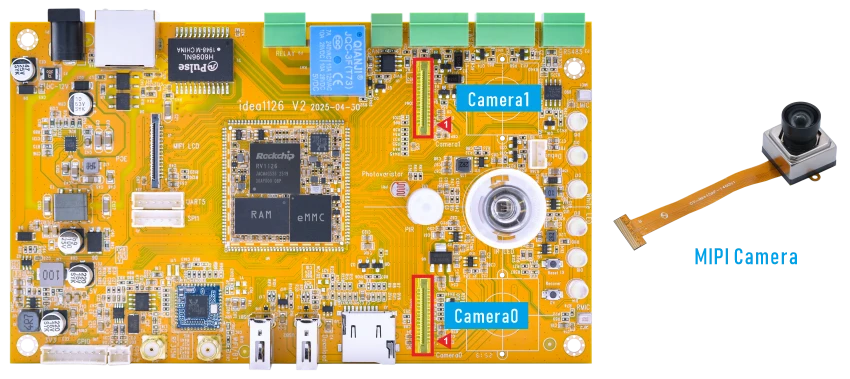
5.19.1 GStreamer Version
❶ Connect two cameras to the development board and power on.
❷ Check the video device nodes.
1grep "" /sys/class/video4linux/v*/name | grep mainpath
root@rv1126b-buildroot:/# grep "" /sys/class/video4linux/v*/name | grep mainpath
/sys/class/video4linux/video23/name:rkisp_mainpath4linux/v*/name | grep mainpath
/sys/class/video4linux/video31/name:rkisp_mainpath
The output shows that camera0 uses the device node /dev/video23, and camera1 uses the device node /dev/video31
❸ Preview (camera0 for example).
1gst-launch-1.0 v4l2src device=/dev/video23 ! video/x-raw,format=NV16,width=1920,height=1080, framerate=25/1 ! waylandsink
❹ Record video.
1gst-launch-1.0 v4l2src device=/dev/video23 num-buffers=100 ! \
2video/x-raw,format=NV12,width=1920,height=1080,framerate=30/1 ! \
3videoconvert ! mpph264enc ! h264parse ! mp4mux ! \
4filesink location=/tmp/h264.mp4
❺ Capture JPEG images.
1gst-launch-1.0 -v v4l2src device=/dev/video23 num-buffers=10 ! \
2video/x-raw,format=NV12,width=1920,height=1080 ! mppjpegenc ! \
3multifilesink location=/tmp/test%05d.jpg
5.19.2 Rockit Version
❶ Stop the default rkipc service.
1killall -9 rkipc
❷ Check the network status and obtain the Ethernet IP address of the board.
1ifconfig eth0
root@rv1126b-buildroot:/# ifconfig eth0
eth0      Link encap:Ethernet  HWaddr 1A:25:9A:BA:66:BF
          inet addr:192.168.0.205  Bcast:192.168.0.255  Mask:255.255.255.0
          inet6 addr: fe80::4c00:9dc6:a350:5a53/64 Scope:Link
          UP BROADCAST RUNNING MULTICAST  MTU:1500  Metric:1
          RX packets:17 errors:0 dropped:1 overruns:0 frame:0
          TX packets:8 errors:0 dropped:0 overruns:0 carrier:0
          collisions:0 txqueuelen:1000
          RX bytes:1614 (1.5 KiB)  TX bytes:1200 (1.1 KiB)
          Interrupt:80
❸ Start the camera demo.
1sample_demo_dual_camera -s 0 -W 1920 -H 1080 -w 720 -h 576 -f 30 -r 0 -s 1 -W 1920 -H 1080 -w 720 -h 576 -f 30 -r 0 -n 0 -b 1
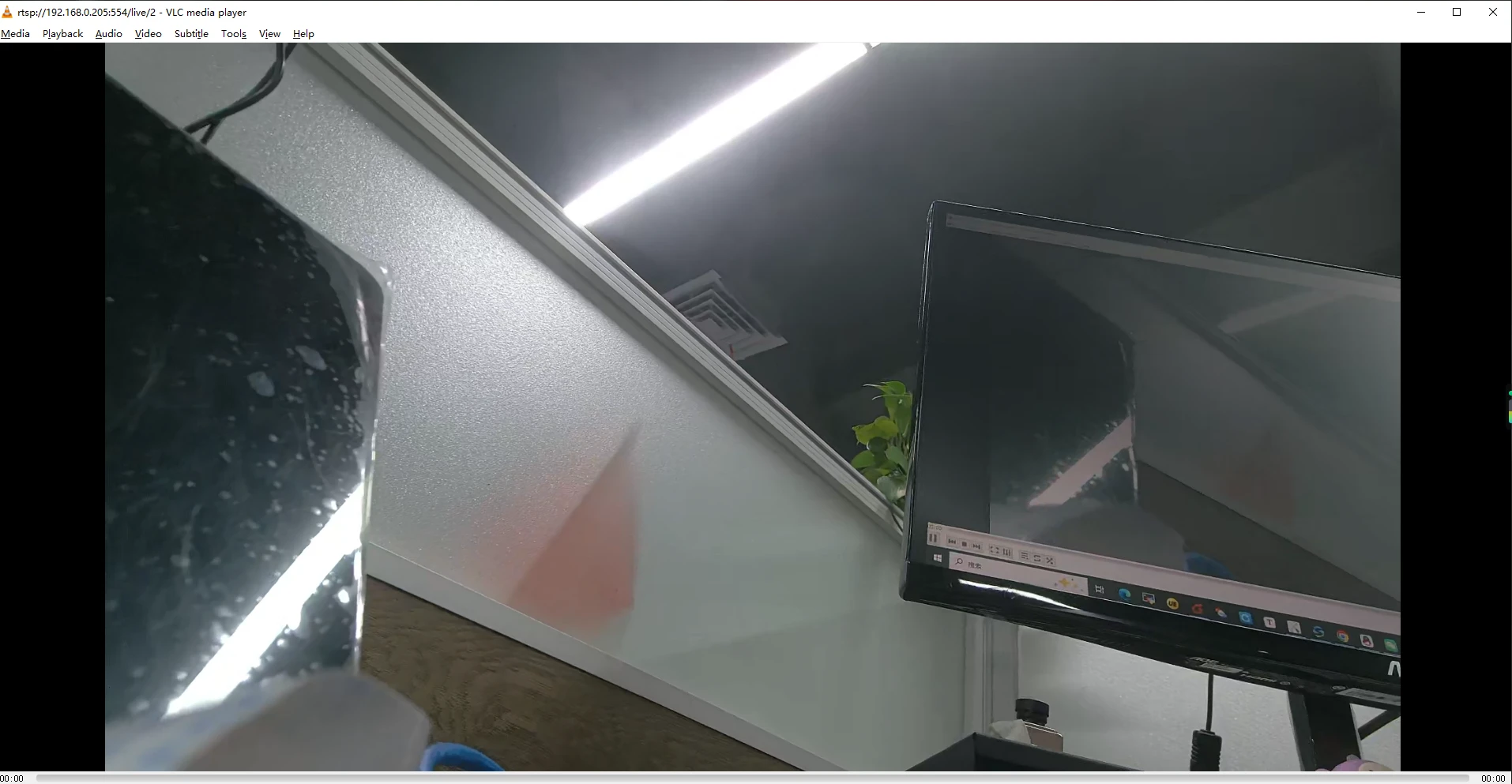
❹ Preview the camera stream on the PC.
Open VLC media player on the PC, select Media -> Open Network Stream… and enter one of the following RTSP URLs.
Camera0
1rtsp://192.168.0.205:554/live/0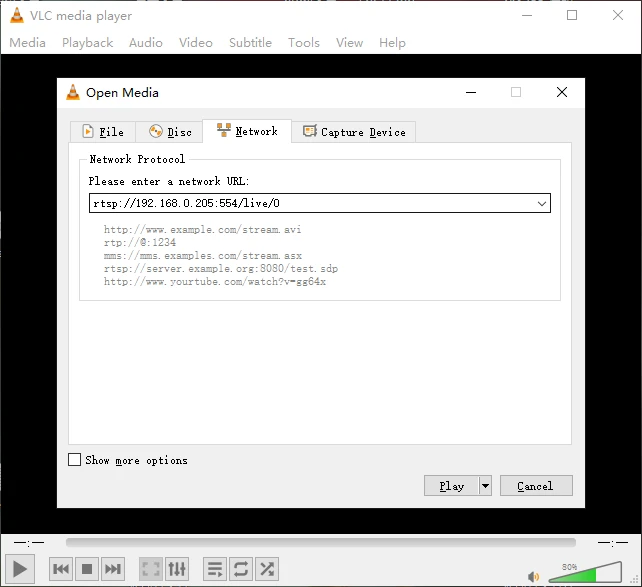
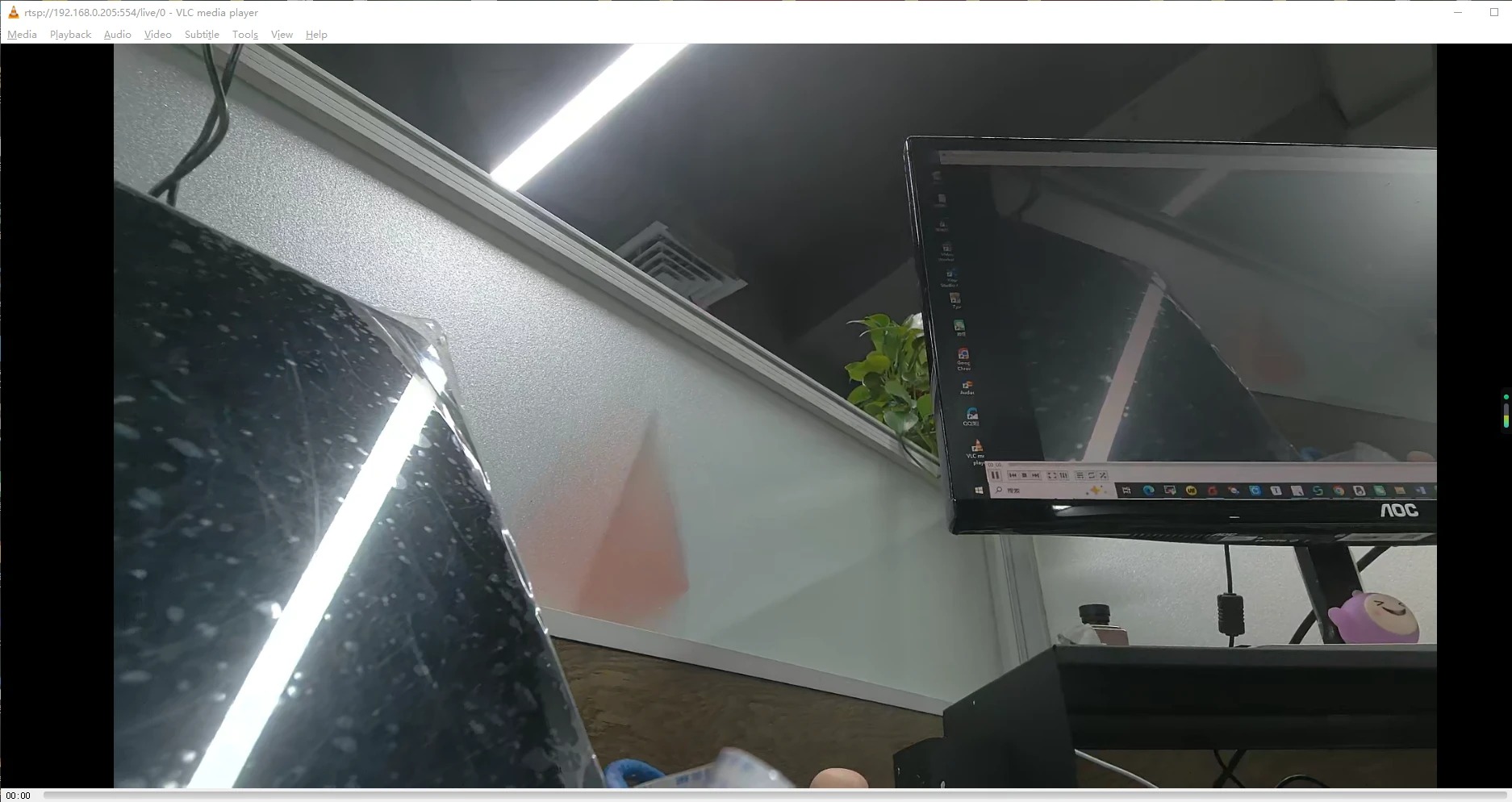
Camera1
1rtsp://192.168.0.205:554/live/2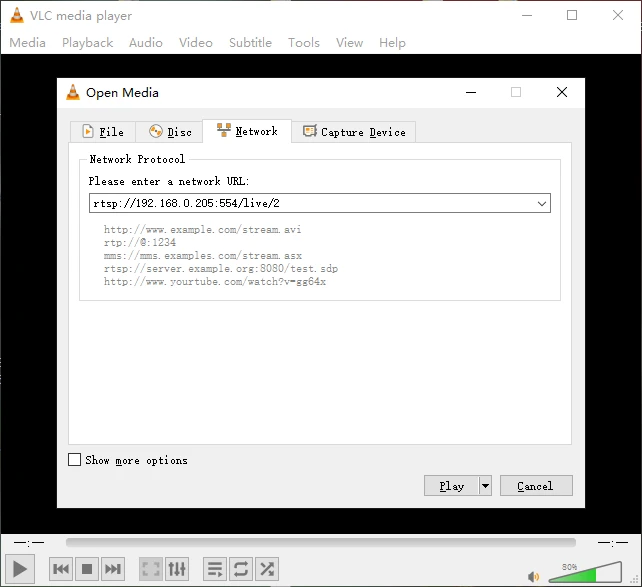
Note
Replace 192.168.0.205 with the actual Ethernet IP address of the board.
5.20 Video Playback
5.20.1 GStreamer Version
5.20.1.1 Built-in playback
The script instruction directory is in /rockchip-test/video/, just run it.
root@rv1126b-buildroot:/# ls /rockchip-test/video/
test_gst_multivideo.sh       test_gst_video_fps.sh     video_test.sh
test_gst_video.sh            test_gst_video_maxfps.sh
test_gst_video_benchmark.sh  video_stresstest.sh
root@rv1126b-buildroot:/# /rockchip-test/video/test_gst_video.sh
Setting pipeline to PAUSED ...
Pipeline is PREROLLING ...
Redistribute latency...
mpp[2290]: mpp_info: mpp version: 53ff3d39 author: Yandong Lin   2025-12-23 fix[hal_vepu]: poll max set to 1 on split out lowdelay mode
mpp[2290]: mpp_info: mpp version: 53ff3d39 author: Yandong Lin   2025-12-23 fix[hal_vepu]: poll max set to 1 on split out lowdelay mode
mpp[2290]: mpp_info: mpp version: 53ff3d39 author: Yandong Lin   2025-12-23 fix[hal_vepu]: poll max set to 1 on split out lowdelay mode
mpp[2290]: mpp: unable to create enc vp8 for soc rv1126b unsupported
mpp[2290]: mpp_info: mpp version: 53ff3d39 author: Yandong Lin   2025-12-23 fix[hal_vepu]: poll max set to 1 on split out lowdelay mode
mpp[2290]: mpp_info: mpp version: 53ff3d39 author: Yandong Lin   2025-12-23 fix[hal_vepu]: poll max set to 1 on split out lowdelay mode
Redistribute latency...
mpp[2290]: h264d_api: is_avcC=1
mpp[2290]: mpp_buf_slot: mismatch h_stride_by_pixel 1472 - 1280
mpp[2290]: mpp_buf_slot: mismatch h_stride_by_byte 1472 - 1280
mpp[2290]: mpp_buf_slot: mismatch size_total 1589760 - 1843200
mpp[2290]: mpp_buf_slot: mismatch h_stride_by_pixel 1472 - 1280
mpp[2290]: mpp_buf_slot: mismatch h_stride_by_byte 1472 - 1280
mpp[2290]: mpp_buf_slot: mismatch size_total 1589760 - 1843200
Pipeline is PREROLLED ...
Prerolled, waiting for async message to finish...
Setting pipeline to PLAYING ...
New clock: GstSystemClock
Redistribute latency...
0:00:03.9 / 0:00:29.5 (13.3 %)
5.20.1.2 Command line
1export GST_MPP_VIDEODEC_DEFAULT_ARM_AFBC=1
2gst-play-1.0 --videosink="waylandsink fullscreen=true" /mnt/udisk/video/4KP30/4K30P-BLACKPINK-DDU-DU_DDU-DU.mp4 --audiosink="alsasink device=hw:0,0"
Command explanation:
export GST_MPP_VIDEODEC_DEFAULT_ARM_AFBC=1Open AFBC.
--videosink="kmssink plane-id=74"Specifies the plane. Which can be viewed using the command cat /sys/kernel/debug/dri/0/state | grep “plane[”.
/mnt/udisk/video/4KP30/4K30P-BLACKPINK-DDU-DU_DDU-DU.mp4The media file path to be played.
--audiosink="alsasink device=hw:0,0"Specifies the audio output device as hw:0,0.
5.20.2 Rockit Version
❶ Stop the default rkipc service.
1killall -9 rkipc
root@rv1126b-buildroot:/# killall -9 rkipc
root@rv1126b-buildroot:/#
[   19.533598] mpp_vcodec_chan: mpp_vcodec_chan_destory: destroy chan 3 hnd 000000003ddc32e2 online 0 combo -1 mst -1
[   19.533841] mpp_vcodec_chan: mpp_vcodec_chan_destory: destroy chan 3 done
[   19.533868] mpp_vcodec_chan: mpp_vcodec_chan_destory: destroy chan 1 hnd 0000000030ab6293 online 0 combo -1 mst -1
[   19.547082] mpp_vcodec_chan: mpp_vcodec_chan_destory: destroy chan 1 done
[   19.547137] mpp_vcodec_chan: mpp_vcodec_chan_destory: destroy chan 0 hnd 000000000b16c964 online 0 combo -1 mst -1
[   19.547374] mpp_vcodec_chan: mpp_vcodec_chan_destory: destroy chan 0 done
[   19.554306] kmpp_venc_chan_put_frm: invalid chan id 0
[   19.554912] kmpp_venc_chan_put_frm: invalid chan id 1
[   19.587637] kmpp_venc_chan_put_frm: invalid chan id 0
[   19.620837] rkcif-mipi-lvds: stream[0] start stopping, total mode 0x8, cur 0x8
[   19.667880] rockchip-mipi-csi2 mipi0-csi2: stream off, src_sd: 00000000a2f5faab, sd_name:rockchip-csi2-dphy0
[   19.667919] rockchip-mipi-csi2 mipi0-csi2: stream OFF
[   19.667950] rockchip-csi2-dphy csi2-dphy0: csi2_dphy_s_stream_stop stream stop, dphy0
[   19.667972] rockchip-csi2-dphy csi2-dphy0: csi2_dphy_s_stream stream on:0, dphy0, ret 0
[   19.668007] imx415 5-0036: s_stream: 0. 3864x2192, hdr: 0, bpp: 10
[   19.668542] rkcif-mipi-lvds: stream[0] stopping finished, dma_en 0x0
[   20.706397] rkisp-vir0: waiting on params stream off event timeout
[   21.026378] rkvpss-vir0: rkvpss_stream_stop id:0 timeout
[   21.035507] ivs_release 20
[   21.035833] vi_release 27
[   21.035882] rockit vpss stream off
[   21.035943] rockit vpss stream off
[   21.035985] rockit vpss stream off
[   21.036059] venc_release 19
[   21.036191] vrgn_release 30
[   21.049362] vsys_release, 6
[   21.138784] dw9714 5-000c: dw9714_set_power(1046) on(0)
❷ Video playback.
1simple_vdec_bind_vo -i /mnt/udisk/testh264.h264
root@rv1126b-buildroot:/# simple_vdec_bind_vo -i /mnt/udisk/testh264.h264
Input: /mnt/udisk/testh264.h264, Bind: 1
rockit_load start
v4l2_tx probe successv4l2_rx_probe success
rockit_load end
rockit log path (null), log_size = 0
log_file = (nil)
(null)           02:48:12-602 {log_level_init    :209}

 please use echo name=level > /tmp/rt_log_level set log level
        name: all cmpi mb sys vdec venc rgn vpss vgs tde avs wbc vo vi ai ao aenc adec
        log_level: 0 1 2 3 4 5 6

rockit default level 4, can use export rt_log_level=x, x=0,1,2,3,4,5,6 change
(null)           02:48:12-602 {read_log_level    :083} text is all=4
(null)           02:48:12-602 {read_log_level    :085} module is all, log_level is 4
(null)           02:48:12-602 {dump_version      :060} ---------------------------------------------------------
(null)           02:48:12-603 {dump_version      :061} rockit version: git-5057bd373 Thu Dec 11 09:34:24 2025 +0800
(null)           02:48:12-603 {dump_version      :062} rockit building: built-Chu 2025-12-15 10:15:00
(null)           02:48:12-603 {dump_version      :063} ---------------------------------------------------------
(null)           02:48:12-603 {monitor_log_level :141} #Start monitor_log_level thread, arg:(nil)
vsys dev open 4
[   54.203995] vsys dev open 6
[   54.215177] rkvpss-offline: CLK_CORE_VPSS set to 396000000 Hz (requested 400000000 Hz)
load library(librga.so) in releative path
Video resolution: 800x1280, Codec: H.264
mpp[1465]: mpp_info: mpp version: 53ff3d39 author: Yandong Lin   2025-12-23 fix[hal_vepu]: poll max set to 1 on split out lowdelay mode
mpp[1465]: hal_264d_com: control info: fmt 0, w 800, h 1280
mpp[1465]: mpp_dec: mpp_dec_proc_cfg found MPP_DEC_SET_FRAME_INFO fmt 0
mpp[1465]: mpp_buf_slot: mismatch h_stride_by_pixel 960 - 800
mpp[1465]: mpp_buf_slot: mismatch h_stride_by_byte 960 - 800
mpp[1465]: mpp_buf_slot: mismatch size_total 1843200 - 2048000
mpp[1465]: mpp_buf_slot: set frame info: w  800 h 1280 hor  800 ver 1280
mpp[1465]: mpp_dec: setting default w  800 h 1280 h_str  800 v_str 1280
Video codec: H.264/AVC
Video: 800x1280, timebase: 1/1200000
[SEND] Frame 100, PTS=0 us
get a hdl = 0x558c383870
[   54.529486] phys = 53278000
get a hdl = 0x558c3839d0
[   54.533331] phys = 4af1f000
get a hdl = 0x558c3841e0
load library(librga.so) in releative path
rga_api version 1.10.5_[9]
Command explanation:
simple_vdec_bind_voVideo decoding and display test tool.
-iSpecifies the input video file.
/mnt/udisk/testh264.h264Input H.264 file path.