3. Debian Application
Account: linaro;
Password: linaro
3.1 Serial Terminal
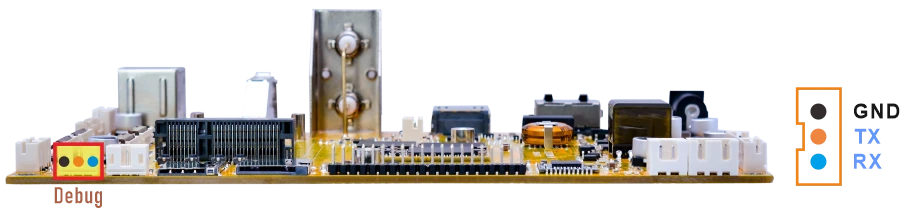
❶ Connect the USB-to-serial module to the PC and connect the other end to the Debug UART interface on the board.
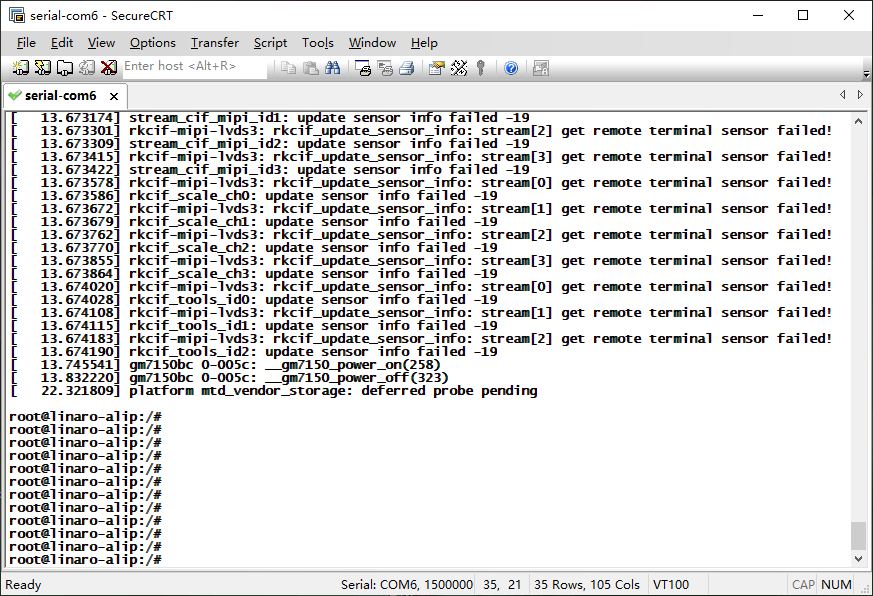
❷ Open a serial terminal tool on the PC, select the corresponding serial port, and set the baud rate to 1500000.
❸ Power on the board and check whether the boot log is displayed in the serial terminal.
3.2 Display
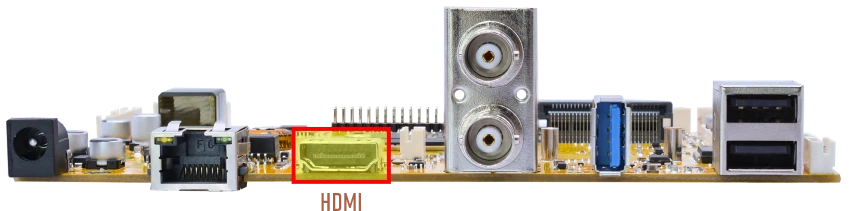
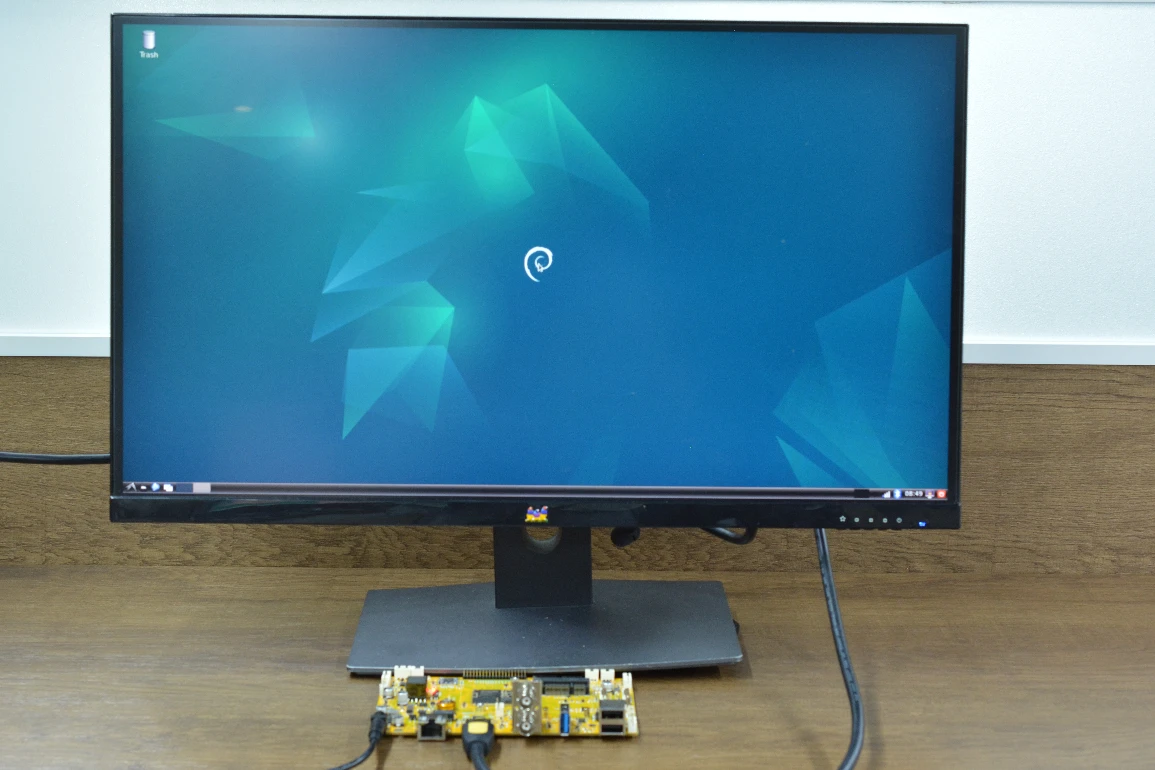
The KIT1126B uses an LT9611 MIPI-to-HDMI bridge chip to convert the MIPI DSI display signal to HDMI output. The HDMI interface supports 1920×1080@60Hz video output.
1cat /sys/class/lt9611/hdmi/status
3.3 USB
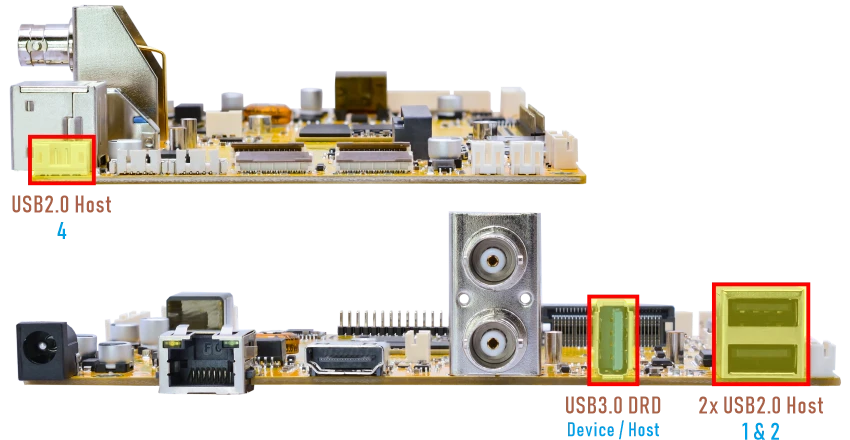
3.3.1 USB3.0 DRD
The USB3.0 DRD supports both Host and Device roles, with Device as the default configuration for image flashing/upgrading. It can be switched to host mode by command, after which it supports peripherals such as mouse, keyboards, and USB flash drives.
1echo host > /sys/kernel/debug/usb/21500000.usb/mode
root@linaro-alip:/# echo host > /sys/kernel/debug/usb/21500000.usb/mode
root@linaro-alip:/# [  181.246010] dwc3 21500000.usb: request 00000000ff01b354 was not queued to ep0out
[  181.246123] android_work: did not send uevent (0 0 0000000000000000)
[  181.292970] read descriptors
[  181.293003] read strings
[  181.353390] phy phy-21400000.usb2-phy.2: illegal mode
[  181.353439] xhci-hcd xhci-hcd.1.auto: xHCI Host Controller
[  181.353715] xhci-hcd xhci-hcd.1.auto: new USB bus registered, assigned bus number 3
[  181.353869] xhci-hcd xhci-hcd.1.auto: hcc params 0x0220fe64 hci version 0x110 quirks 0x0002008022010010
[  181.353914] xhci-hcd xhci-hcd.1.auto: irq 76, io mem 0x21500000
[  181.354037] xhci-hcd xhci-hcd.1.auto: xHCI Host Controller
[  181.354289] xhci-hcd xhci-hcd.1.auto: new USB bus registered, assigned bus number 4
[  181.354321] xhci-hcd xhci-hcd.1.auto: Host supports USB 3.0 SuperSpeed
[  181.354481] usb usb3: New USB device found, idVendor=1d6b, idProduct=0002, bcdDevice= 6.01
[  181.354497] usb usb3: New USB device strings: Mfr=3, Product=2, SerialNumber=1
[  181.354505] usb usb3: Product: xHCI Host Controller
[  181.354512] usb usb3: Manufacturer: Linux 6.1.141 xhci-hcd
[  181.354518] usb usb3: SerialNumber: xhci-hcd.1.auto
[  181.355185] hub 3-0:1.0: USB hub found
[  181.355232] hub 3-0:1.0: 1 port detected
[  181.355586] usb usb4: We don't know the algorithms for LPM for this host, disabling LPM.
[  181.355699] usb usb4: New USB device found, idVendor=1d6b, idProduct=0003, bcdDevice= 6.01
[  181.355712] usb usb4: New USB device strings: Mfr=3, Product=2, SerialNumber=1
[  181.355719] usb usb4: Product: xHCI Host Controller
[  181.355726] usb usb4: Manufacturer: Linux 6.1.141 xhci-hcd
[  181.355732] usb usb4: SerialNumber: xhci-hcd.1.auto
[  181.356199] hub 4-0:1.0: USB hub found
[  181.356240] hub 4-0:1.0: 1 port detected
In USB host mode, when a USB flash drive is connected, a removable media dialog box will pop up automatically.
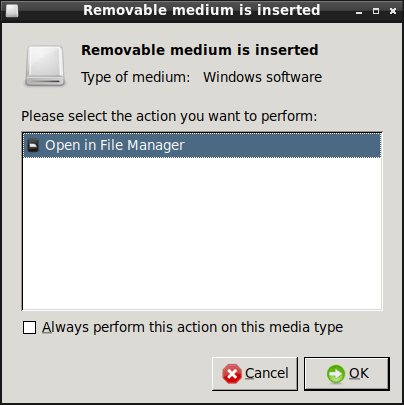
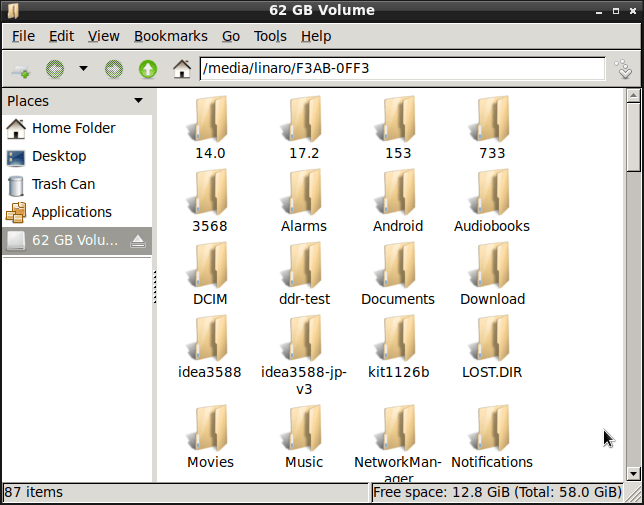
Keep Open in File Manager selected and click OK. The system will then open the USB flash drive directory, and users can access the files on the USB flash drive.
The current USB connection speed can be checked from the kernel log.
When the device operates in USB2.0 mode, the log usually shows high-speed.
Serial terminal output[ 29.129173] usb 1-1.4: new high-speed USB device number 4 using ehci-platform [ 29.271041] usb 1-1.4: New USB device found, idVendor=0dd8, idProduct=3b00, bcdDevice= 0.02 [ 29.271084] usb 1-1.4: New USB device strings: Mfr=1, Product=2, SerialNumber=3 [ 29.271103] usb 1-1.4: Product: OnlyDisk [ 29.271117] usb 1-1.4: Manufacturer: Netac [ 29.271132] usb 1-1.4: SerialNumber: C0E8BFA3EC38F796 [ 29.272832] usb-storage 1-1.4:1.0: USB Mass Storage device detected [ 29.273819] scsi host0: usb-storage 1-1.4:1.0 [ 30.369514] scsi 0:0:0:0: Direct-Access Netac OnlyDisk 8.01 PQ: 0 ANSI: 6 [ 30.375530] sd 0:0:0:0: [sda] 121610240 512-byte logical blocks: (62.3 GB/58.0 GiB) [ 30.376532] sd 0:0:0:0: [sda] Write Protect is off [ 30.377264] sd 0:0:0:0: [sda] Write cache: disabled, read cache: enabled, doesn't support DPO or FUA [ 30.385346] sda: sda1 [ 30.385745] sd 0:0:0:0: [sda] Attached SCSI removable disk [ 30.739171] FAT-fs (sda1): utf8 is not a recommended IO charset for FAT filesystems, filesystem will be case sensitive! [ 30.746158] FAT-fs (sda1): Volume was not properly unmounted. Some data may be corrupt. Please run fsck.
When the device operates in USB3.0 mode, the log usually shows SuperSpeed.
Serial terminal output[12018.032123] usb 4-1: new SuperSpeed USB device number 2 using xhci-hcd [12018.061656] usb 4-1: New USB device found, idVendor=0dd8, idProduct=3b00, bcdDevice= 0.02 [12018.061687] usb 4-1: New USB device strings: Mfr=1, Product=2, SerialNumber=3 [12018.061696] usb 4-1: Product: OnlyDisk [12018.061703] usb 4-1: Manufacturer: Netac [12018.061710] usb 4-1: SerialNumber: C0E8BFA3EC38F796 [12018.063818] usb-storage 4-1:1.0: USB Mass Storage device detected [12018.064352] scsi host0: usb-storage 4-1:1.0 [12019.809647] scsi 0:0:0:0: Direct-Access Netac OnlyDisk 8.01 PQ: 0 ANSI: 6 [12019.813201] sd 0:0:0:0: [sda] 121610240 512-byte logical blocks: (62.3 GB/58.0 GiB) [12019.813803] sd 0:0:0:0: [sda] Write Protect is off [12019.814173] sd 0:0:0:0: [sda] Write cache: disabled, read cache: enabled, doesn't support DPO or FUA [12019.819871] sda: sda1 [12019.820429] sd 0:0:0:0: [sda] Attached SCSI removable disk
1echo device > /sys/kernel/debug/usb/21500000.usb/mode
2usbdevice start
root@linaro-alip:/# echo device > /sys/kernel/debug/usb/21500000.usb/mode
[  135.621011] xhci-hcd xhci-hcd.1.auto: remove, state 4
[  135.621056] usb usb4: USB disconnect, device number 1
root@linaro-alip:/# [  135.622239] xhci-hcd xhci-hcd.1.auto: USB bus 4 deregistered
[  135.622541] xhci-hcd xhci-hcd.1.auto: remove, state 4
[  135.622569] usb usb3: USB disconnect, device number 1
[  135.624313] xhci-hcd xhci-hcd.1.auto: USB bus 3 deregistered
[  137.050107] read descriptors
[  137.050143] read strings
[  137.404721] dwc3 21500000.usb: device reset
[  137.491762] android_work: sent uevent USB_STATE=CONNECTED
[  137.525471] android_work: sent uevent USB_STATE=CONFIGURED
root@linaro-alip:/# usbdevice start
[2026-04-28 03:26:50] usbdevice [3848]: Sending start request to service...
[2026-04-28 03:26:50] usbdevice [3848]: Check /var/log/usb-gadget.log for usb-service log...
3.3.2 USB2.0 Host
The USB2.0 Host can connect peripherals such as mice, keyboards, and flash drives.
After a USB flash drive is inserted and recognized successfully, a removable media dialog box will pop up automatically.
Keep Open in File Manager selected and click OK. The system will then open the USB flash drive directory, and users can access the files on the USB flash drive.
3.4 Audio
3.4.1 Audio Input
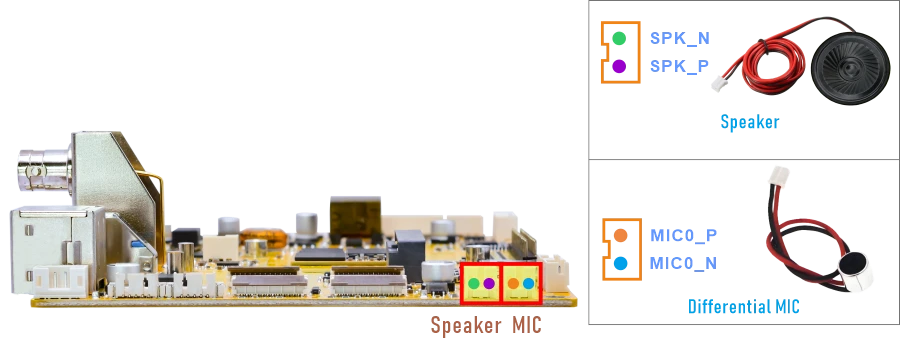
❶ Connect the MIC to the connector (2-pin/2.0mm pitch).
❷ Configure Audio input gain.
1amixer -c 0 cset name='ACodec Digital Gain Volume' 100
root@linaro-alip:/# amixer -c 0 cset name='ACodec Digital Gain Volume' 100
numid=44,iface=MIXER,name='ACodec Digital Gain Volume'
  ; type=INTEGER,access=rw---R--,values=1,min=0,max=127,step=0
  : values=100
  | dBscale-min=-95.00dB,step=0.75dB,mute=0
❸ Record audio.
1arecord -D hw:0,0 -f cd -t wav test.wav
root@linaro-alip:/# arecord -D hw:0,0 -f cd  -t wav test.wav
Recording WAVE 'test.wav' : Signed 16 bit Little Endian, Rate 44100 Hz, Stereo
3.4.2 Audio Output
❶ Connect the Speaker to the connector (2-pin/2.0mm pitch)
❷ Check Audio devices.
1cat /proc/asound/cards
root@linaro-alip:/# cat /proc/asound/cards
 0 [rockchiprv1126b]: rockchip_rv1126 - rockchip,rv1126b-acodec
                      rockchip,rv1126b-acodec
 1 [lt9611ex       ]: simple-card - lt9611ex
                      lt9611ex
❸ Configure Audio output volume.
1amixer -c 0 cset name='DAC Digital Volume' 250,250
❹ Play the audio file.
1aplay -D hw:0,0 test.wav
1aplay -D hw:1,0 test.wav
3.5 Ethernet
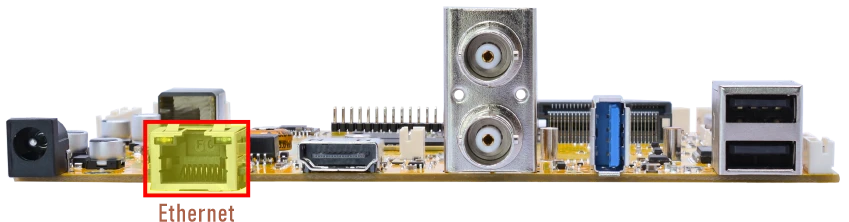
The KIT1126B provides a 100M Ethernet RJ45 interface with PoE support, allowing both data transmission and power supply through a single Ethernet cable.
❶ Connect the network cable to the Ethernet port.
[ 2764.898280] rk_gmac-dwmac 21c70000.ethernet end0: Link is Up - 100Mbps/Full - flow control rx/tx
[ 2764.898305] IPv6: ADDRCONF(NETDEV_CHANGE): end0: link becomes ready
❷ Check the network interface information.
1ifconfig end0
root@linaro-alip:/# ifconfig end0
end0: flags=4163<UP,BROADCAST,RUNNING,MULTICAST>  mtu 1500
        inet 192.168.0.65  netmask 255.255.255.0  broadcast 192.168.0.255
        inet6 fe80::4c82:5f17:7cfd:99fb  prefixlen 64  scopeid 0x20<link>
        ether 0a:11:04:25:8b:c9  txqueuelen 1000  (Ethernet)
        RX packets 239  bytes 23252 (22.7 KiB)
        RX errors 0  dropped 19  overruns 0  frame 0
        TX packets 121  bytes 11107 (10.8 KiB)
        TX errors 0  dropped 0 overruns 0  carrier 0  collisions 0
        device interrupt 74
❸ Test network connectivity.
1ping -I end0 www.armdesigner.com
root@linaro-alip:/# ping -I end0 www.armdesigner.com
PING d3dsoj86mhwkk6.cloudfront.net (13.32.99.13) from 192.168.0.65 end0: 56(84) bytes of data.
64 bytes from server-13-32-99-13.fra60.r.cloudfront.net (13.32.99.13): icmp_seq=1 ttl=246 time=181 ms
64 bytes from server-13-32-99-13.fra60.r.cloudfront.net (13.32.99.13): icmp_seq=2 ttl=246 time=181 ms
64 bytes from server-13-32-99-13.fra60.r.cloudfront.net (13.32.99.13): icmp_seq=3 ttl=246 time=181 ms
64 bytes from server-13-32-99-13.fra60.r.cloudfront.net (13.32.99.13): icmp_seq=4 ttl=246 time=181 ms
64 bytes from server-13-32-99-13.fra60.r.cloudfront.net (13.32.99.13): icmp_seq=5 ttl=246 time=181 ms
^C
--- d3dsoj86mhwkk6.cloudfront.net ping statistics ---
5 packets transmitted, 5 received, 0% packet loss, time 4006ms
rtt min/avg/max/mdev = 180.572/181.025/181.482/0.333 ms
3.6 SD Card
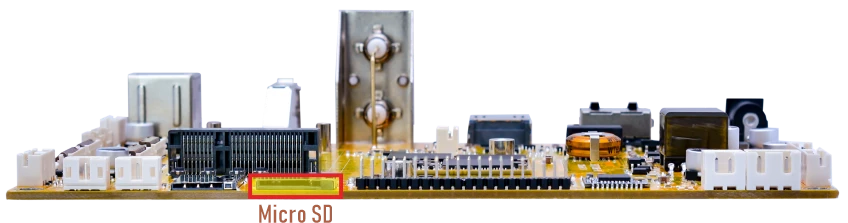
After the micro SD card is inserted and recognized successfully, a removable media dialog box will pop up automatically.
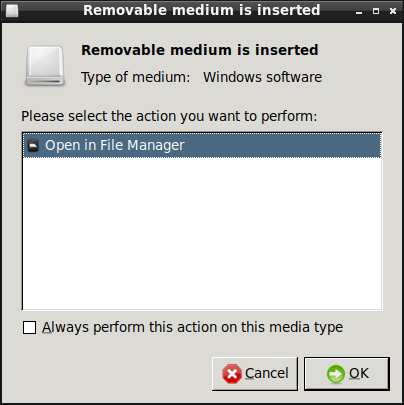
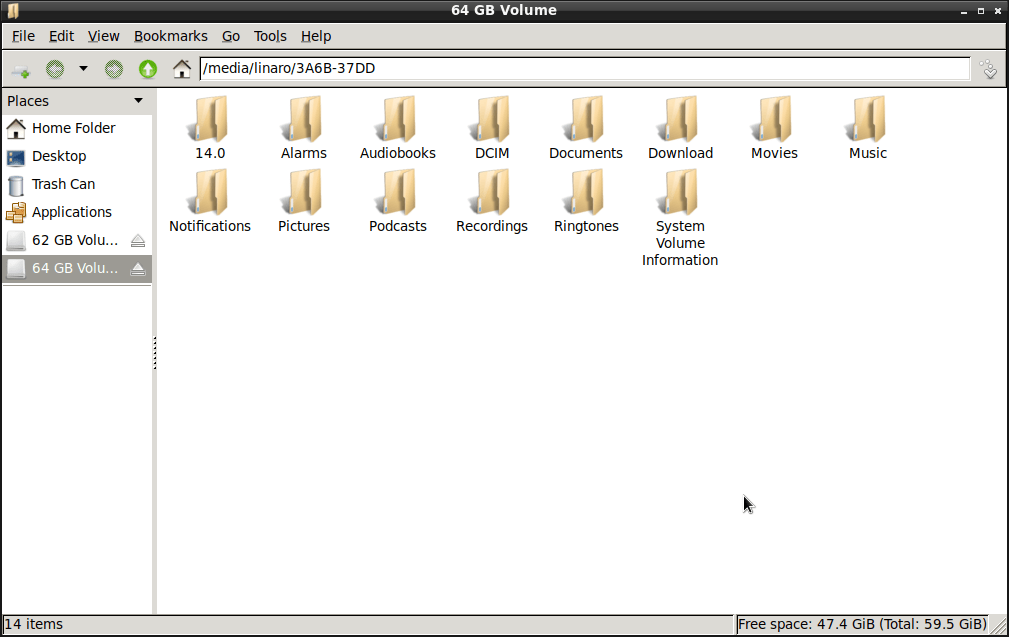
Keep Open in File Manager selected and click OK. The system will then open the micro SD card directory, and users can access the files on the micro SD card.
3.7 WiFi & Bluetooth
3.7.1 WiFi
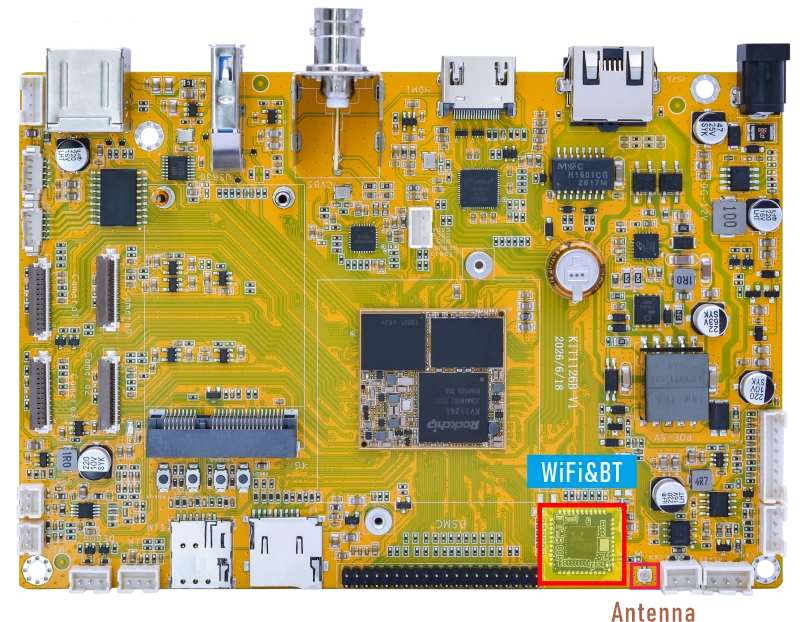
❶ Connect the WiFi antenna.
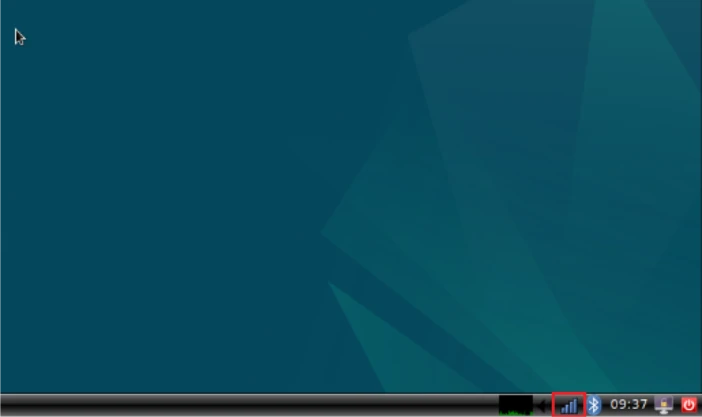
❷ Click the network icon in the bottom-right corner of the UI interface.
❸ Select the SSID from the list of available networks and enter the password.
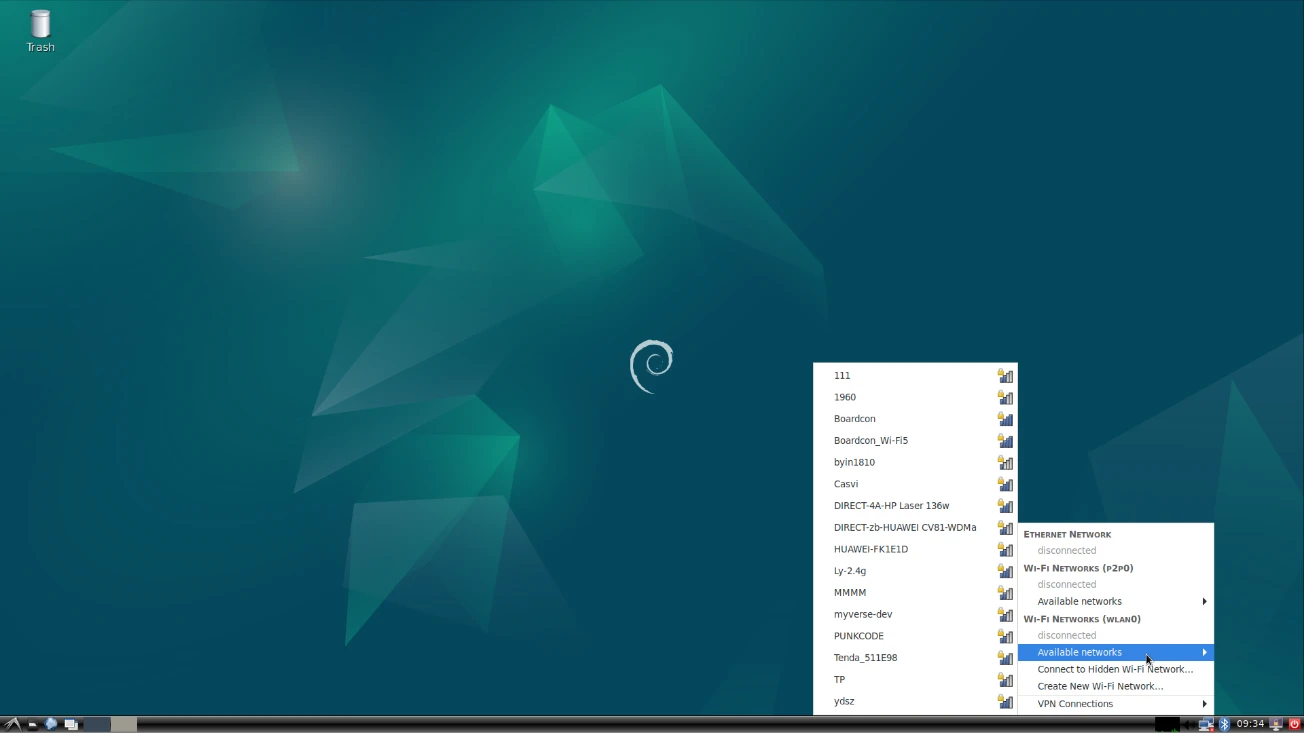
❹ After connected, user can open Browser or ping URL/IP at terminal to test network.
1ifconfig wlan0
2ping -I wlan0 www.armdesigner.com
root@linaro-alip:/# ifconfig wlan0
wlan0: flags=4163<UP,BROADCAST,RUNNING,MULTICAST>  mtu 1500
        inet 192.168.0.137  netmask 255.255.255.0  broadcast 192.168.0.255
        inet6 fe80::a7f5:ff59:d63d:cc33  prefixlen 64  scopeid 0x20<link>
        ether 14:0a:02:c9:0b:71  txqueuelen 1000  (Ethernet)
        RX packets 198  bytes 23938 (23.3 KiB)
        RX errors 0  dropped 19  overruns 0  frame 0
        TX packets 100  bytes 12026 (11.7 KiB)
        TX errors 0  dropped 0 overruns 0  carrier 0  collisions 0
root@linaro-alip:/# ping -I wlan0 www.armdesigner.com
PING d3dsoj86mhwkk6.cloudfront.net (13.32.99.46) from 192.168.0.137 wlan0: 56(84) bytes of data.
64 bytes from server-13-32-99-46.fra60.r.cloudfront.net (13.32.99.46): icmp_seq=1 ttl=246 time=200 ms
64 bytes from server-13-32-99-46.fra60.r.cloudfront.net (13.32.99.46): icmp_seq=2 ttl=246 time=408 ms
64 bytes from server-13-32-99-46.fra60.r.cloudfront.net (13.32.99.46): icmp_seq=3 ttl=246 time=407 ms
64 bytes from server-13-32-99-46.fra60.r.cloudfront.net (13.32.99.46): icmp_seq=4 ttl=246 time=241 ms
64 bytes from server-13-32-99-46.fra60.r.cloudfront.net (13.32.99.46): icmp_seq=5 ttl=246 time=355 ms
^C
--- d3dsoj86mhwkk6.cloudfront.net ping statistics ---
5 packets transmitted, 5 received, 0% packet loss, time 14455ms
rtt min/avg/max/mdev = 199.599/322.273/408.425/86.536 ms
3.7.2 Bluetooth
❶ Click the Bluetooth icon in the bottom right corner of the UI interface.
❷ The Bluetooth device name is hidden by default. Set the Bluetooth device name to be visible. Click Adapter -> Preferences -> Always visible
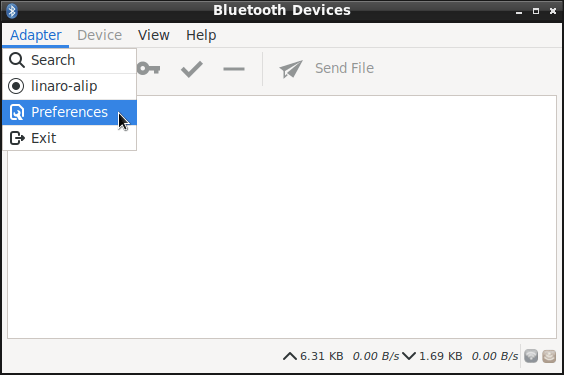
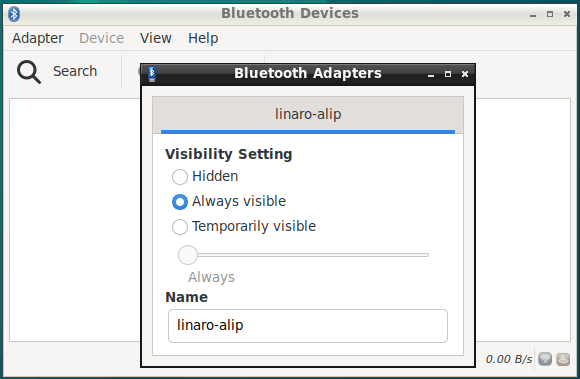
❸ Click Search to start searching and select the available device in the list to pair.
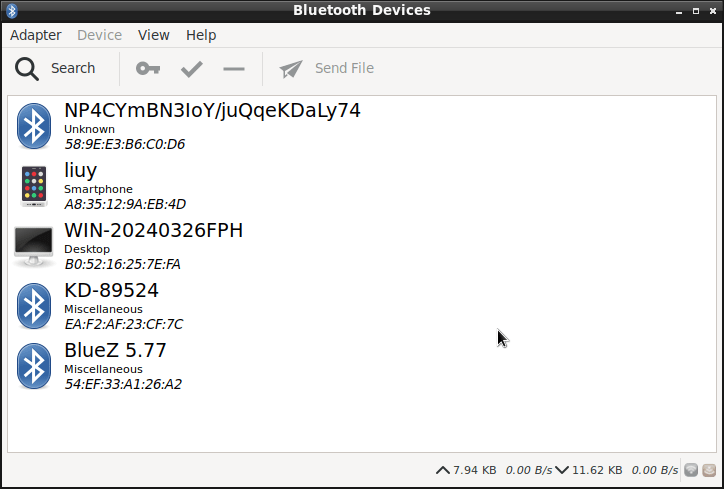
After pairing, devices can connect with each other automatically.
3.8 IR
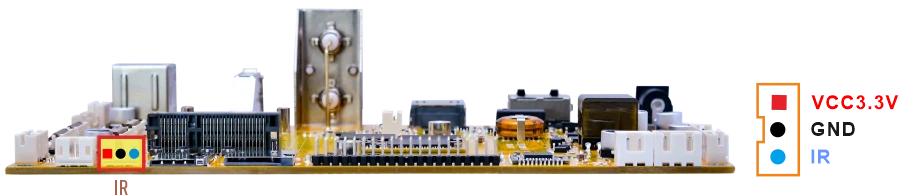
❶ Connect the IR receiver.
❷ Enable IR debug logs.
1echo 1 > /sys/module/rockchip_pwm_remotectl/parameters/code_print
❸ Press remote button, key value printed to log.
root@linaro-alip:/# echo 1 > /sys/module/rockchip_pwm_remotectl/parameters/code_print
root@linaro-alip:/#
[  491.683319] USERCODE=0x1818
[  491.710393] RMC_GETDATA=98
[  492.139070] USERCODE=0x1818
[  492.166245] RMC_GETDATA=9a
[  492.497621] USERCODE=0x1818
[  492.524752] RMC_GETDATA=99
[  492.944628] USERCODE=0x1818
[  492.971758] RMC_GETDATA=9b
[  495.202257] USERCODE=0x1818
[  495.229391] RMC_GETDATA=e4
[  495.542678] USERCODE=0x1818
[  495.569868] RMC_GETDATA=e5
[  496.287006] USERCODE=0x1818
[  496.314186] RMC_GETDATA=e6
3.9 RS485
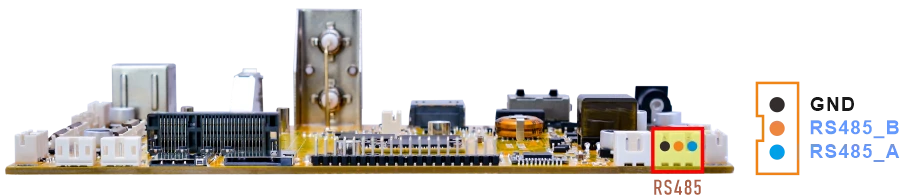
❶ Connect PC and board with USB-to-RS485 adapter.
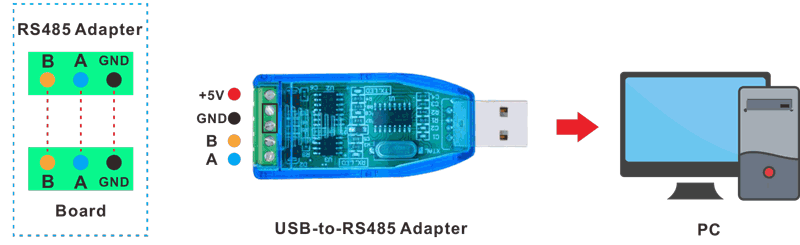
RS485 connection
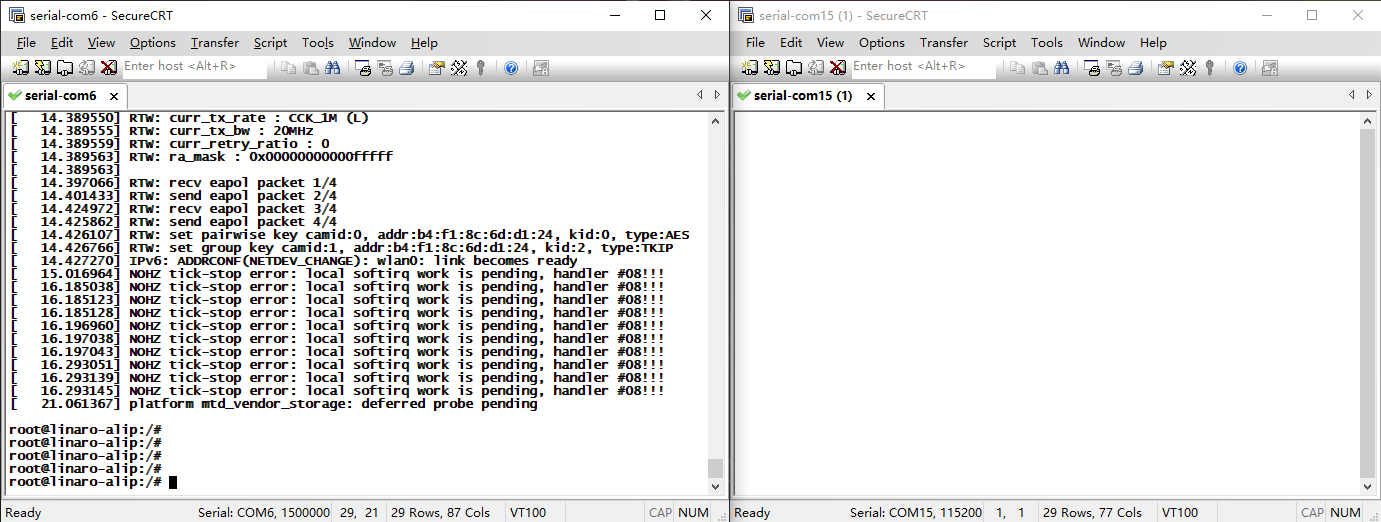
❷ Open two serial terminal windows. Set the debug serial port baud rate to 1500000, and set the RS485 serial port baud rate to 115200.
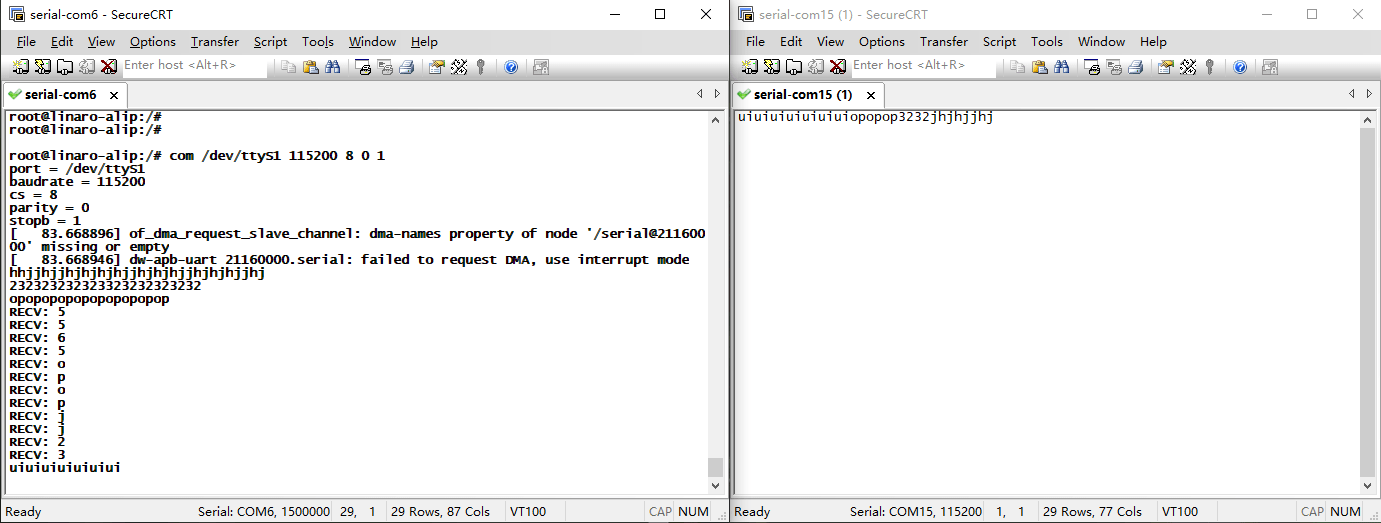
❸ Execute command on the terminal serial port of board.
1com /dev/ttyS1 115200 8 0 1
❹ Input character to test RS485 communication.
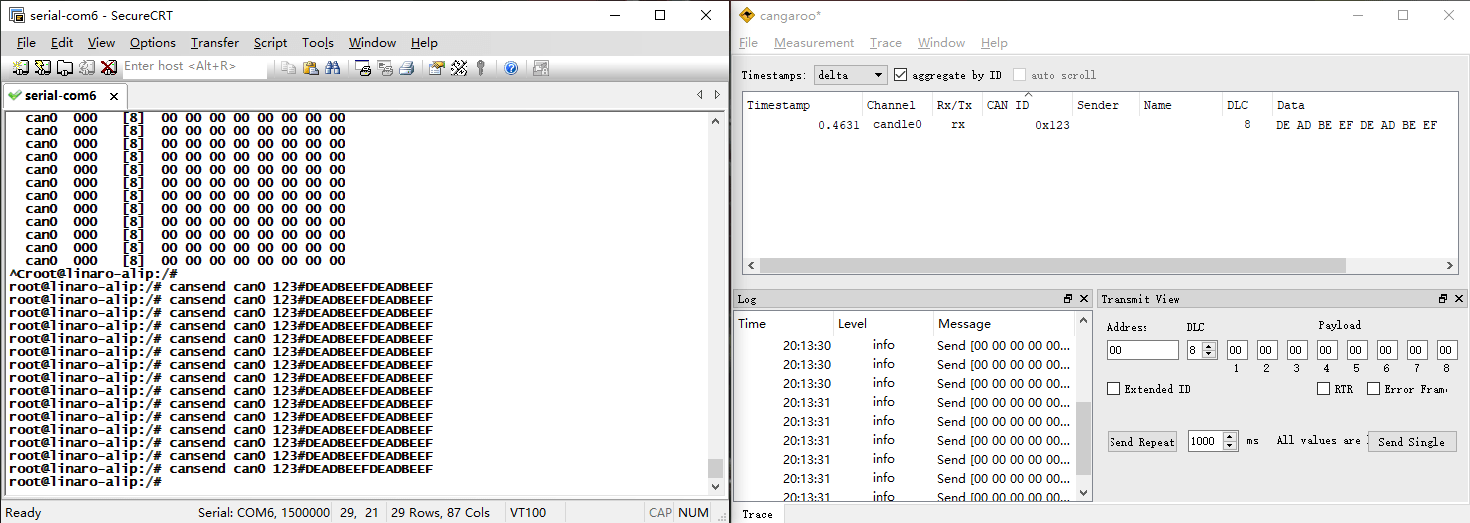
3.10 CAN
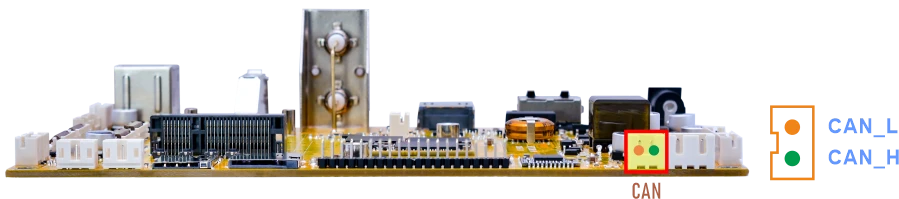
❶ Connect PC and board with USB-to-CAN adapter.
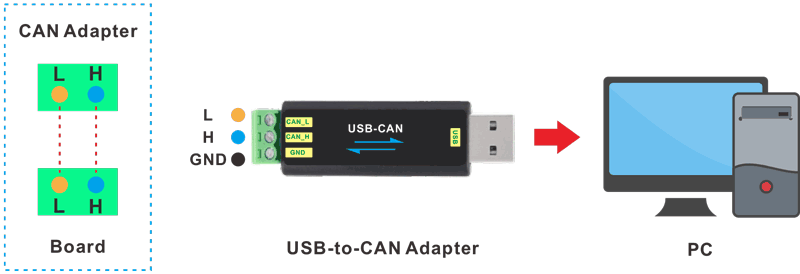
CAN connection
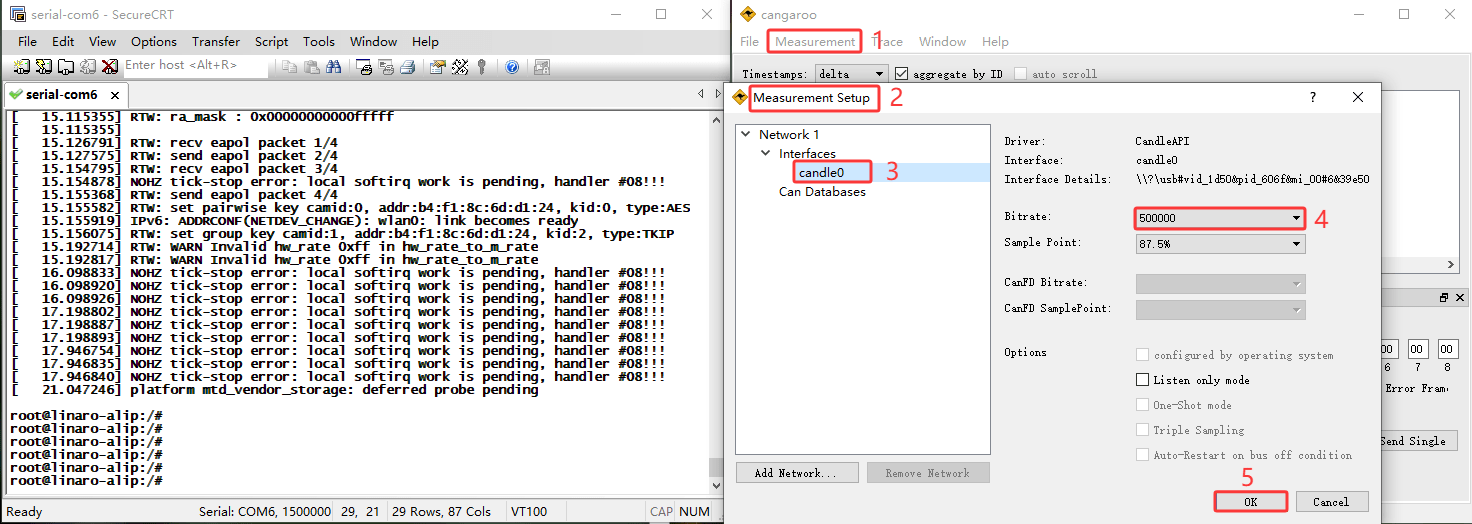
❷ Open the CAN application and set the baudrate to 500000 on PC.
❸ Configure and enable the CAN on the board with a bitrate of 500000.
1ip link set can0 down
2ip link set can0 type can bitrate 500000
3ip link set can0 up
❹ Configure CAN as receiver.
1candump can0
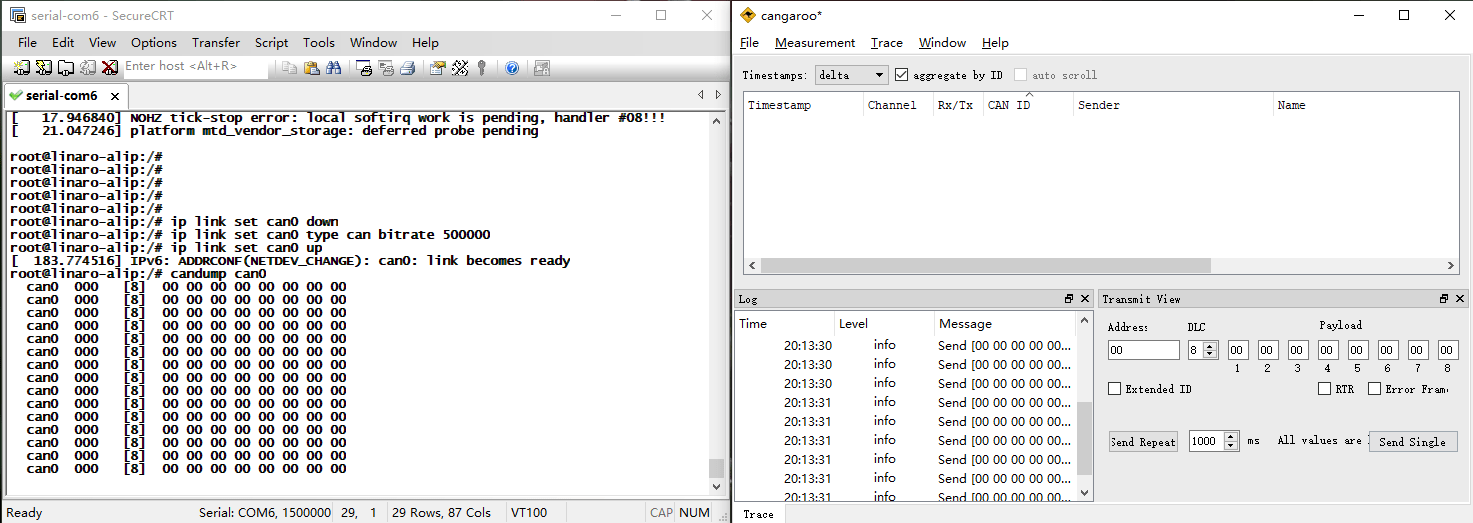
❺ Set CAN as Transmitter.
1cansend can0 123#DEADBEEFDEADBEEF
3.11 4G & GPS
3.11.1 4G
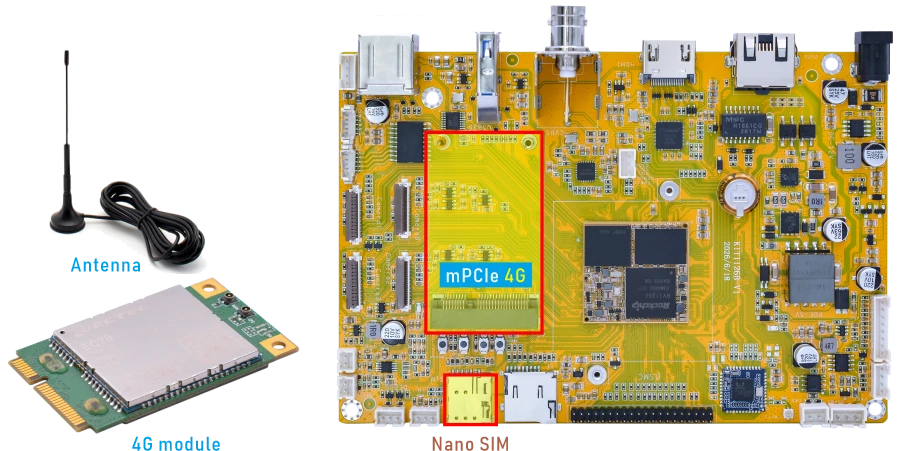
❶ Insert 4G module to mPCIe slot (4G model: EC20/EC25).
❷ Connect antenna and insert SIM card.
❸ Power on.
❹ Initiate the PPP connection.
1pppd call quectel-ppp &
root@linaro-alip:/# pppd call quectel-ppp &
[1] 2311
root@linaro-alip:/# pppd options in effect:
debug           # (from /etc/ppp/peers/quectel-ppp)
nodetach                # (from /etc/ppp/peers/quectel-ppp)
dump            # (from /etc/ppp/peers/quectel-ppp)
noauth          # (from /etc/ppp/peers/quectel-ppp)
user test               # (from /etc/ppp/peers/quectel-ppp)
password ??????         # (from /etc/ppp/peers/quectel-ppp)
remotename 3gppp                # (from /etc/ppp/peers/quectel-ppp)
/dev/ttyUSB3            # (from /etc/ppp/peers/quectel-ppp)
115200          # (from /etc/ppp/peers/quectel-ppp)
lock            # (from /etc/ppp/peers/quectel-ppp)
connect chat -s -v -f /etc/ppp/peers/quectel-chat-connect               # (from /etc/ppp/peers/quectel-ppp)
disconnect chat -s -v -f /etc/ppp/peers/quectel-chat-disconnect         # (from /etc/ppp/peers/quectel-ppp)
nocrtscts               # (from /etc/ppp/peers/quectel-ppp)
modem           # (from /etc/ppp/peers/quectel-ppp)
asyncmap 0              # (from /etc/ppp/options)
lcp-echo-failure 4              # (from /etc/ppp/options)
lcp-echo-interval 30            # (from /etc/ppp/options)
hide-password           # (from /etc/ppp/peers/quectel-ppp)
novj            # (from /etc/ppp/peers/quectel-ppp)
novjccomp               # (from /etc/ppp/peers/quectel-ppp)
ipcp-accept-local               # (from /etc/ppp/peers/quectel-ppp)
ipcp-accept-remote              # (from /etc/ppp/peers/quectel-ppp)
ipparam 3gppp           # (from /etc/ppp/peers/quectel-ppp)
noipdefault             # (from /etc/ppp/peers/quectel-ppp)
ipcp-max-failure 30             # (from /etc/ppp/peers/quectel-ppp)
defaultroute            # (from /etc/ppp/peers/quectel-ppp)
usepeerdns              # (from /etc/ppp/peers/quectel-ppp)
noccp           # (from /etc/ppp/peers/quectel-ppp)
noipx           # (from /etc/ppp/options)
abort on (BUSY)
abort on (NO CARRIER)
abort on (NO DIALTONE)
abort on (ERROR)
abort on (NO ANSWER)
timeout set to 30 seconds
send (AT^M)
expect (OK)
AT^M^M
OK
 -- got it

send (ATE0^M)
expect (OK)
^M
ATE0^M^M
OK
 -- got it

send (ATI;+CSUB;+CSQ;+CPIN?;+COPS?;+CGREG?;&D2^M)
expect (OK)
^M
^M
Quectel^M
EC25^M
Revision: EC25AUXGAR08A13M1G^M
^M
SubEdition: V01^M
^M
+CSQ: 28,99^M
^M
+CPIN: READY^M
^M
+COPS: 0,0,"CHN-CT",7^M
^M
+CGREG: 0,1^M
^M
OK
 -- got it

send (AT+CGDCONT=1,"IP","3gnet",,0,0^M)
expect (OK)
^M
^M
OK
 -- got it

send (ATD*99#^M)
expect (CONNECT)
^M
^M
CONNECT
 -- got it

Script chat -s -v -f /etc/ppp/peers/quectel-chat-connect finished (pid 2312), status = 0x0
Serial connection established.
using channel 1
Using interface ppp0
Connect: ppp0 <--> /dev/ttyUSB3
sent [LCP ConfReq id=0x1 <asyncmap 0x0> <magic 0xeb9c7c8b> <pcomp> <accomp>]
rcvd [LCP ConfReq id=0x0 <asyncmap 0x0> <auth chap MD5> <magic 0xf2d5ab14> <pcomp> <accomp>]
sent [LCP ConfAck id=0x0 <asyncmap 0x0> <auth chap MD5> <magic 0xf2d5ab14> <pcomp> <accomp>]
rcvd [LCP ConfAck id=0x1 <asyncmap 0x0> <magic 0xeb9c7c8b> <pcomp> <accomp>]
sent [LCP EchoReq id=0x0 magic=0xeb9c7c8b]
rcvd [LCP DiscReq id=0x1 magic=0xf2d5ab14]
rcvd [CHAP Challenge id=0x1 <8380068e98fae673efa9489659daf771>, name = "UMTS_CHAP_SRVR"]
sent [CHAP Response id=0x1 <8515fbebe164a4df63c62305abb0437c>, name = "test"]
rcvd [LCP EchoRep id=0x0 magic=0xf2d5ab14 eb 9c 7c 8b]
rcvd [CHAP Success id=0x1 ""]
CHAP authentication succeeded
CHAP authentication succeeded
sent [IPCP ConfReq id=0x1 <addr 0.0.0.0> <ms-dns1 0.0.0.0> <ms-dns2 0.0.0.0>]
sent [IPV6CP ConfReq id=0x1 <addr fe80::5455:8d88:f65d:649a>]
rcvd [IPCP ConfReq id=0x0]
sent [IPCP ConfNak id=0x0 <addr 0.0.0.0>]
rcvd [IPCP ConfNak id=0x1 <addr 10.3.160.36> <ms-dns1 202.96.134.33> <ms-dns2 202.96.128.166>]
sent [IPCP ConfReq id=0x2 <addr 10.3.160.36> <ms-dns1 202.96.134.33> <ms-dns2 202.96.128.166>]
rcvd [IPCP ConfReq id=0x1]
sent [IPCP ConfAck id=0x1]
rcvd [IPCP ConfAck id=0x2 <addr 10.3.160.36> <ms-dns1 202.96.134.33> <ms-dns2 202.96.128.166>]
Could not determine remote IP address: defaulting to 10.64.64.64
Script /etc/ppp/ip-pre-up started (pid 2319)
Script /etc/ppp/ip-pre-up finished (pid 2319), status = 0x0
not replacing default route to wlan0 [192.168.0.1]
local  IP address 10.3.160.36
remote IP address 10.64.64.64
primary   DNS address 202.96.134.33
secondary DNS address 202.96.128.166
Script /etc/ppp/ip-up started (pid 2322)
Script /etc/ppp/ip-up finished (pid 2322), status = 0x0
sent [IPV6CP ConfReq id=0x1 <addr fe80::5455:8d88:f65d:649a>]
❺ Test network.
1ifconfig ppp0
2ping -I ppp0 www.armdesigner.com
root@linaro-alip:/# ifconfig ppp0
ppp0: flags=4305<UP,POINTOPOINT,RUNNING,NOARP,MULTICAST>  mtu 1500
        inet 10.3.160.36  netmask 255.255.255.255  destination 10.64.64.64
        ppp  txqueuelen 3  (Point-to-Point Protocol)
        RX packets 4  bytes 52 (52.0 B)
        RX errors 0  dropped 0  overruns 0  frame 0
        TX packets 14  bytes 198 (198.0 B)
        TX errors 0  dropped 0 overruns 0  carrier 0  collisions 0
root@linaro-alip:/# ping -I ppp0 www.armdesigner.com
PING d3dsoj86mhwkk6.cloudfront.net (13.32.99.68) from 10.3.160.36 ppp0: 56(84) bytes of data.
64 bytes from server-13-32-99-68.fra60.r.cloudfront.net (13.32.99.68): icmp_seq=1 ttl=245 time=518 ms
64 bytes from server-13-32-99-68.fra60.r.cloudfront.net (13.32.99.68): icmp_seq=2 ttl=245 time=485 ms
64 bytes from server-13-32-99-68.fra60.r.cloudfront.net (13.32.99.68): icmp_seq=3 ttl=245 time=444 ms
64 bytes from server-13-32-99-68.fra60.r.cloudfront.net (13.32.99.68): icmp_seq=4 ttl=245 time=403 ms
64 bytes from server-13-32-99-68.fra60.r.cloudfront.net (13.32.99.68): icmp_seq=5 ttl=245 time=362 ms
64 bytes from server-13-32-99-68.fra60.r.cloudfront.net (13.32.99.68): icmp_seq=6 ttl=245 time=314 ms
^C
--- d3dsoj86mhwkk6.cloudfront.net ping statistics ---
6 packets transmitted, 6 received, 0% packet loss, time 5004ms
rtt min/avg/max/mdev = 313.526/420.887/517.775/69.843 ms
3.11.2 GPS
❶ Insert 4G module to mPCIe socket.
❷ Connect a GPS antenna.
❸ Power on.
❹ Enable the GPS function.
1echo -e "AT+QGPS=1\r\n" > /dev/ttyUSB2
❺ Read the GPS data.
1cat /dev/ttyUSB1
root@linaro-alip:/# echo -e "AT+QGPS=1\r\n" > /dev/ttyUSB2
root@linaro-alip:/# cat /dev/ttyUSB1
$GPVTG,,T,,M,,N,,K,N*2C
$GPGSA,A,1,,,,,,,,,,,,,,,*1E
$GPGGA,,,,,,0,,,,,,,,*66
$GPRMC,,V,,,,,,,,,,N,V*29
$GPVTG,,T,,M,,N,,K,N*2C
$GPGSA,A,1,,,,,,,,,,,,,,,*1E
$GPGGA,,,,,,0,,,,,,,,*66
$GPRMC,,V,,,,,,,,,,N,V*29
$GPVTG,,T,,M,,N,,K,N*2C
$GPGSA,A,1,,,,,,,,,,,,,,,*1E
$GPGGA,,,,,,0,,,,,,,,*66
$GPRMC,,V,,,,,,,,,,N,V*29
$GPVTG,,T,,M,,N,,K,N*2C
$GPGSA,A,1,,,,,,,,,,,,,,,*1E
3.12 Motor
Note
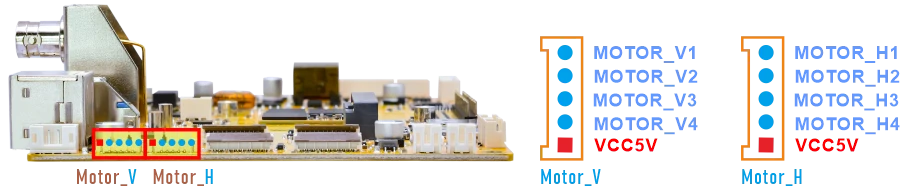
Note: Motor_H is temporarily unavailable because its signals are multiplexed with other interfaces on the baseboard only. This document only covers Motor_V testing.
❶ Connect the motor.
❷ Run the test command.
1motor_test /dev/motorX <steps>
<steps>is the number of motor steps.Use a positive value for forward rotation and a negative value for reverse rotation.
Replace
/dev/motorXwith the actual motor device node.
Examples:
Run the motor forward for one full revolution (e.g., 4076 steps)
1motor_test /dev/motor0 4076
Run the motor in reverse for 1000 steps:
1motor_test /dev/motor0 -1000
3.13 ADC
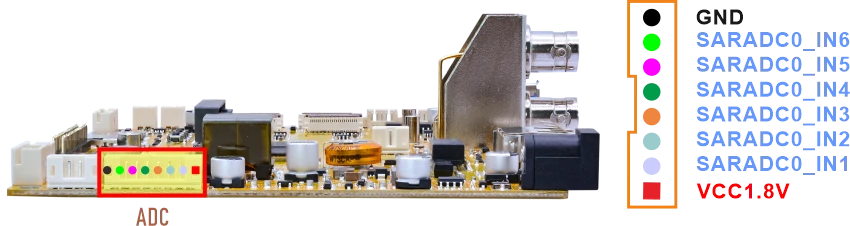
This test is used to check whether the ADC raw value changes according to the input voltage.
Connect the ADC pin to two different voltage levels within 0~1.8V respectively. For each level, after setting the pin to that level, execute the test command.
Example for ADC1:
1cat /sys/bus/iio/devices/iio:\device0/in_voltage1_raw
root@linaro-alip:/# cat /sys/bus/iio/devices/iio:\device0/in_voltage1_raw
8181
root@linaro-alip:/# cat /sys/bus/iio/devices/iio:\device0/in_voltage1_raw
0
For other ADC read commands, refer to the ADC read command description below.
1cat /sys/bus/iio/devices/iio:\device0/in_voltage1_raw   //ADC1
2cat /sys/bus/iio/devices/iio:\device0/in_voltage2_raw   //ADC2
3cat /sys/bus/iio/devices/iio:\device0/in_voltage3_raw   //ADC3
4cat /sys/bus/iio/devices/iio:\device0/in_voltage4_raw   //ADC4
5cat /sys/bus/iio/devices/iio:\device0/in_voltage5_raw   //ADC5
6cat /sys/bus/iio/devices/iio:\device0/in_voltage6_raw   //ADC6
1for i in 1 2 3 4 5 6; do
2    echo -n "ADC$i: "
3    cat /sys/bus/iio/devices/iio:\device0/in_voltage${i}_raw
4done
3.14 Camera
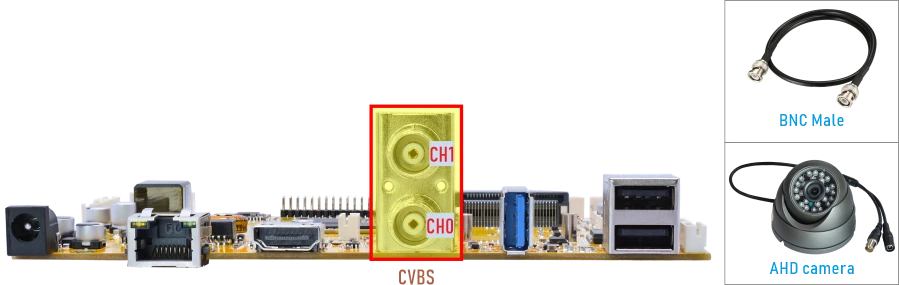
CVBS
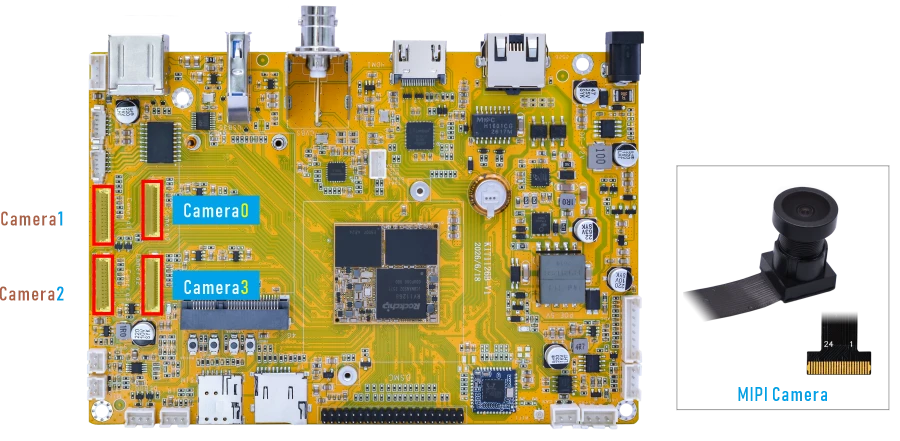
MIPI CSI
The KIT1126B provides six camera interfaces, including two CVBS and four MIPI CSI. The two CVBS camera interfaces (CH0 and CH1) share a single input channel. Only one can be enabled for preview at a time; the other remains inactive until selected.
3.14.1 CVBS Camera
❶ Connect the AHD camera to the board and power on.
❷ Start the video preview.
The CH0 is selected by default.
1gst-launch-1.0 v4l2src device=/dev/video0 ! video/x-raw,format=NV16,width=720,height=576, framerate=25/1 ! kmssink &
root@linaro-alip:/# gst-launch-1.0 v4l2src device=/dev/video0 ! video/x-raw,format=NV16,width=720,height=576, framerate=25/1 ! kmssink &
[  159.121029] rkvpss-offline: CLK_CORE_VPSS set to 396000000 Hz (requested 400000000 Hz)
[  159.123058] gm7150bc 0-005c: __gm7150_power_on(258)
[  159.195172] gm7150bc 0-005c: __gm7150_power_off(323)
[  159.533651] rkvpss-offline: CLK_CORE_VPSS set to 396000000 Hz (requested 400000000 Hz)
[  159.535437] gm7150bc 0-005c: __gm7150_power_on(258)
[  159.607115] gm7150bc 0-005c: __gm7150_power_off(323)
Setting pipeline to PAUSED ...
[  159.827606] gm7150bc 0-005c: __gm7150_power_on(258)
Using mplane plugin for capture
Pipeline is live and does not need PREROLL ...
Pipeline is PREROLLED ...
Setting pipeline to PLAYING ...
New clock: GstSystemClock
[  159.909874] rkcif-dvp: stream[0] start streaming
[  159.910363] rkcif-dvp: Allocate dummy buffer, size: 0x000cb000
[  159.910382] rkcif-dvp: get vblank fail, vblank_def 0, vblank_curr 0
[  159.910402] rkcif-dvp: set dual edge mode(off,0x2000000)!!!
[  159.910890] gm7150bc 0-005c: gm7150_querystd: get PAL_B_D_N signal.
[  159.910915] gm7150bc 0-005c: gm7150_stream: on: 1, 720x576
[  159.911566] gm7150bc 0-005c: gm7150_full_init ok, channel: CH1
[  160.432878] gm7150bc 0-005c: gm7150_check_signal: value:0x70.
[  160.432919] gm7150bc 0-005c: ======No signal
[  160.433523] gm7150bc 0-005c: gm7150_get_mode: get PAL_B_D_N signal.
[  160.433542] gm7150bc 0-005c: stream on, wait for BT656 sync...
Redistribute latency...
0:00:06.0 / 99:99:99.
❸ Switch to the desired CVBS interface.
1echo 0 > /sys/class/gm7150/gm7150_4/input_channel
root@linaro-alip:/# echo 0 > /sys/class/gm7150/gm7150_4/input_channel
[  525.697602] gm7150bc 0-005c: switch to input CH1 (reg=0x00)
[  526.019496] gm7150bc 0-005c: gm7150_check_signal: value:0x7e.
[  526.019538] gm7150bc 0-005c: have signal
[  526.020008] gm7150bc 0-005c: gm7150_get_mode: get PAL_B_D_N signal.
0:06:09.0 / 99:99:99.:06:06.1 / 99:99:99.
1echo 1 > /sys/class/gm7150/gm7150_4/input_channel
root@linaro-alip:/# echo 1 > /sys/class/gm7150/gm7150_4/input_channel
[  409.804592] gm7150bc 0-005c: switch to input CH2 (reg=0x02)
[  410.118774] gm7150bc 0-005c: gm7150_check_signal: value:0x7e.
[  410.118814] gm7150bc 0-005c: have signal
[  410.119351] gm7150bc 0-005c: gm7150_get_mode: get PAL_B_D_N signal.
0:04:46.7 / 99:99:99.:04:10.1 / 99:99:99.
❹ Verify that the image from the selected CVBS interface is displayed correctly.
# Note: Ensure the GM7150 is powered on and the camera preview is running.
# Display supported V4L2 controls
v4l2-ctl -d /dev/v4l-subdev14 --list-ctrls

# Set image brightness (0~255)
v4l2-ctl -d /dev/v4l-subdev14 --set-ctrl brightness=200

# Set image contrast (0~255)
v4l2-ctl -d /dev/v4l-subdev14 --set-ctrl contrast=150

# Set image saturation (0~255)
v4l2-ctl -d /dev/v4l-subdev14 --set-ctrl saturation=100

# Set image hue (0~255)
v4l2-ctl -d /dev/v4l-subdev14 --set-ctrl hue=128

# Read current input channel (0=CH1, 1=CH2)
cat /sys/class/gm7150/gm7150_4/input_channel

# Switch to CH0
echo 0 > /sys/class/gm7150/gm7150_4/input_channel

# Switch to CH1
echo 1 > /sys/class/gm7150/gm7150_4/input_channel

# Read signal status (1=signal detected, 0=no signal)
cat /sys/class/gm7150/gm7150_4/signal_status

# Read detected video standard (NTSC/PAL/SECAM)
cat /sys/class/gm7150/gm7150_4/video_standard
3.14.2 MIPI Camera
❶ Connect the MIPI camera to the board and power on.
❷ Check the camera preview device nodes.
1grep "" /sys/class/video4linux/v*/name | grep mainpath
2grep "" /sys/class/video4linux/v*/name | grep selfpath
root@linaro-alip:/# grep "" /sys/class/video4linux/v*/name | grep mainpath
/sys/class/video4linux/video55/name:rkisp_mainpath
/sys/class/video4linux/video63/name:rkisp_mainpath
/sys/class/video4linux/video71/name:rkisp_mainpath
/sys/class/video4linux/video79/name:rkisp_mainpath
root@linaro-alip:/# grep "" /sys/class/video4linux/v*/name | grep selfpath
/sys/class/video4linux/video56/name:rkisp_selfpath
/sys/class/video4linux/video64/name:rkisp_selfpath
/sys/class/video4linux/video72/name:rkisp_selfpath
/sys/class/video4linux/video80/name:rkisp_selfpath
❸ Preview the camera.
1gst-launch-1.0 v4l2src device=/dev/video55 ! video/x-raw,format=NV16,width=1920,height=1080, framerate=25/1 ! xvimagesink
root@linaro-alip:/# gst-launch-1.0 v4l2src device=/dev/video55 ! video/x-raw,format=NV16,width=1920,height=1080, framerate=25/1 ! xvimagesink
[  495.817649] rkvpss-offline: CLK_CORE_VPSS set to 396000000 Hz (requested 400000000 Hz)width=1920,height=1080, framerate=25/1 ! xvimagesink
[  495.819610] gm7150bc 0-005c: __gm7150_power_on(258)
[  495.889448] gm7150bc 0-005c: __gm7150_power_off(323)
Setting pipeline to PAUSED ...
Using mplane plugin for capture
Pipeline is live and does not need PREROLL ...
Pipeline is PREROLLED ...
Setting pipeline to PLAYING ...
New clock: GstSystemClock
[  495.982917] rkisp_hw 21d00000.isp: set isp clk = 297000000Hz
[  495.987927] rkisp rkisp-vir0: first params buf queue
[  495.988194] rkcif-mipi-lvds: stream[0] start streaming
[  495.988429] rockchip-mipi-csi2 mipi0-csi2: stream on, src_sd: 00000000fcf2d8c5, sd_name:rockchip-csi2-dphy1
[  495.988447] rockchip-mipi-csi2 mipi0-csi2: stream ON
[  495.988571] rockchip-csi2-dphy1: dphy1, data_rate_mbps 742
[  495.988605] rockchip-csi2-dphy csi2-dphy1: csi2_dphy_s_stream stream on:1, dphy1, ret 0
[  495.988617] sc200ai 3-0030: 1920x1080@10, mode 0, vts 0xd2f
Redistribute latency...
0:00:09.3 / 99:99:99.
1gst-launch-1.0 v4l2src device=/dev/video63 ! video/x-raw,format=NV16,width=1920,height=1080, framerate=25/1 ! xvimagesink
root@linaro-alip:/# gst-launch-1.0 v4l2src device=/dev/video52 ! video/x-raw,format=NV16,width=1920,height=1080, framerate=25/1 ! kmssink
[  254.595943] rkvpss-offline: CLK_CORE_VPSS set to 396000000 Hz (requested 400000000 Hz)width=1920,height=1080, framerate=25/1 ! kmssink
Setting pipeline to PAUSED ...
Using mplane plugin for capture
Pipeline is live and does not need PREROLL ...
Pipeline is PREROLLED ...
Setting pipeline to PLAYING ...
New clock: GstSystemClock
[  254.673186] rkisp_hw 21d00000.isp: set isp clk = 297000000Hz
[  254.675289] rkcif-mipi-lvds1: stream[0] start streaming
[  254.675555] rockchip-mipi-csi2 mipi1-csi2: stream on, src_sd: 00000000a0550fb3, sd_name:rockchip-csi2-dphy2
[  254.675578] rockchip-mipi-csi2 mipi1-csi2: stream ON
[  254.675626] rockchip-csi2-dphy2: dphy2, data_rate_mbps 742
[  254.675658] rockchip-csi2-dphy csi2-dphy2: csi2_dphy_s_stream stream on:1, dphy2, ret 0
[  254.675670] sc200ai 3-0030: 1920x1080@10, mode 0, vts 0x1a5e
Redistribute latency...
0:00:14.8 / 99:99:99.
1gst-launch-1.0 v4l2src device=/dev/video71 ! video/x-raw,format=NV16,width=1920,height=1080, framerate=25/1 ! xvimagesink
1gst-launch-1.0 v4l2src device=/dev/video79 ! video/x-raw,format=NV16,width=1920,height=1080, framerate=25/1 ! xvimagesink
1killall gst-launch-1.0
2gst-launch-1.0 v4l2src device=/dev/video56 ! video/x-raw,format=NV16,width=1920,height=1080, framerate=25/1 ! fpsdisplaysink name=video22 video-sink="xvimagesink render-rectangle=\"<60,0,840,500>\"" text-overlay=false &
3gst-launch-1.0 v4l2src device=/dev/video64 ! video/x-raw,format=NV16,width=1920,height=1080, framerate=25/1 ! fpsdisplaysink name=video30 video-sink="xvimagesink render-rectangle=\"<920,0,840,500>\"" text-overlay=false &
4gst-launch-1.0 v4l2src device=/dev/video72 ! video/x-raw,format=NV16,width=1920,height=1080, framerate=25/1 ! fpsdisplaysink name=video22 video-sink="xvimagesink render-rectangle=\"<60,500,840,500>\"" text-overlay=false &
5gst-launch-1.0 v4l2src device=/dev/video80 ! video/x-raw,format=NV16,width=1920,height=1080, framerate=25/1 ! fpsdisplaysink name=video30 video-sink="xvimagesink render-rectangle=\"<920,500,840,500>\"" text-overlay=false &
3.15 Video Playback
3.15.1 Built-in Script
The script instruction directory is in /rockchip-test/video/, just run it.
1/rockchip-test/video/test_gst_video.sh
root@linaro-alip:/# /rockchip-test/video/test_gst_video.sh
[ 8784.261311] rkvpss-offline: CLK_CORE_VPSS set to 396000000 Hz (requested 400000000 Hz)
[ 8784.263250] gm7150bc 0-005c: __gm7150_power_on(258)
[ 8784.333829] gm7150bc 0-005c: __gm7150_power_off(323)
Setting pipeline to PAUSED ...
Pipeline is PREROLLING ...
Redistribute latency...
mpp[3017]: mpp_info: mpp version: 520ab553 author: Herman Chen   2025-12-16 fix[sys_cfg]: Fix decoder sys_cfg crash
mpp[3017]: mpp_info: mpp version: 520ab553 author: Herman Chen   2025-12-16 fix[sys_cfg]: Fix decoder sys_cfg crash
mpp[3017]: mpp_info: mpp version: 520ab553 author: Herman Chen   2025-12-16 fix[sys_cfg]: Fix decoder sys_cfg crash
mpp[3017]: mpp: unable to create enc vp8 for soc rv1126b unsupported
mpp[3017]: mpp_info: mpp version: 520ab553 author: Herman Chen   2025-12-16 fix[sys_cfg]: Fix decoder sys_cfg crash
mpp[3017]: mpp_info: mpp version: 520ab553 author: Herman Chen   2025-12-16 fix[sys_cfg]: Fix decoder sys_cfg crash
Redistribute latency...
mpp[3017]: h264d_api: is_avcC=1
mpp[3017]: mpp_buf_slot: mismatch h_stride_by_pixel 1472 - 1280
mpp[3017]: mpp_buf_slot: mismatch h_stride_by_byte 1472 - 1280
mpp[3017]: mpp_buf_slot: mismatch size_total 1589760 - 1843200
mpp[3017]: mpp_buf_slot: mismatch h_stride_by_pixel 1472 - 1280
mpp[3017]: mpp_buf_slot: mismatch h_stride_by_byte 1472 - 1280
mpp[3017]: mpp_buf_slot: mismatch size_total 1589760 - 1843200
Pipeline is PREROLLED ...
Prerolled, waiting for async message to finish...
Setting pipeline to PLAYING ...
Redistribute latency...
New clock: GstSystemClock
0:00:04.1 / 0:00:29.5 (14.1 %)
3.15.2 Command Line
1export GST_MPP_VIDEODEC_DEFAULT_ARM_AFBC=1
2gst-play-1.0 --flags=3 --videosink="kmssink plane-id=74" /media/linaro/F3AB-0FF3/video/4KP30/4K30P-BLACKPINK-DDU-DU_DDU-DU.mp4 --audiosink="alsasink device=hw:1,0"
Command explanation:
export GST_MPP_VIDEODEC_DEFAULT_ARM_AFBC=1: Open AFBC.--videosink="kmssink plane-id=74": Specifies the plane. Which can be viewed using the command: cat /sys/kernel/debug/dri/0/state | grep "plane["/media/linaro/F3AB-0FF3/video/4KP30/4K30P-BLACKPINK-DDU-DU_DDU-DU.mp4: The media file path to be played.--audiosink="alsasink device=hw:1,0": Specifies the audio output device as hw:1,0.
root@linaro-alip:/# export GST_MPP_VIDEODEC_DEFAULT_ARM_AFBC=1
root@linaro-alip:/# gst-play-1.0 --flags=3 --videosink="kmssink plane-id=74" /media/linaro/F3AB-0FF3/video/4KP30/4K30P-BLACKPINK-DDU-DU_DDU-DU.mp4 --audiosink="alsasink device=hw:1,0"
Press 'k' to see a list of keyboard shortcuts.ideosink="kmssink plane-id=74" /media/linaro/F3AB-0FF3/video/4KP30/4K30P-BLACKPINK-DDU-DU_DDU-DU.mp4 --audiosink="alsasink device=hw:1,0"
Now playing /media/linaro/F3AB-0FF3/video/4KP30/4K30P-BLACKPINK-DDU-DU_DDU-DU.mp4
Redistribute latency...
mpp[3091]: mpp_info: mpp version: 520ab553 author: Herman Chen   2025-12-16 fix[sys_cfg]: Fix decoder sys_cfg crash
mpp[3091]: mpp_info: mpp version: 520ab553 author: Herman Chen   2025-12-16 fix[sys_cfg]: Fix decoder sys_cfg crash
mpp[3091]: mpp_info: mpp version: 520ab553 author: Herman Chen   2025-12-16 fix[sys_cfg]: Fix decoder sys_cfg crash
mpp[3091]: mpp: unable to create enc vp8 for soc rv1126b unsupported
mpp[3091]: mpp_info: mpp version: 520ab553 author: Herman Chen   2025-12-16 fix[sys_cfg]: Fix decoder sys_cfg crash
mpp[3091]: mpp_info: mpp version: 520ab553 author: Herman Chen   2025-12-16 fix[sys_cfg]: Fix decoder sys_cfg crash
Redistribute latency...
mpp[3091]: h264d_api: is_avcC=1
mpp[3091]: mpp_buf_slot: mismatch h_stride_by_pixel 4032 - 3840
mpp[3091]: mpp_buf_slot: mismatch h_stride_by_byte 4032 - 3840
mpp[3091]: mpp_buf_slot: mismatch size_total 13063680 - 16588800
mpp[3091]: mpp_buf_slot: mismatch h_stride_by_pixel 4032 - 3840
mpp[3091]: mpp_buf_slot: mismatch h_stride_by_byte 4032 - 3840
mpp[3091]: mpp_buf_slot: mismatch size_total 13063680 - 16588800
WARNING No volume control found
WARNING debug information: ../gst/playback/gstplaysink.c(2908): gen_audio_chain (): /GstPlayBin:playbin/GstPlaySink:playsink:
Volume/mute is not available
Redistribute latency...
Redistribute latency...
[ 8937.184627] [drm:vop_plane_atomic_check] *ERROR* Invalid source: 3840x2160. max input: 1920x1920
Redistribute latency...
0:00:12.1 / 0:03:28.8